




Quick Answer: iOS 27 was announced at WWDC 2026 on June 8, 2026. It supports iPhone 11 and newer – every device that runs iOS 26.
The developer beta is available now. The public beta arrives in July 2026. The full release lands in September 2026, alongside the iPhone 18.
The headline feature is Siri AI: a fully rebuilt, Google Gemini-powered assistant with its own standalone app.
Latest Update — September 1, 2026: Apple has released iOS 27.0 beta 8 (24A5430a), the latest developer beta. See what’s new, what’s changed, and whether you should install it in our iOS 27 Beta 8 guide.
Read More: iOS 26 VS iOS 27
iOS 27 Beta Updates Timeline
| Version | Release Date | Build |
|---|---|---|
| iOS 27 Beta 1 | June 8, 2026 | 24A5355q |
| iOS 27 Beta 2 | June 22, 2026 | 24A5367f |
| iOS 27 Beta 3 | July 6, 2026 | 24A5379h |
| iOS 27 Beta 4 | July 20, 2026 | 24A5392k |
| iOS 27 Beta 5 | August 3, 2026 | 24A5408d |
| iOS 27 Beta 6 | August 17, 2026 | 24A5418b |
| iOS 27 Beta 7 | August 24, 2026 | 24A5424a |
| iOS 27 Beta 8 | August 31, 2026 | 24A5430a |
Note: Apple officially confirms iOS 27 beta 8 was released August 31 with build 24A5430a. Beta 7 was released August 24.
How to Update to the Latest iOS 27 Beta.
Before installing a beta update, recommend backing up the iPhone. Apple also recommends having a compatible device, an internet connection, sufficient storage, and power available during the update.
If You’re Already Running an iOS 27 Beta
- Open Settings on your iPhone.
- Tap General.
- Tap Software Update.
- Tap Beta Updates.
- Make sure iOS 27 Developer Beta is selected if you’re enrolled in the Apple Developer Program.
- Return to Software Update.
- If iOS 27 Beta 8 or a newer beta is available, tap Download and Install.
- Enter your passcode if prompted and follow the onscreen instructions.
Once the download finishes, your iPhone will restart and complete the installation.
If You Don’t See the iOS 27.0 beta 8
If the beta doesn’t appear under Software Update, check that your iPhone is enrolled in the appropriate Apple beta program and that Beta Updates is configured correctly.


You should also make sure you’re connected to Wi-Fi, have enough free storage, and keep the iPhone connected to power while updating.
How to Check Your iOS Version
After the update, go to:
Settings → General → About
Your current iOS version will be displayed there.
Important: Beta Software Isn’t the Same as the Final Release
iOS 27 beta software is intended for testing and can contain bugs, compatibility problems, or other issues. If you use your iPhone as your primary device, consider waiting for the public release rather than installing a developer beta.
iOS 27 Developer Beta 3 Released (Updated July 2026)
Last Updated: July 8, 2026
Apple has officially released iOS 27 Developer Beta 3, bringing another round of improvements before the first public beta arrives. While this update doesn’t introduce many brand-new features, it focuses on refining the overall iOS 27 experience with interface improvements, Siri enhancements, bug fixes, and better system stability.
What’s New in iOS 27 Beta 3?
- Siri Voice Customization: New controls let users adjust Siri’s voice pace and expressiveness, making conversations sound more natural.
- Liquid Glass Refinements: Apple has improved readability, contrast, and the appearance of app icons while adding more customization options for the Liquid Glass design.
- Lock Screen Updates: Some Lock Screen Control Center buttons now use black icons instead of white, improving visibility with certain wallpapers.
- Performance & Stability: Faster animations, smoother app launches, and numerous bug fixes make Beta 3 feel more polished than earlier developer releases.
- Developer Improvements: Apple has updated APIs and developer tools to help apps take advantage of the latest iOS 27 capabilities.
Should You Install iOS 27 Beta 3?
If you’re a developer or enjoy testing new software, Beta 3 is currently the most refined iOS 27 developer build. However, it is still pre-release software and may contain bugs or app compatibility issues. Most users should wait for the upcoming iOS 27 Public Beta, which Apple has confirmed will arrive later in July.
What Is iOS 27?
iOS 27 is Apple’s 2026 major software update for iPhone.
Apple announced it at the WWDC 2026 keynote on June 8, 2026 – Tim Cook’s final WWDC as CEO before John Ternus takes over as Apple’s top executive in September.
After iOS 26 introduced the Liquid Glass design and laid the groundwork for Apple Intelligence, iOS 27 finishes the job.
Think of iOS 26 as Apple pouring the foundation. iOS 27 is Apple building the house on top of it.
The features Apple promised at WWDC 2024 and partially shipped in 2025 are finally here, working the way they were supposed to from the start.
The centrepiece is Siri AI – a complete rebuild of Apple’s assistant powered by Google Gemini, with its own standalone app and real-time screen awareness.
Beyond Siri, iOS 27 delivers significant performance gains Apple is calling its “Snow Leopard moment“: up to 30% faster app launches, 70% faster photo loading, and 80% faster AirDrop transfers, alongside deep Apple Intelligence integration across Photos, Messages, Mail, Safari, and Calendar.
Craig Federighi described iOS 27 as “available to more users than any iOS release ever” — because for the first time in years, Apple has not dropped any iPhones from the supported list.
- 📰 See also: iOS 27 Is Finally Here: 7 Huge Features That Will Change Your iPhone Forever
- 📰 See also: iOS 27 Features: 14 Major Upgrades Apple Just Confirmed for Your iPhone
iOS 27 Release Date
Apple follows a consistent annual release pattern. Here is where iOS 27 stands as of today:
| Milestone | Date | Status |
|---|---|---|
| WWDC 2026 Announcement | June 8, 2026 | ✅ Complete |
| Developer Beta 1 | June 8, 2026 | ✅ Available now |
| Developer Beta (ongoing) | June–August 2026 | 🔄 Rolling |
| Public Beta 1 | Mid-July 2026 | ⏳ Upcoming |
| Release Candidate | Late August 2026 | ⏳ Upcoming |
| Official Public Release | ~September 15, 2026 | ⏳ Upcoming |
Apple has followed the same release cadence for 14 consecutive years. The official launch is expected on or around Monday, September 15, 2026, timed to the iPhone 18 and iPhone Fold launch event. iOS 27 will come pre-installed on all iPhone 18 models.
Pro Tip: If you want to try iOS 27 early, the public beta is the safer option over the developer beta. Enroll for free at beta.apple.com. Install it on a secondary device, not your daily driver — beta builds will have bugs, especially in the first few weeks.
iOS 27 Supported Devices
This is the broadest iOS compatibility list Apple has offered in years. Every iPhone that can run iOS 26 will run iOS 27 — no devices have been dropped.
Full Supported Devices List
| Supported iPhones | Not Supported |
|---|---|
| iPhone 17 Pro Max | iPhone XS / XS Max |
| iPhone 17 Pro | iPhone XR |
| iPhone 17 Air | iPhone X |
| iPhone 17 | iPhone 8 / 8 Plus |
| iPhone 17e | iPhone 7 / 7 Plus and older |
| iPhone 16 Pro Max | |
| iPhone 16 Pro | |
| iPhone 16 Plus | |
| iPhone 16 | |
| iPhone 16e | |
| iPhone 15 Pro Max | |
| iPhone 15 Pro | |
| iPhone 15 Plus | |
| iPhone 15 | |
| iPhone 14 Pro Max | |
| iPhone 14 Pro | |
| iPhone 14 Plus | |
| iPhone 14 | |
| iPhone 13 Pro Max | |
| iPhone 13 Pro | |
| iPhone 13 mini | |
| iPhone 13 | |
| iPhone 12 Pro Max | |
| iPhone 12 Pro | |
| iPhone 12 mini | |
| iPhone 12 | |
| iPhone SE (3rd generation) | |
| iPhone SE (2nd generation) | |
| iPhone 11 Pro Max | |
| iPhone 11 Pro | |
| iPhone 11 |
Apple Intelligence & Siri AI Compatibility
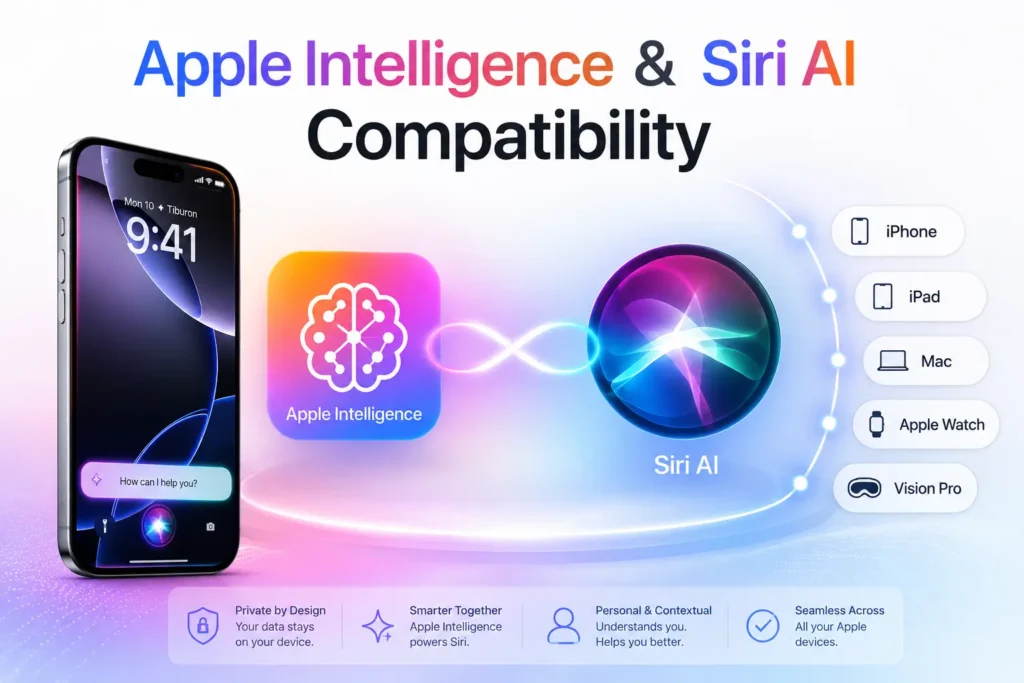
Getting iOS 27 is not the same as getting every iOS 27 feature. There is a meaningful split:
| Feature Tier | Minimum Device |
|---|---|
| iOS 27 (all features except AI) | iPhone 11 or newer |
| Apple Intelligence + Siri AI | iPhone 15 Pro or newer |
| Advanced Siri voice customization | iPhone 17 Pro, iPhone Air, or newer |
iPhone 11 through iPhone 15 and 15 Plus receive the full iOS 27 update — faster performance, Liquid Glass refinements, improved parental controls, enhanced Photos tools — but miss out on Siri AI and Apple Intelligence features entirely. If you want the new Siri, you need an iPhone 15 Pro or newer.
Note for EU users: Siri AI will not be available on iPhone and iPad in the EU at launch due to Digital Markets Act (DMA) compliance requirements. Mac, Apple Watch, and Apple Vision Pro users in the EU are not affected.
This table will be updated as Apple confirms any changes during the beta period.
Top New Features of iOS 27
Smarter Siri AI
Siri AI is not a software patch — it is a complete rebuild from scratch.
For the first time since Siri launched in 2011, Apple has fundamentally changed what the assistant can do and how it works.
The new Siri runs on Apple Intelligence with Google Gemini foundation models under the hood.
It arrives with its own dedicated standalone app (the first time Siri has had its own app icon), accessible from your home screen like any other app.
A new swipe-down gesture from the top of the screen drops you directly into a chat-style “Ask” interface.
Siri AI is screen-aware — it reads your active display in real time without you needing to copy or switch apps.
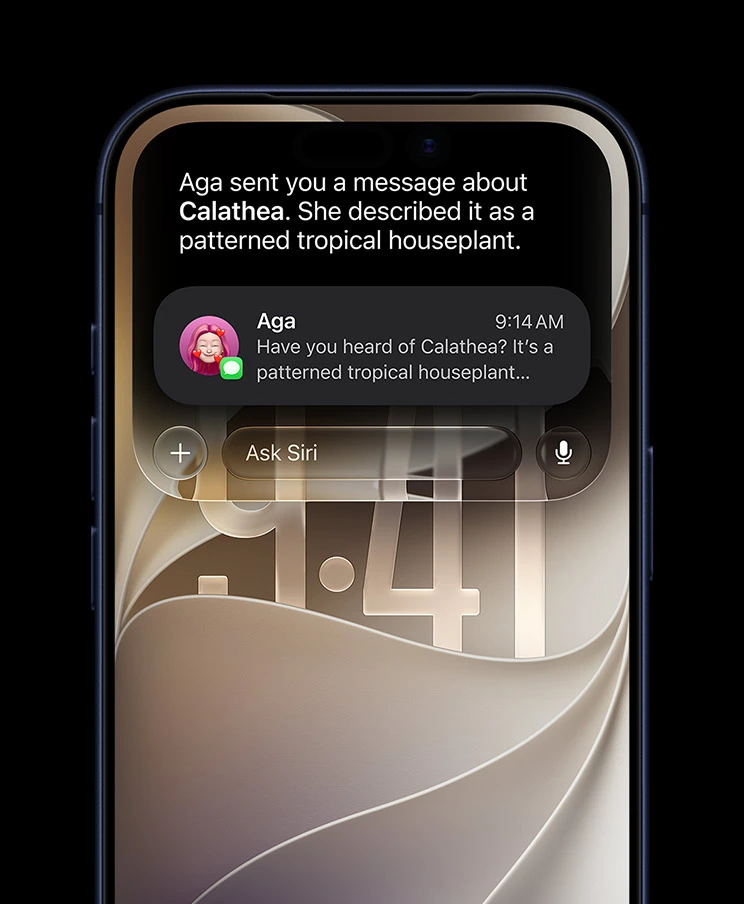
If a friend texts you a flight number, you can say “add this to my calendar and text the arrival time to my wife,” and Siri reads the screen, creates the event, and sends the message without you touching anything else.
Apple claims multi-step, cross-app task execution is now reliable and fast.
You can also chat with Siri like you would with ChatGPT or Claude — type or speak, and the conversation history is saved in the app, synced across your devices via iCloud. Siri now lives in the Dynamic Island, popping up with a new animation when you say “Hey Siri” or hold the side button.
Siri AI also handles multiple commands in one go. Ask it to check the weather, review your calendar, and send a message — all in a single request — and it executes all three without breaking the task into separate back-and-forths.
Requires iPhone 15 Pro or newer for full functionality. Advanced voice customisation requires iPhone 17 Pro or iPhone Air.
📖 Deep dive: How Siri AI Changes iPhone Use in 2026 | How to Get Siri AI: 7 Easy Steps to Unlock the Smartest Assistant
New in iOS 27: Personalized Siri Experience
- Voice Controls: Adjust pace and expressivity (exclusive to iPhone 17 Pro & Air).
- Dynamic Island Integration: Siri now appears as a bubble with a “Search or Ask” field.
- Screen Awareness: Siri can act on visible text (e.g., flight details → Calendar + Messages).
- Regional Rollout: Not available in EU at launch due to DMA compliance.
Enhanced Apple Intelligence
Apple Intelligence in iOS 27 is no longer a separate opt-in feature — it is woven into the fabric of iOS itself.
Apple calls this going “ambient”: AI features appear where you need them across every core app, without you having to find them.
What’s new specifically in iOS 27:
- Safari gets tab management powered by AI, plus one-tap password updating
- Mail gets Smart Reply suggestions and AI-generated summaries of long threads
- Messages gets one-tap reply suggestions based on conversation context
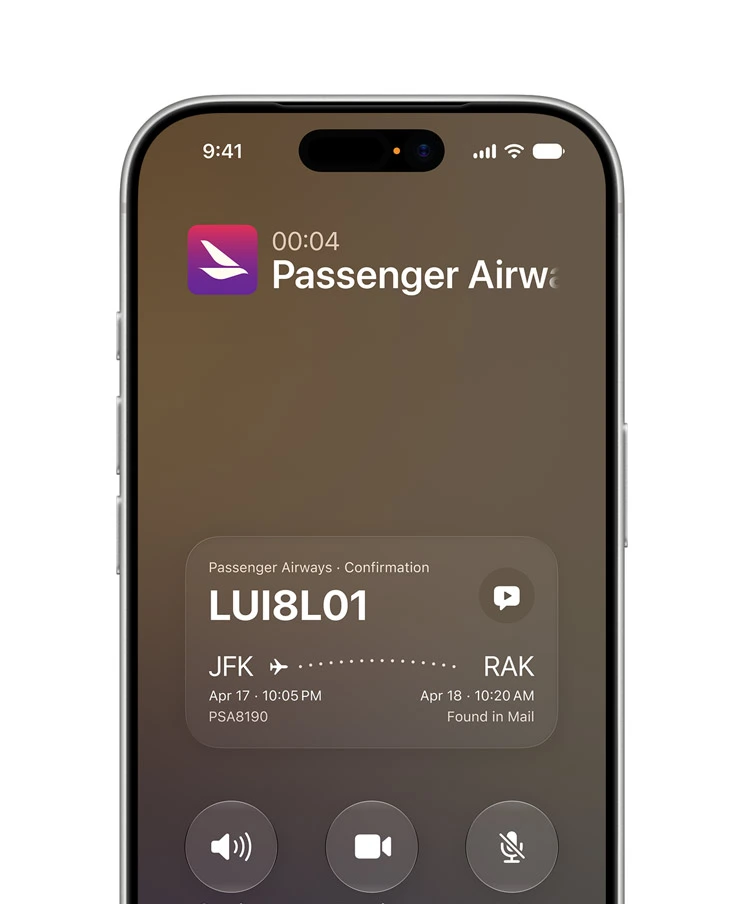
- Calendar can now build multi-step events from on-screen text — point Siri at a text message with flight details, and it builds the full itinerary
- Shortcuts gets a “Describe a Shortcut” feature — describe what you want in plain language and Apple Intelligence builds the automation for you
- Cross-app awareness lets features in one app pull context from another — your Phone app now pulls context from Mail and Messages mid-call (see Call Context below)
Apple remains emphatic about privacy. “We believe privacy in AI is non-negotiable,” Craig Federighi said at WWDC 2026. Processing happens on-device where possible. When cloud processing is needed, Apple uses Private Cloud Compute — Apple says it cannot see your data, and it is never used for model training.
📖 Deep dive: How to Use Apple Intelligence: The Ultimate 2026 Guide
New Photos Features

The iOS 27 Photos app gets its most significant editing overhaul since the introduction of AI clean-up tools. Three new tools stand out:
Extend lets you expand an image beyond its original frame. Specify how much to add, what to fill it with, and which direction to expand — the AI fills in the gap. Useful for adjusting composition after the fact, or converting a portrait-orientation shot to landscape for a wallpaper.
Cleanup (enhanced) removes unwanted objects from photos with greater accuracy than the iOS 26 version. In our testing on iPhone 17 Pro, complex backgrounds that previously needed multiple passes now clean up in a single attempt.
Spatial Reframing is the headline tool — it lets you adjust the perspective of a shot after it is taken. The demo at WWDC showed a user completely shifting the camera angle of a photo, not just cropping. This is made possible by the depth data the iPhone’s camera system captures but previously could not apply after shooting.
Photos also loads 70% faster than iOS 26 in the library view — a performance improvement that is immediately noticeable on any supported device.
Image Playground can now create photorealistic images (a step up from the illustrated style in iOS 26), and generated images automatically include a SynthID watermark. Image Playground is also now available for creating Lock Screen wallpapers and Contact Posters directly.
Improved Messages
Messages in iOS 27 gets a layer of AI that works without you needing to think about it. Key additions:
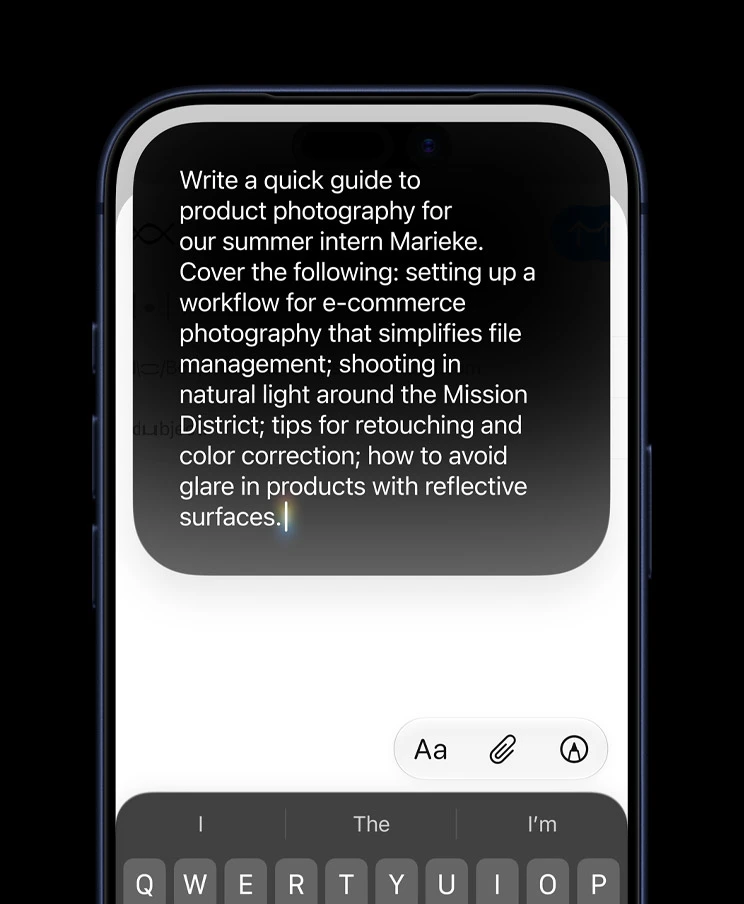
Smart Reply suggests context-aware responses based on the conversation. Unlike the simple quick-reply bubbles in older iOS versions, Smart Reply in iOS 27 reads the full thread and generates replies that actually match the tone and subject of the chat.
One-tap suggestions appear inline as you type, similar to how keyboard autocomplete works but for full replies. Tap the suggestion to send, or ignore it and keep typing.
Cross-app context is the most interesting new layer. If a conversation includes a restaurant suggestion, Messages can pull up the restaurant’s booking availability without you leaving the thread. Similarly, addresses and dates in threads can be added to Maps or Calendar with a single tap, powered by Apple Intelligence’s on-screen awareness.
Better Call Screening
The Phone app gets a feature Apple calls Call Context — it pulls relevant information from your Mail and Messages to surface context before and during a call.
If someone calls you and you have an existing email thread with them, a summary of that thread appears on your call screen. If the caller references something from a previous conversation, you have the context immediately without having to check the app separately.
Call screening has also been extended to better handle unknown numbers, with Siri AI able to describe the likely purpose of an unknown call based on any available signals.
New Lock Screen Features
iOS 27 gives you more control over the Lock Screen’s Liquid Glass aesthetic introduced in iOS 26. The main addition is an opacity slider that lets you dial the translucency of system elements from fully transparent to fully opaque. If you found the iOS 26 Liquid Glass look difficult to read in bright light, this is the fix Apple should have included from day one.
Image Playground can now generate new Lock Screen wallpapers directly from the Lock Screen customisation menu. Describe what you want or let Apple Intelligence suggest something based on your photo library.
Visual Intelligence is now accessible from the Lock Screen camera — tap the new Siri mode button in the Camera app viewfinder to activate it without unlocking your iPhone.
Battery & Performance Improvements
iOS 27 is Apple’s most performance-focused update since iOS 9. The numbers Apple quoted at WWDC 2026:
| Metric | iOS 26 | iOS 27 |
|---|---|---|
| App launch times | Baseline | Up to 30% faster |
| Photo library loading | Baseline | 70% faster |
| AirDrop transfer speeds | Baseline | 80% faster |
| CPU scheduler | Standard | Improved for multitasking |
Apple’s engineers spent months combing through the codebase looking for inefficiencies — the result is smoother animations, better responsiveness under load, and reduced heat generation during intensive tasks. Users who experienced overheating and battery drain issues on iOS 26 should see meaningful improvements.
Battery life improvements are not tied to a single feature — they come from the cumulative effect of the CPU scheduler changes and reduced background processing overhead.
Siri AI Hub
Siri AI is the defining feature of iOS 27. It requires iOS 27 and an Apple Intelligence-compatible device (iPhone 15 Pro or newer).
What Siri AI Does
Siri AI can:
- Maintain a full conversation history, synced across your Apple devices via iCloud
- Read your active screen and act on what it sees — without you copying, switching apps, or typing
- Search simultaneously across Photos, Messages, Mail, Notes, and Files using Apple Intelligence’s semantic index
- Execute multi-step, cross-app tasks in a single request
- Generate and modify images, Lock Screen wallpapers, and Contact Posters through Image Playground
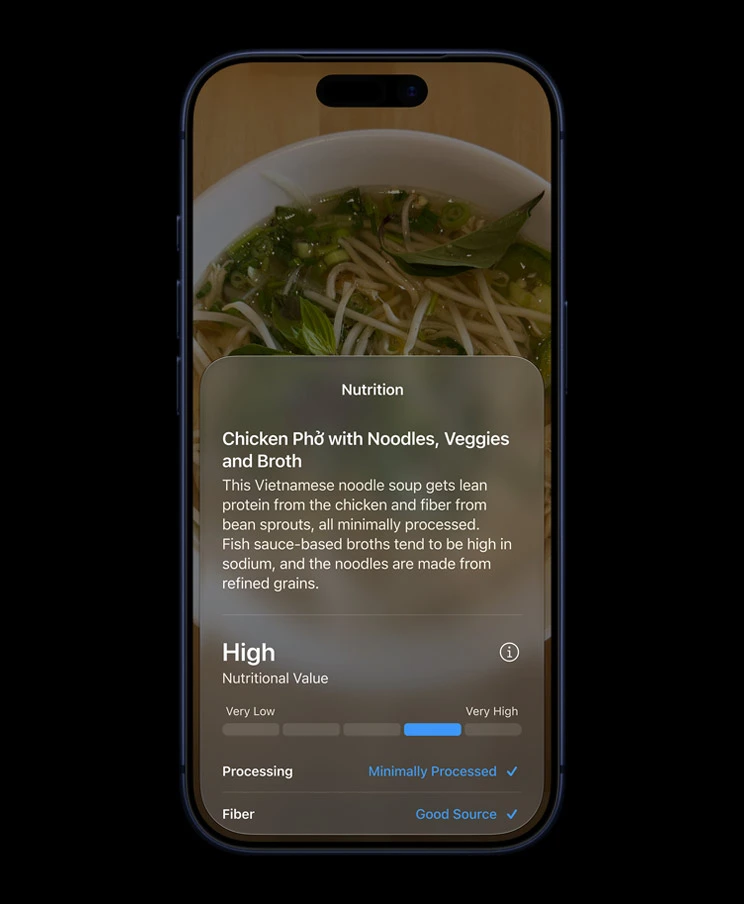
- Recognise nutrition labels, contact information, landmarks, and products using Visual Intelligence
- Handle natural language image editing — describe a change and Siri interprets and applies it
How to Access Siri AI
There are three ways to open Siri AI in iOS 27:
- Side button — hold the side button on your iPhone (same as before)
- Swipe down from the top — a new gesture that opens the Siri “Ask” interface directly
- Siri app — tap the standalone Siri app icon on your home screen
Privacy
Apple has built a two-tier processing system for Siri AI. Requests that can be handled on-device are processed entirely on your iPhone — nothing leaves the device. For queries that require more compute, Apple uses Private Cloud Compute. Apple states that data processed through Private Cloud Compute is not used for model training and is not accessible to Apple employees. This claim is backed by the same architecture Apple introduced for Private Cloud Compute in iOS 18.
Important for EU users: Siri AI is not available on iPhone or iPad in the EU at launch. This is due to Digital Markets Act requirements. Mac, Apple Watch, and Apple Vision Pro users in the EU do get access.
Limitations
- Requires iPhone 15 Pro or newer for Apple Intelligence features (iPhone 11–15 get iOS 27 but not Siri AI)
- Advanced voice customisation is limited to iPhone 17 Pro and iPhone Air or newer
- Third-party app integration (e.g., Gmail, Spotify) is currently limited — Siri AI works best within Apple’s native apps at launch
- EU availability delayed at launch
📖 Siri AI guides on AppleHeadlines:
- How Siri AI Changes iPhone Use in 2026
- How to Get Siri AI: 7 Easy Steps to Unlock the Smartest Assistant
Apple Intelligence Hub
Apple Intelligence is the underlying AI platform that powers Siri AI and every other intelligent feature in iOS 27. Here are the key pillars and where to go deeper:
Writing Tools
Apple Intelligence writing tools in iOS 27 appear across Mail, Notes, Messages, and any text field system-wide. They can proofread, rewrite in different tones, and summarise long documents. New in iOS 27: context-aware tone suggestions that adapt based on who you are writing to.
Image Generation
Image Playground now generates photorealistic images (not just illustrated style). Images automatically include a SynthID watermark. You can generate Lock Screen wallpapers and Contact Posters, choose aspect ratios, and modify generated images using natural language descriptions.
AI Summaries
Apple Intelligence now summarises long email threads, notification stacks, and webpage articles. In iOS 27 the summaries are more accurate and better at capturing the actionable parts of a message — not just the topic, but what the sender actually wants you to do.
AI Notifications
Notification summaries group and prioritise alerts intelligently. In iOS 27, Apple has refined the notification summarisation that launched in iOS 26, reducing the number of inaccurate or confusing AI-generated summaries that some users reported in the previous year.
📖 Full guide: How to Use Apple Intelligence: The Ultimate 2026 Guide
Privacy & Security Features
Apple’s position at WWDC 2026 was clear: “We believe privacy in AI is non-negotiable.” iOS 27 continues Apple’s approach of on-device processing wherever possible, with Private Cloud Compute for queries that require additional compute.
Key privacy additions in iOS 27:
Parental Controls Overhaul — iOS 27 introduces the most significant redesign to Screen Time and parental controls since the feature launched. Highlights include:
- Mandatory child accounts for users under 13 (parents set this up during device setup)
- Ask to Browse: kids request access to blocked websites, parents approve or deny from their own device
- App Schedules: set time windows when specific apps are accessible
- Communication Safety updates: expanded content warnings in Messages and FaceTime
- Time Allowances: flexible daily limits that can vary by day of week
One-tap Password Updating — Safari and Apple Intelligence now work together to identify saved passwords for compromised sites and prompt you to update them in one tap, including auto-generating a new strong password and saving it.
Visual Intelligence Privacy — Visual Intelligence processing uses Private Cloud Compute when a query requires it, with the same no-training, no-Apple-access guarantees as Siri AI processing.
Accessibility Features
iOS 27 brings new capabilities for users who are blind, have low vision, or have motor impairments.
Head Tracking improvements — expanded gesture recognition for controlling iPhone using head movements. iOS 27 adds more customisable action mappings, making it easier to configure for individual needs.
Magnifier enhancements — the Magnifier app gets improved detection for nutrition labels and small text, powered by Visual Intelligence.
Personal Voice updates — the feature that lets users create a synthetic voice from their own recordings gets faster creation time and improved naturalness in iOS 27.
Display accessibility — the new Liquid Glass opacity slider (available system-wide) benefits users who found the translucency of iOS 26 difficult to read, particularly in outdoor or bright-light environments.
Apple has also improved VoiceOver performance and updated its support for Braille displays, though specific details were not detailed in the WWDC keynote.
How to Install iOS 27
When the public release lands in September 2026, installing iOS 27 takes about 15 minutes on a stable Wi-Fi connection.
Before you start:
- Back up your iPhone (Settings → [Your Name] → iCloud → iCloud Backup → Back Up Now)
- Connect to Wi-Fi
- Plug your iPhone in or ensure it has at least 50% battery
- Make sure you have at least 5GB of free storage
How to install:
- Open the Settings app on your iPhone
- Tap General
- Tap Software Update
- If iOS 27 appears, tap Download and Install
- Enter your passcode if prompted
- Tap Agree on the Terms and Conditions
- Your iPhone will download the update, restart, and complete installation
The process typically takes 10–20 minutes depending on your internet speed. Your iPhone will restart once during installation — this is normal.
If the update does not appear: Wait a few hours. Apple staggers rollouts to avoid server overload on release day. If iOS 27 is still not appearing after 24 hours, try going to Settings → General → Software Update and pulling down to refresh.
If installation fails: The most common cause is insufficient storage. Go to Settings → General → iPhone Storage and free up space by removing apps or clearing Photos.
iOS 27 Beta Information
The iOS 27 developer beta is available now (as of June 8, 2026). Here is what you need to know about each stage:
Developer Beta
- Available: June 8, 2026 — now
- Who it’s for: Registered Apple developers (requires an Apple Developer Program account)
- Stability: Rough. Expect crashes, battery drain, and broken app features. Not suitable for your primary device
- How to install: Download from developer.apple.com
Public Beta
- Expected: Mid-July 2026
- Who it’s for: Anyone — enroll free at beta.apple.com
- Stability: Better than developer beta, but still buggy. Use on a secondary device
- How to install: Enroll your Apple ID at beta.apple.com, then go to Settings → General → Software Update on your iPhone
Release Candidate (RC)
- Expected: Late August 2026
- Stability: Near-final. Very close to what ships to the public
- Who gets it: Registered developers automatically
Public Release
- Expected: ~September 15, 2026
- Who gets it: All supported devices via Settings → General → Software Update
Should you install the beta? If you are curious and own a secondary iPhone, the public beta is worth trying in July. If your primary iPhone is your only device, wait for the September release.
iOS 26’s rocky launch is a useful reminder that first-day iOS releases can introduce new bugs even as they fix old ones.
iOS 27 vs iOS 26
| Feature | iOS 26 | iOS 27 |
|---|---|---|
| Siri | Voice commands, limited AI | Fully rebuilt Siri AI with dedicated app, screen awareness, Google Gemini |
| Apple Intelligence | Optional, limited to select apps | Ambient — integrated across Safari, Mail, Messages, Photos, Calendar |
| Photos editing | Basic AI clean-up | Extend, Cleanup (improved), Spatial Reframing |
| Messages | Standard + basic suggestions | Smart Reply, one-tap suggestions, cross-app context |
| Lock Screen | Liquid Glass fixed opacity | Liquid Glass + opacity slider |
| App launch speed | Baseline | Up to 30% faster |
| Photo library loading | Baseline | 70% faster |
| AirDrop | Standard speeds | 80% faster |
| Image Playground | Illustrated-style generation | Photorealistic + SynthID watermarks |
| Parental controls | Screen Time (largely unchanged) | Fully rebuilt: Ask to Browse, App Schedules, Time Allowances |
| Design language | Liquid Glass introduced | Liquid Glass refined |
| Supported devices | iPhone 11+ | iPhone 11+ (no additional drops) |
| iPhone Fold support | No | Native adaptive layout support |
The headline shift: iOS 26 laid the foundation, iOS 27 completes it. If you were frustrated by the unfinished feel of iOS 26’s AI features, iOS 27 is the version that was implicitly promised at WWDC 2024.
Common Questions
iOS 27 is Apple’s 2026 major iPhone software update, announced at WWDC 2026 on June 8. It rebuilds Siri from scratch with a Google Gemini-powered Siri AI, deepens Apple Intelligence across every core app, delivers significant performance improvements, and overhauling parental controls. It supports iPhone 11 and all newer models.
The public release is expected in September 2026 — most likely around September 15, timed to the iPhone 18 launch. A public beta is coming in July 2026. The developer beta is already available.
Every iPhone that supports iOS 26 also supports iOS 27 — from iPhone 11 up to iPhone 17 Pro Max. No devices have been dropped. However, Siri AI and Apple Intelligence features require iPhone 15 Pro or newer.
Yes. Like every major iOS update, iOS 27 is a free over-the-air update for all supported devices. You install it through Settings → General → Software Update.
Back up your device first, then go to Settings → General → Software Update. When iOS 27 appears in September, tap Download and Install. The process takes 10–20 minutes on Wi-Fi. Full step-by-step guide above.
Yes. Apple confirmed at WWDC 2026 that iPhone 11 is supported. Craig Federighi specifically called it out on stage. However, iPhone 11 does not get Siri AI or Apple Intelligence — those features require iPhone 15 Pro or newer.
Siri AI is a fully rebuilt version of Siri powered by Apple Intelligence and Google Gemini. It has its own standalone app, a new swipe-down gesture interface, persistent conversation history across your Apple devices, and real-time screen awareness. It requires iPhone 15 Pro or newer.
iOS 27 is available in the EU, but Siri AI will not be available on iPhone and iPad in the EU at launch, due to Digital Markets Act compliance requirements. Mac, Apple Watch, and Apple Vision Pro users in the EU do get Siri AI.
Latest iOS 27 News
This section is updated weekly with the latest iOS 27 developments.
From AppleHeadlines:
- 📰 iOS 27 Is Finally Here: 7 Huge Features That Will Change Your iPhone Forever — June 10, 2026
- 📰 iOS 27 Features: 14 Major Upgrades Apple Just Confirmed for Your iPhone — June 11, 2026
- 📰 How Siri AI Changes iPhone Use in 2026 — June 10, 2026
- 📰 How to Get Siri AI: 7 Easy Steps to Unlock the Smartest Assistant — June 10, 2026
- 📰 How to Use Apple Intelligence: The Ultimate 2026 Guide — Updated for iOS 27
- 📰 iOS 26 Features: The Complete Guide to Apple’s Big Update — Reference: what changed in iOS 26
Check back weekly for beta release notes, new feature coverage, bug fix reports, and security update roundups.
Disclaimer: iOS 27 is currently in developer beta. Features described are based on Apple’s official WWDC 2026 announcements and developer beta testing as of June 12, 2026. Some features may change before the public release in September 2026. This guide is updated regularly as new information becomes available. Apple Intelligence and Siri AI features require compatible hardware and may not be available in all regions at launch.
iOS 27 Update History
July 8, 2026
✔ Added iOS 27 Developer Beta 3 features, Siri improvements, Liquid Glass refinements, and release information.
June 2026
✔ Initial publication covering iOS 27 announcement, major features, supported iPhones, and Apple Intelligence.

T’kal is the lead strategist and developer behind Apple Headlines. With a background in digital marketing and web development, he specializes in technical Apple troubleshooting, software news, and hardware rumors. T’kal focuses on delivering high-authority tech content that bridges the gap between Apple enthusiasts and the latest industry innovations.