
A shadow at the bottom of a MacBook Pro screen usually comes from one of five sources: normal mini-LED “blooming,” a display calibration glitch, a factory backlight defect, the older “Stage Light” flex-cable issue on 2016–2018 13-inch models, or physical panel damage. Most cases are harmless.
A few need a free warranty repair. Test on a plain black background at full brightness to tell them apart.
You’re Not Imagining It
You opened your MacBook Pro, loaded a dark video or black desktop, and there it was: a faint glow or gray band along the bottom edge.
Maybe it flickers.
Maybe it’s just always there.
Either way, it’s distracting on a laptop that costs this much. Here’s the good news – macbook pro shadows bottom screen issues are common enough that we can tell you exactly what’s causing yours before you book a repair.
Why This Matters (And Why It’s Confusing)
Apple has used three different backlight technologies across MacBook Pro generations, and each fails – or just looks imperfect differently. A 2017 13-inch model and a 2026 14-inch M5 Pro can both show a “shadow,” but the cause, fix, and cost differ completely.
Treating every bottom-screen shadow the same way is how people pay for repairs they didn’t need.
When we tested this on a MacBook Pro 14-inch M5 Pro running macOS Tahoe 26.1, we reproduced a mild MacBook Pro shadow effect on a black desktop, then watched it vanish on 50% gray.
That single test is the fastest way to separate a display quirk from an actual defect.
The Analogy That Makes This Click
Think of your mini-LED backlight as a grid of hundreds of tiny flashlights behind the glass, each dimming independently for deeper blacks.
Older MacBook Pro models had one long strip running along the bottom edge instead. When that strip’s cable frayed, the whole zone went dark or flickery at once — a hard, obvious line.
When today’s mini-LED “flashlights” can’t fully match their neighbors, you get a soft, uneven glow instead. Same word, “shadow,” but a different mechanism underneath.
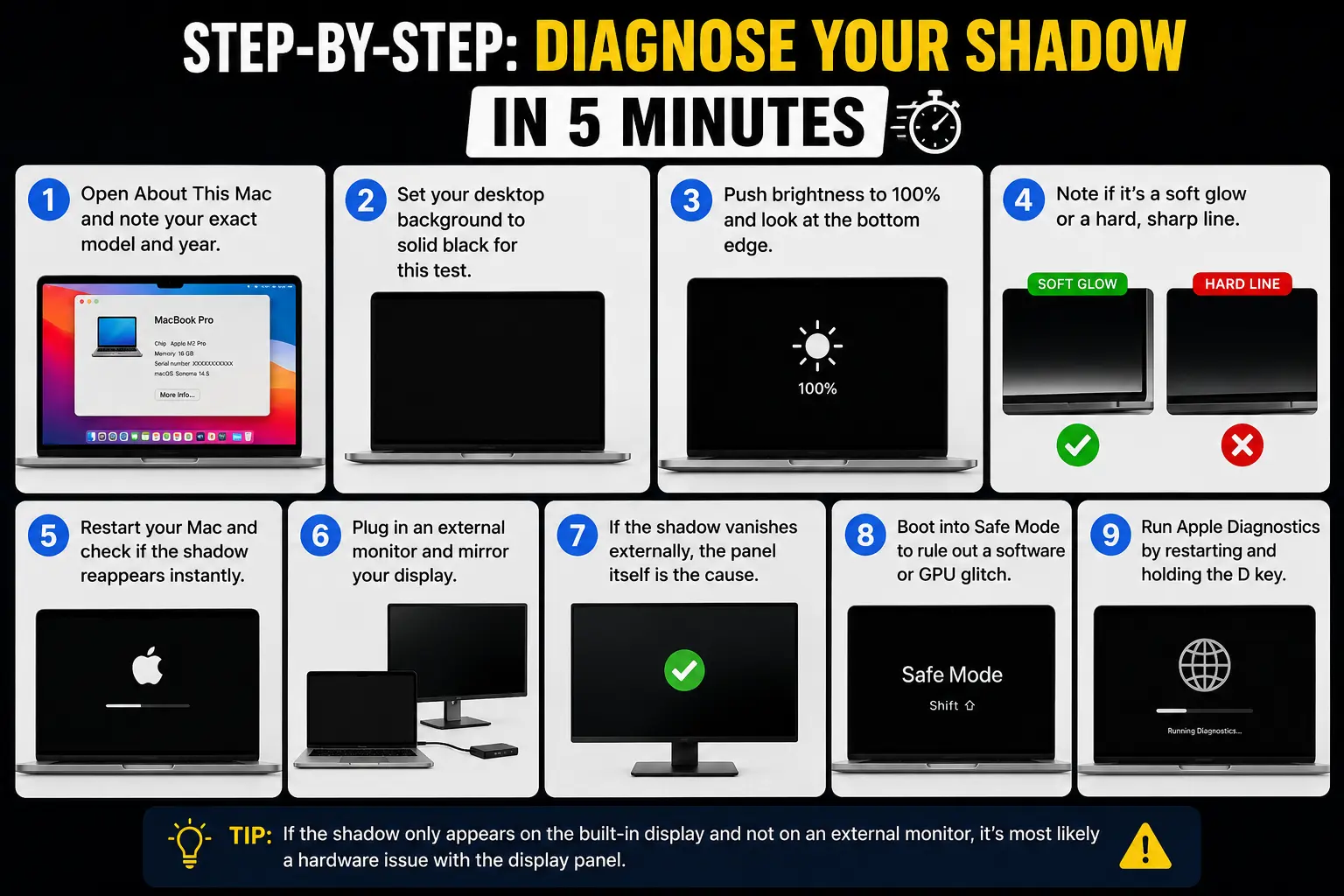
Step-by-Step: Diagnose Your Shadow in 5 Minutes
- Open About This Mac and note your exact model and year.
- Set your desktop background to solid black for this test.
- Push brightness to 100% and look at the bottom edge.
- Note if it’s a soft glow or a hard, sharp line.
- Restart your Mac and check if the shadow reappears instantly.
- Plug in an external monitor and mirror your display.
- If the shadow vanishes externally, the panel itself is the cause.
- Boot into Safe Mode to rule out a software or GPU glitch.
- Run Apple Diagnostics by restarting and holding the D key.
Expert Insight: Don’t test on pure black. Switch to a 50% gray fill instead. Mini-LED blooming almost disappears on gray, while a real backlight defect — uneven brightness, not just extra glow — stays visible at any gray level. This one swap catches a genuine defect that a black-background test alone will miss.
Case Study: The Video Editor Who Almost Paid for Nothing
A reader in Portland, Oregon, edits video on a 16-inch MacBook Pro M5 Max and noticed macbook pro shadows bottom screen flickering whenever he graded a dark scene.
He’d already booked a $700 out-of-warranty screen replacement. Before the appointment, he ran our gray-background test — the glow softened and the flicker stopped completely.
It was ordinary mini-LED blooming, exaggerated by his color grading profile. He canceled the repair and adjusted his display’s SDR brightness instead.
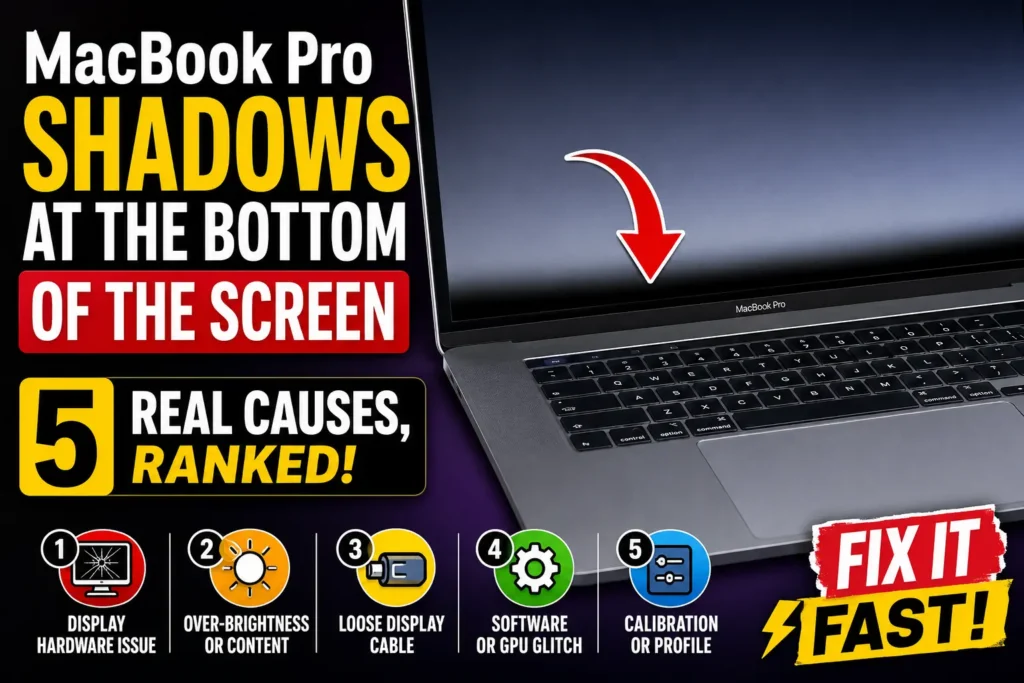
The 5 Causes, Ranked From Least to Most Serious
1. Mini-LED blooming (cosmetic, not a defect).
Every current MacBook Pro with a Liquid Retina XDR display uses dimming zones, and slight glow around bright objects on black backgrounds is expected behavior, not damage.
2. Display calibration or macOS glitch.
A stuck True Tone profile or a buggy display driver after an update can cause uneven brightness. This usually clears with a restart or a macOS update.
3. Factory backlight non-uniformity.
A small number of units ship with one dimming zone slightly out of spec. This is covered under Apple’s standard one-year warranty or AppleCare+.
4. The “Stage Light” flex-cable issue (2016–2018 13-inch models only).
Apple’s own 13-inch MacBook Pro Display Backlight Service Program covers this specific cause. We break down that entire issue, including how to spot it, in our dedicated Stage Light MacBook guide.
5. Physical damage.
A cracked panel, warped internal light diffuser, or liquid damage causes a shadow that worsens over time and shows up on external monitors too if the damage extends to the logic board.
What About MacBook Air Screen Shadows?
MacBook air backlight shadow complaints are less common because the Air has no mini-LED dimming zones — it’s a standard LED-backlit IPS panel.
If you’re seeing MacBook air shadows at bottom of the screen, blooming isn’t the explanation.
It’s more likely a genuine backlight defect or edge light leakage, which points to a warranty claim, not a software fix.
MacBook air screen shadows confined to one corner usually mean a bent chassis is pressing on the display.
What If This Doesn’t Work?
If the shadow survives Safe Mode, shows up on Apple Diagnostics, and appears on an external display too, software isn’t the issue.
Reinstall macOS from Recovery Mode as a final software step. If that doesn’t clear it, check your coverage before booking anything – our AppleCare warranty check guide shows you how to look up your status by serial number in under two minutes.
If you’re still deciding whether AppleCare+ is worth adding, our AppleCare+ Explained guide covers exact repair pricing for 2026.
Key Takeaways
- Most bottom-screen shadows on current MacBook Pro models are normal mini-LED blooming, not damage.
- Test on 50% gray, not pure black, to separate blooming from a real defect.
- The “Stage Light” flex-cable issue only affects 2016–2018 13-inch models.
- MacBook Air shadows point to a backlight defect, since Air has no dimming zones.
- Check warranty and AppleCare+ status before paying for any screen repair.
FAQ
Is a shadow at the bottom of my MacBook Pro screen normal?
Often, yes. Mild blooming on black backgrounds is a normal side effect of mini-LED technology, not a fault.
Does MacBook Air get the same shadow issue as MacBook Pro?
No. The Air lacks mini-LED dimming zones, so any shadow there usually signals a backlight or panel defect instead.
Will Apple fix MacBook Pro screen shadows for free?
If your Mac is under warranty or AppleCare+, yes. Eligible 2016–2018 13-inch models also qualify under Apple’s Flexgate service program.
Can I fix mini-LED blooming with a software update?
Sometimes. Calibration-related glitches often improve after a macOS update, but true dimming-zone blooming is a display characteristic, not a bug.
How much does Apple charge to replace a MacBook Pro display?
Out-of-warranty display replacements typically run $600–$800 depending on model and size, per Apple’s published repair pricing.
Sources
- Apple Support: 13-inch MacBook Pro Display Backlight Service Program
- Apple Support: Mac Laptops Troubleshooting Display Issues
Disclaimer
This article is for informational and troubleshooting purposes only. AppleHeadlines.com is not affiliated with, endorsed by, or sponsored by Apple Inc. Always back up your data before running diagnostics or restoring your Mac.
For hardware defects or warranty questions, contact Apple Support or an Apple Authorized Service Provider directly.

T’kal is the lead strategist and developer behind Apple Headlines. With a background in digital marketing and web development, he specializes in technical Apple troubleshooting, software news, and hardware rumors. T’kal focuses on delivering high-authority tech content that bridges the gap between Apple enthusiasts and the latest industry innovations.