





Last updated: November 3, 2026
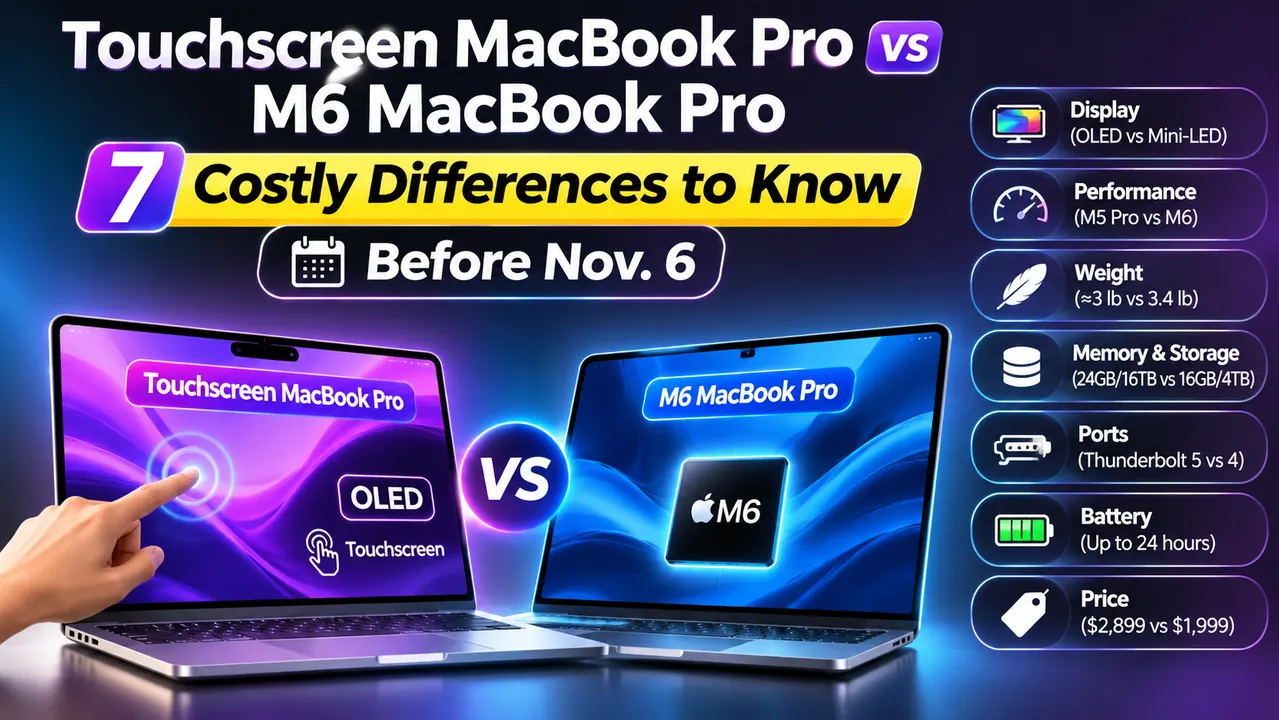
Choosing between the Touchscreen MacBook Pro and the M6 MacBook Pro? Here’s the short answer:
The older M5 Pro chip in the touchscreen model reportedly outperforms the newer M6 in heavy multi-core workloads. Meanwhile, the M6 takes the lead in single-task speed.
You wanted a new MacBook Pro.
Then Apple launched two in the same week.
One has a touchscreen and an OLED panel.
The other has a brand-new chip and a price that’s $900 lower.
Now every spec sheet reads like a riddle, and both laptops ship November 6.
This guide shows what really separates them, where your money goes, and which one fits your work.
We kept it plain, and we did the math for you.


Why This Choice Matters More Than Usual
Most years, picking a MacBook Pro is easy.
The newest chip is the fastest chip, so you buy the newest one.
Not this year.
Apple’s new touchscreen MacBook Pro (officially the “MacBook Pro with PROLED XDR Display”) uses the M5 Pro and M5 Max chips from March 2026.
The new M6 MacBook Pro uses Apple’s newest base chip.
According to Tom’s Guide, Apple skipped the M6 Pro and M6 Max for this round.
Bloomberg’s Mark Gurman reportedly says those chips aren’t even in development.
So the newer name is not the faster laptop. That trips up a lot of buyers.
A quick note on how we built this guide.
Both laptops hit stores on November 6, so we haven’t tested either one yet.
We won’t pretend otherwise. Instead, we lined up Apple’s official specs, early hands-on reports, and Tom’s Guide’s lab numbers for the exact chips inside.
We’ll update this page with real-world results after launch.
MacBook Pro Specs Compared
Compare the M6 MacBook Pro with the new touchscreen OLED model.
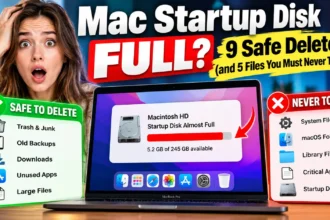
| Specifications | BEST VALUE M6 MacBook Pro 14-inch $1,999 | PREMIUM PICK Touchscreen MacBook Pro 14-inch $2,899 |
|---|---|---|
| Chip | M6 12-core CPU · 12-core GPU | M5 Pro M5 Max option |
| Starting memory | 16GB | 24GB |
| Maximum memory | 32GB | 128GB |
| Starting storage | 1TB | 1TB |
| Maximum storage | 4TB | 16TB (M5 Max) |
| Display technology | Mini-LED | Tandem OLED |
| Display design | Notch | Dynamic Island |
| Touchscreen | ✕ No | ✓ Yes |
| Peak brightness (rated) | Up to 1,600 nits (HDR) | Up to 2,000 nits |
| Thunderbolt ports | 3 × Thunderbolt 4 | 3 × Thunderbolt 5 |
| Other ports | HDMI, SD, MagSafe | HDMI, SD, MagSafe |
| Weight | About 3.4 lb | About 3 lb |
| Battery life (rated) | Up to 24 hours | Up to 24 hours* |
*The touchscreen model’s 24-hour battery rating refers to the 16-inch M5 Pro configuration. The 16-inch touchscreen model starts at $3,399 with M5 Pro and $4,799 with M5 Max.
The M6 MacBook Pro has the lower starting price.
The touchscreen model offers OLED, touch input, and higher memory options.
1. Where the $900 Price Gap Really Goes
The touchscreen MacBook Pro price looks scary next to the M6. But the $900 gap has two parts, and nobody explains them.
Tom’s Guide lists the March 14-inch M5 Pro MacBook Pro at $2,499. Here’s the math:
- M6 to M5 Pro (non-touch): $1,999 to $2,499 is $500 for a stronger chip.
- M5 Pro (non-touch) to touchscreen: $2,499 to $2,899 is $400 for the OLED panel, touch, Dynamic Island, and the new lighter design.
Tom’s Guide says every new OLED model costs $400 more than its mini-LED twin.
So the question isn’t “touchscreen or not.”
It’s two smaller questions. Do you need the stronger chip? Do you want the new screen and body for $400 extra?
Apple’s own store price for the older M5 Pro model can differ by configuration, so check before you buy.
If you’re a student, the M6 starts at $1,899 with education pricing.
2. The Screen: Tandem OLED vs Mini-LED
This is the biggest visual difference, and it’s real.
The touchscreen model uses a tandem OLED panel.
Each pixel makes its own light.
That means true black and no “blooming,” the glow you sometimes see around bright objects on mini-LED screens.
Apple rates it at 2,000 nits of peak brightness.
Tom’s Guide says its contrast reaches 10 million to 1 in a hands-on test.
The M6 keeps the Liquid Retina XDR mini-LED screen.
Apple lists up to 1,600 nits of peak HDR brightness and a 1,000,000:1 contrast ratio.
It also keeps the notch.
It’s still a gorgeous display.
Tom’s Guide’s benchmarks on the previous generation showed excellent color accuracy.
Who notices the difference? Video editors, photographers, and anyone who grades color or watches HDR movies in dark rooms.
If you mostly write, code, and browse, you may never miss the OLED.
One caution: rated brightness and lab-tested brightness are different things.
Tom’s Guide measured about 1,026 nits of HDR on the March mini-LED model.
Wait for independent tests of the OLED before you trust any big number.
3. Touch: Useful Tool or Expensive Gimmick?
Apple resisted touchscreen laptops for years.
Now it has built one, and it did it carefully.
The touch sensor sits inside the display panel instead of on top of it.
Apple says that cuts delay.
The company also redesigned the hinge so the screen stays steady when you tap it.
In macOS 27 Golden Gate, you can swipe through web pages, pinch to zoom photos, and flick windows into place.
Most apps work right away because macOS turns taps into clicks.
Here’s what you should know before you get excited:
- No Apple Pencil support. Reports say the screen is for fingers only.
- Arm fatigue is a real debate. TechRadar’s writer argued Apple never solved it. Your arm still has to reach up to the screen.
- You can reportedly turn touch off. Early coverage, citing MacStories, says it’s an Accessibility setting.
Think of touch like a second remote control. Handy for quick jobs, like scrolling a long page or dragging a slide.
But you wouldn’t use it all day when the main controller is already in your hands.
For app developers, touch has a clear job. You can test iPhone and iPad gestures right on your Mac.
4. The Chip: Why the “Older” M5 Pro Wins in Heavy Work
Here’s where most comparison articles stop short.
Tom’s Guide benchmarked the M6 in a Mac mini, which isn’t a laptop, so treat these numbers as a guide, not a promise:
M6 vs. M5 Pro vs. M5 Max Benchmarks
See how Apple’s chips compare in synthetic benchmarks and real-world video encoding.
| Benchmark | M6 Mac mini | M5 Pro MacBook Pro | M5 Max MacBook Pro |
|---|---|---|---|
| Geekbench 6 Single-core | 4,708 | ~4,300 | 4,338 |
| Geekbench 6 Multi-core | 21,405 | 29,411 | 29,430 |
| HandBrake 4K to 1080p encoding | 2:45 | 1:45 | N/A |
Its 4,708 score leads the listed Geekbench 6 single-core results.
Both score around 29,400, significantly ahead of the M6 result.
It completes the listed HandBrake test in 1:45 versus 2:45 for M6.
Let’s turn that into plain English.
The M6 is slightly quicker at one task at a time.
The M5 Pro is about 37% faster when many tasks run together.
It also finished the video job a full minute sooner.
Analogy time. Picture the M6 as one very fast worker.
Picture the M5 Pro as a crew of 18 workers who are a bit slower each.
Hand them a single small errand, and the fast worker wins.
Hand them a moving truck full of boxes, and the crew wins every time.
Video exports, code builds, 3D renders, and big photo batches are “moving truck” jobs. Email, docs, and web browsing are “small errands.”
If you want a deeper look at the newest chip, the M6 brings 12 CPU cores and 12 GPU cores. Apple says it’s up to 30% faster in graphics and 25% faster in AI work than the M5.
Pro Tip: Match the Chip to Your Slowest Day
Don’t buy a MacBook for your average day. Buy for your worst deadline day.
Think about the heaviest task you handle each month, whether it’s a 4K video export, a huge code build, or a demanding creative project.
If that task takes under a minute on your current MacBook Air, the M6 should be plenty.
If it makes you walk away from your desk, the extra cores could save valuable time.
5. Design, Weight, and Ports
The touchscreen model ends a design run that started in 2021. OLED panels don’t need a thick backlight, so the laptop gets thinner and lighter.
The 14-inch weighs about 3 pounds.
The M6 weighs about 3.4.
Tom’s Guide says the 16-inch is just over 4 pounds.
Borders shrink, so the 16-inch screen grows to 16.3 inches.
Other changes you’ll notice:
- Dynamic Island replaces the notch. It shows Live Activities, media controls, and Spotlight.
- A glowing Apple logo returns on the lid.
- A redesigned speaker system with six speakers. Apple says it has 50% deeper bass.
- Thunderbolt 5 instead of Thunderbolt 4.
Both laptops keep HDMI, an SD card slot, MagSafe, and a headphone jack.
The big difference is displays.
The M6 drives up to two external screens.
The M5 Pro supports three, and the M5 Max supports four.
6. Battery Life: Same Claim, Open Question
Apple rates both for up to 24 hours. On paper, it’s a tie.
In real life, don’t assume that.
Tom’s Guide’s mini-LED 16-inch M5 Pro lasted 21 hours and 25 minutes in a web test.
The M5 Max lasted just under 18 hours. OLED screens save power on dark content but burn more on bright white pages.
That means a writer in a white document might see different results than a movie watcher. We’ll wait for tests before we call a winner.
7. Memory and Storage: The Hidden Ceiling
The M6 tops out at 32GB of memory.
The touchscreen model goes up to 128GB.
For most people, that gap never matters.
It matters if you edit 8K video, train local AI models, or run many virtual machines.
Memory can’t be upgraded later, so buy the amount you’ll need in year four, not year one.
Storage works the same way.
Both start at 1TB. If you’re nervous about filling it, here’s how to free up space when your Mac startup disk is full.
Which MacBook Pro Should I Buy in 2026? A 5-Step Decision
Use this quick list. Stop at the first step that fits you.
- Check your budget first. If $2,899 feels like a stretch, buy the M6 MacBook Pro.
- Name your heaviest task. If it’s video, 3D, or large code builds, lean toward the M5 Pro.
- Ask about your eyes. If you grade color or watch HDR video daily, the OLED earns its $400.
- Test your touch habit. If you’d turn touch off right away, skip the touchscreen premium.
- Check memory needs. If you need more than 32GB, only the touchscreen model works.
Real-World Example: Two Buyers, Two Different Answers
This is an illustrative scenario, not a customer review.
Meet Maya, a freelance video editor.
She edits 4K wedding films and exports three or four a week.
She was ready to buy the M6 because “newer is better.” Then she compared the multi-core numbers.
Her export times matter because clients wait on her. The M5 Pro’s roughly one-minute lead on a short test could mean much more on a long film.
She chose the touchscreen model and said the OLED helped her judge color.
Now meet Dev, a student who writes code and browses all day.
Nothing he does needs 29,000 multi-core points.
The M6 at $1,899 with education pricing covers him easily.
He saved about $1,000 and put it toward a good monitor.
Same two laptops. Different jobs. Different winners.
What If This Doesn’t Work? (Still Can’t Decide)
Stuck between the two? Try these fixes:
- Wait for reviews. Both ship November 6. Independent tests on battery life, heat, and touch comfort will land within days.
- Try touch in person. Visit an Apple Store once demos are out. Five minutes will tell you if your arm tires.
- Check the return window. Apple lets you return products within a set period. Read the current policy before you open the box.
- Look at the middle option. The March M5 Pro MacBook Pro has the same chip without the touchscreen premium. Confirm it’s still sold in Apple’s store.
- Consider a MacBook Air. If you mostly browse, write, and stream, you may not need any MacBook Pro.
If something feels wrong with your new Mac after delivery, our guide to an Apple Genius Bar appointment shows how to skip the wait.
Key Takeaways
- The touchscreen MacBook Pro starts at $2,899. The M6 MacBook Pro starts at $1,999.
- The touchscreen model uses the M5 Pro, which is stronger in multi-core work than the M6.
- The M6 is a bit quicker in single-core tasks and is the better value.
- Of the $900 gap, about $500 buys the stronger chip and $400 buys OLED, touch, and the new design.
- Touch has no Apple Pencil support and can reportedly be turned off.
- Only the touchscreen model offers more than 32GB of memory.
- Both are rated for up to 24 hours of battery, but real tests are still pending.
- Both ship Friday, November 6.
FAQ
Yes. Apple’s MacBook Pro with PROLED XDR Display is the first Mac with a built-in touchscreen. It comes in 14-inch and 16-inch sizes with M5 Pro or M5 Max chips.
The 14-inch model starts at $2,899 with M5 Pro. The 16-inch starts at $3,399. M5 Max versions start at $4,499 (14-inch) and $4,799 (16-inch). Tom’s Guide says a maxed-out 16-inch reaches $14,549.
Based on tests of the same chips, yes in multi-core and graphics work. The M6 is slightly quicker in single-core speed. We’ll confirm with laptop tests after launch.
Not at launch, according to early reports. Apple hasn’t announced Pencil support for the Mac.
Early coverage citing MacStories says you can disable it in Accessibility settings. Confirm the exact path on your own Mac after setup.
Sources
- Tom’s Guide, “MacBook Pro OLED vs MacBook Pro M6: Which laptop should you buy?” (Oct. 29, 2026):
- Tom’s Guide, “We’ve already tested the chips inside Apple’s PROLED MacBook Pro” (Nov. 1, 2026):
- The Apple Post, “14-inch MacBook Pro with M6: Everything you need to know” (Oct. 31, 2026):
Disclaimer
This article is for general information only. Prices, specs, and release details come from Apple’s announcements and third-party reports as of November 3, 2026, and may change. Benchmark figures for the M6 come from a Mac mini, not a MacBook Pro, so laptop results may differ. We haven’t tested either laptop yet. Confirm current pricing and return terms with Apple before buying. AppleHeadlines.com is an independent publication and isn’t affiliated with Apple Inc. This is not financial advice.
Ready to Pick Your Mac?
Both laptops ship Friday, November 6. Bookmark this page, because we’ll add real-world test results as soon as they’re in. Want more Mac buying guides and fixes? Browse our full Mac section and subscribe to the Apple Headlines YouTube channel for launch-week updates.
Related Posts:

T’kal is the lead strategist and developer behind Apple Headlines. With a background in digital marketing and web development, he specializes in technical Apple troubleshooting, software news, and hardware rumors. T’kal focuses on delivering high-authority tech content that bridges the gap between Apple enthusiasts and the latest industry innovations.