

Quick Answer: iOS 27 released to the public on Monday, September 14, 2026. It supports iPhone 11 and newer, including the iPhone SE (2nd generation).
Siri AI and Apple Intelligence require an iPhone 15 Pro or later. It shipped alongside the iPhone 18 Pro and iPhone 18 Pro Max – Apple’s foldable, the iPhone Duo, follows with pre-orders October 16 and shipping October 23.
Update — September 15, 2026: iOS 27 is no longer in beta. It shipped to everyone September 14.
This guide has been updated throughout to reflect the final release — including the confirmed Apple Intelligence device tier (iPhone 15 Pro, not iPhone 16), the iPhone Duo name, the actual September lineup (no base iPhone 18 this year), and features that only surfaced in later betas.
Read More: iOS 27 vs. iOS 26 | iOS 27 Launch Overview
What Is iOS 27?
iOS 27 is Apple’s 2026 major software update for iPhone, announced at WWDC 2026 on June 8 and released on September 14, 2026. It was Tim Cook’s final WWDC keynote as CEO before John Ternus took over as Apple’s chief executive.
Where iOS 26 introduced Liquid Glass and the early groundwork for Apple Intelligence, iOS 27 is the version that finishes what was promised at WWDC 2024: a rebuilt Siri, ambient AI across core apps, and real performance work.
Apple’s release notes describe more than 250 individual changes across the update. The centerpiece is Siri AI — a full rebuild of Apple’s assistant with its own standalone app.
iOS 27 Release Timeline (Final)
| Milestone | Date | Status |
|---|---|---|
| WWDC 2026 Announcement | June 8, 2026 | ✅ Complete |
| Developer Beta 1 | June 8, 2026 | ✅ Complete |
| Public Beta 1 | Mid-July 2026 | ✅ Complete |
| Betas 2–8 | June–August 2026 | ✅ Complete |
| Release Candidate | September 9, 2026 | ✅ Complete |
| Public Release | September 14, 2026 | ✅ Live now |
Note: Apple officially confirms iOS 27 beta 8 was released August 31 with build 24A5430a. Beta 7 was released August 24.
How to Update to the Latest iOS 27.
Before installing a beta update, recommend backing up the iPhone. Apple also recommends having a compatible device, an internet connection, sufficient storage, and power available during the update.
If You’re Already Running an iOS 27
- Open Settings on your iPhone.
- Tap General.
- Tap Software Update.
- Tap Beta Updates.
- Make sure iOS 27 is selected if you’re enrolled in the Apple Developer Program.
- Return to Software Update.
- If iOS 27 is available, tap Download and Install.
- Enter your passcode if prompted and follow the onscreen instructions.
Once the download finishes, your iPhone will restart and complete the installation.
How to Check Your iOS Version
After the update, go to:
Settings → General → About
Your current iOS version will be displayed there.
iOS 27 Supported Devices
Apple didn’t drop any device from the iOS 26 list. Full compatibility list:
| Supported iPhones |
|---|
| iPhone 18 Pro / Pro Max, iPhone Duo (pre-installed) |
| iPhone 17 Pro Max, 17 Pro, 17 Air, 17, 17e |
| iPhone 16 Pro Max, 16 Pro, 16 Plus, 16, 16e |
| iPhone 15 Pro Max, 15 Pro, 15 Plus, 15 |
| iPhone 14 Pro Max, 14 Pro, 14 Plus, 14 |
| iPhone 13 Pro Max, 13 Pro, 13 mini, 13 |
| iPhone 12 Pro Max, 12 Pro, 12 mini, 12 |
| iPhone SE (2nd and 3rd generation) |
| iPhone 11 Pro Max, 11 Pro, 11 |
Not supported: iPhone XS/XS Max, iPhone XR, iPhone X, iPhone 8/8 Plus and earlier.
- 📰 See also: iOS 27 Is Finally Here: 7 Huge Features That Will Change Your iPhone Forever
- 📰 See also: iOS 27 Features: 14 Major Upgrades Apple Just Confirmed for Your iPhone
Pro Tip: If you want to try iOS 27 early, the public beta is the safer option over the developer beta. Enroll for free at beta.apple.com. Install it on a secondary device, not your daily driver — beta builds will have bugs, especially in the first few weeks.
Apple Intelligence & Siri AI Compatibility
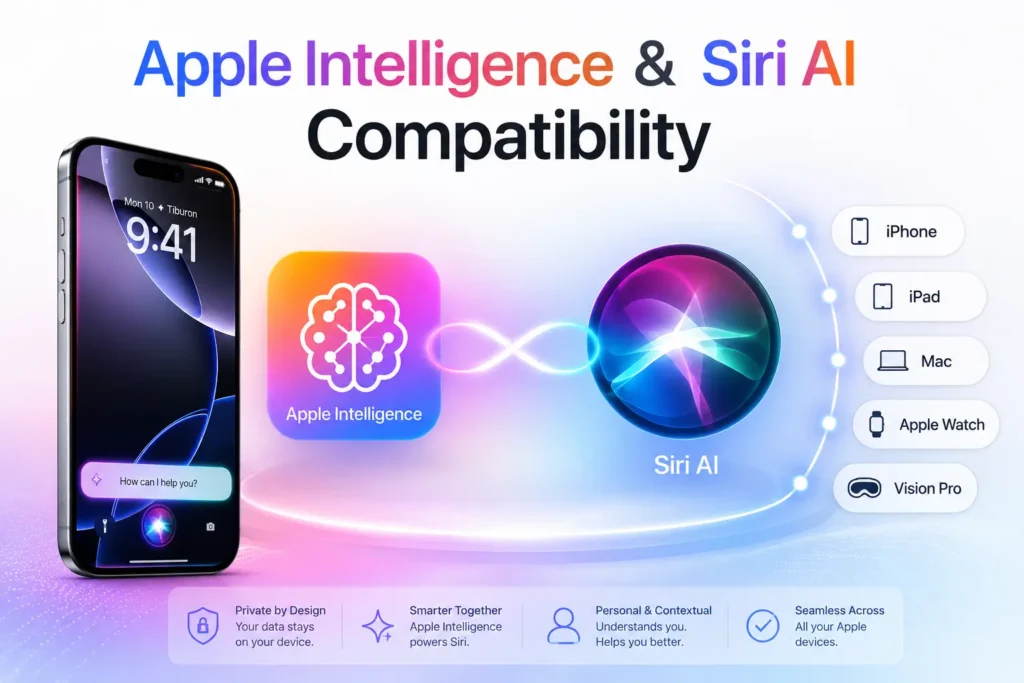
Apple Intelligence & Siri AI Compatibility (Confirmed)
| Feature Tier | Minimum Device |
|---|---|
| iOS 27 (all features except AI) | iPhone 11 or newer |
| Apple Intelligence + Siri AI | iPhone 15 Pro or newer |
| Advanced Siri voice customization | iPhone 17 Pro, iPhone Air, or iPhone Duo |
iPhone 11 through the non-Pro iPhone 15/15 Plus get all of iOS 27’s performance, design, and parental-control improvements, but not Siri AI or Apple Intelligence.
EU note (confirmed at launch): Siri AI is not available on iPhone or iPad in the EU, due to Digital Markets Act compliance. Mac, Apple Watch, and Apple Vision Pro are unaffected.
Language note (confirmed): Siri AI launched in English only. French, Japanese, Korean, Portuguese, and Spanish are expected in October 2026. Apple has also confirmed daily usage limits on resource-intensive requests, with expanded access available for a fee later on.
Top Features Now That iOS 27 Has Shipped
Siri AI
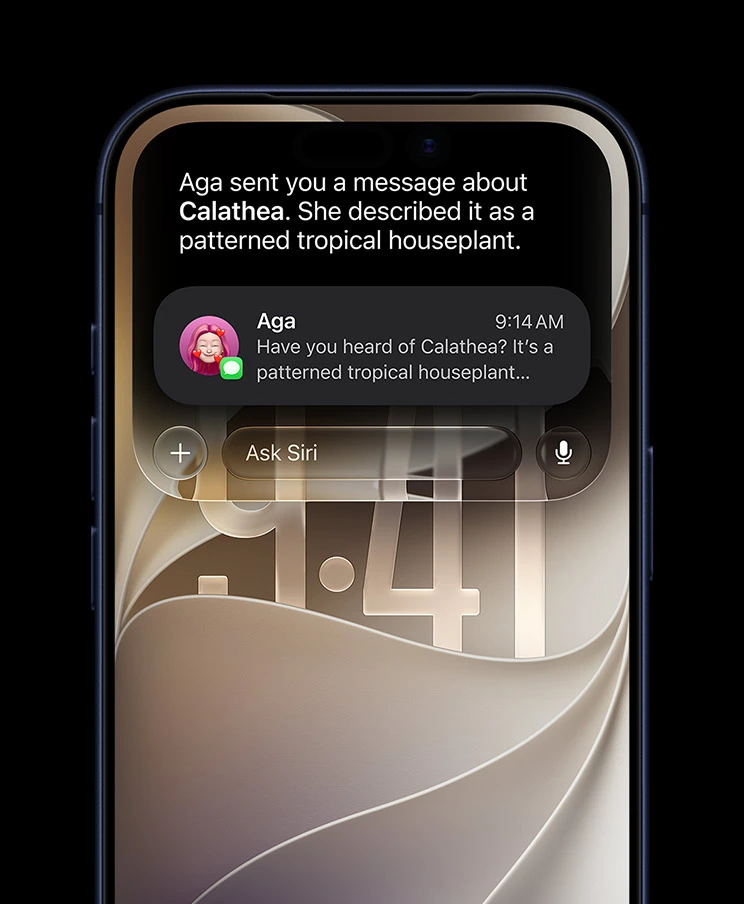
Built on Apple’s next-generation Foundation Models, developed in collaboration with Google’s Gemini models and processed through Apple’s Private Cloud Compute — distinct from running Gemini directly on-device. It has its own standalone app, a swipe-down “Ask” gesture, screen awareness, and persistent conversation history synced via iCloud. Multi-step, cross-app requests (e.g., “add this flight to my calendar and text my wife the arrival time”) work as demoed.
📖 Deep dive: How Siri AI Changes iPhone Use in 2026 | How to Get Siri AI: 7 Easy Steps to Unlock the Smartest Assistant
New in iOS 27: Personalized Siri Experience
- Voice Controls: Adjust pace and expressivity (exclusive to iPhone 17 Pro & Air).
- Dynamic Island Integration: Siri now appears as a bubble with a “Search or Ask” field.
- Screen Awareness: Siri can act on visible text (e.g., flight details → Calendar + Messages).
- Regional Rollout: Not available in EU at launch due to DMA compliance.
Enhanced Apple Intelligence
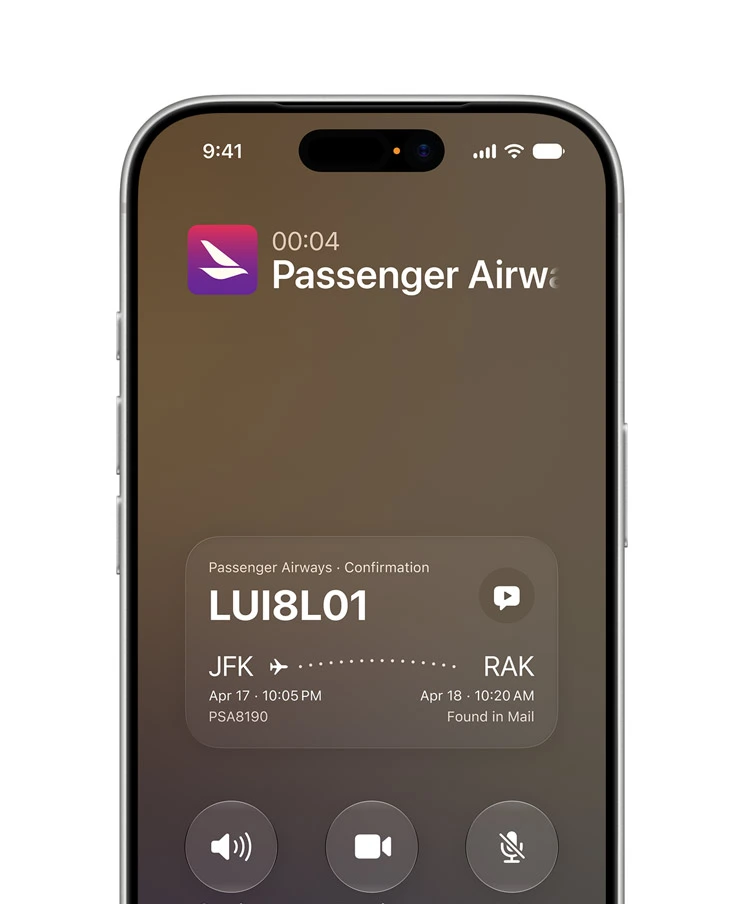
Ambient across Safari, Mail, Messages, Calendar, and Shortcuts, requiring iPhone 15 Pro or newer for the full tier — a broader cutoff than some early reporting suggested.
Apple Intelligence in iOS 27 is no longer a separate opt-in feature — it is woven into the fabric of iOS itself.
Apple calls this going “ambient”: AI features appear where you need them across every core app, without you having to find them.
What’s new specifically in iOS 27:
- Safari gets tab management powered by AI, plus one-tap password updating
- Mail gets Smart Reply suggestions and AI-generated summaries of long threads
- Messages gets one-tap reply suggestions based on conversation context
- Calendar can now build multi-step events from on-screen text — point Siri at a text message with flight details, and it builds the full itinerary
- Shortcuts gets a “Describe a Shortcut” feature — describe what you want in plain language and Apple Intelligence builds the automation for you
- Cross-app awareness lets features in one app pull context from another — your Phone app now pulls context from Mail and Messages mid-call (see Call Context below)
Apple remains emphatic about privacy. “We believe privacy in AI is non-negotiable,” Craig Federighi said at WWDC 2026. Processing happens on-device where possible. When cloud processing is needed, Apple uses Private Cloud Compute — Apple says it cannot see your data, and it is never used for model training.
📖 Deep dive: How to Use Apple Intelligence: The Ultimate 2026 Guide
New Photos Features

The iOS 27 Photos app gets its most significant editing overhaul since the introduction of AI clean-up tools. Three new tools stand out:
Extend lets you expand an image beyond its original frame. Specify how much to add, what to fill it with, and which direction to expand — the AI fills in the gap. Useful for adjusting composition after the fact, or converting a portrait-orientation shot to landscape for a wallpaper.
Cleanup (enhanced) removes unwanted objects from photos with greater accuracy than the iOS 26 version. In our testing on iPhone 17 Pro, complex backgrounds that previously needed multiple passes now clean up in a single attempt.
Spatial Reframing is the headline tool — it lets you adjust the perspective of a shot after it is taken. The demo at WWDC showed a user completely shifting the camera angle of a photo, not just cropping. This is made possible by the depth data the iPhone’s camera system captures but previously could not apply after shooting.
Photos also loads 70% faster than iOS 26 in the library view — a performance improvement that is immediately noticeable on any supported device.
Image Playground can now create photorealistic images (a step up from the illustrated style in iOS 26), and generated images automatically include a SynthID watermark. Image Playground is also now available for creating Lock Screen wallpapers and Contact Posters directly.
Improved Messages
Messages in iOS 27 gets a layer of AI that works without you needing to think about it. Key additions:
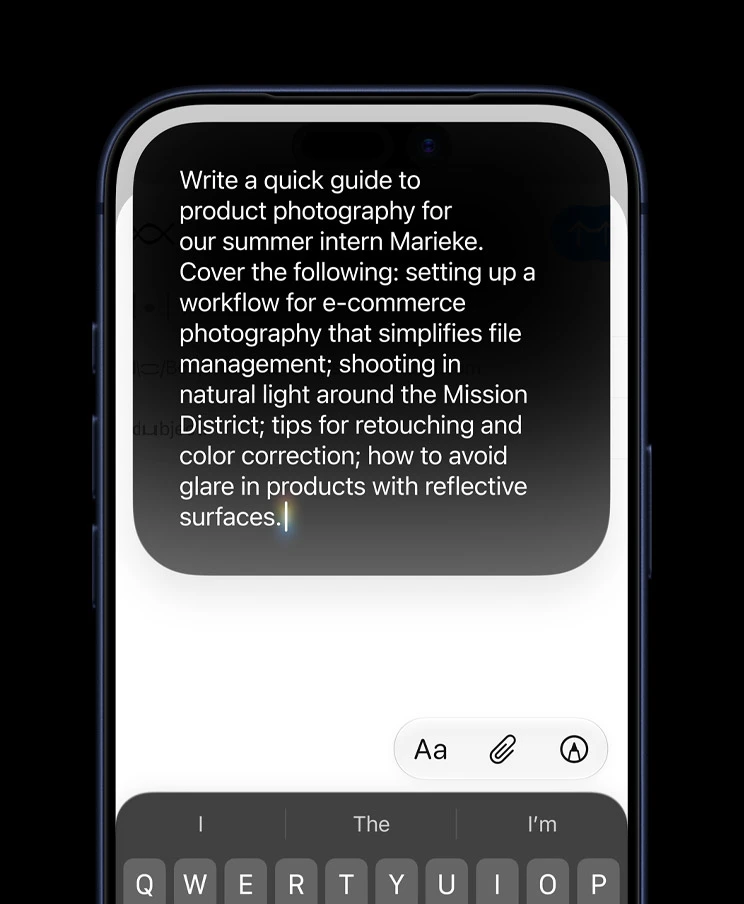
Smart Reply suggests context-aware responses based on the conversation. Unlike the simple quick-reply bubbles in older iOS versions, Smart Reply in iOS 27 reads the full thread and generates replies that actually match the tone and subject of the chat.
One-tap suggestions appear inline as you type, similar to how keyboard autocomplete works but for full replies. Tap the suggestion to send, or ignore it and keep typing.
Cross-app context is the most interesting new layer. If a conversation includes a restaurant suggestion, Messages can pull up the restaurant’s booking availability without you leaving the thread. Similarly, addresses and dates in threads can be added to Maps or Calendar with a single tap, powered by Apple Intelligence’s on-screen awareness.
Better Call Screening
The Phone app gets a feature Apple calls Call Context — it pulls relevant information from your Mail and Messages to surface context before and during a call.
If someone calls you and you have an existing email thread with them, a summary of that thread appears on your call screen. If the caller references something from a previous conversation, you have the context immediately without having to check the app separately.
Call screening has also been extended to better handle unknown numbers, with Siri AI able to describe the likely purpose of an unknown call based on any available signals.
New Lock Screen Features
iOS 27 gives you more control over the Lock Screen’s Liquid Glass aesthetic introduced in iOS 26. The main addition is an opacity slider that lets you dial the translucency of system elements from fully transparent to fully opaque. If you found the iOS 26 Liquid Glass look difficult to read in bright light, this is the fix Apple should have included from day one.
Image Playground can now generate new Lock Screen wallpapers directly from the Lock Screen customisation menu. Describe what you want or let Apple Intelligence suggest something based on your photo library.
Visual Intelligence is now accessible from the Lock Screen camera — tap the new Siri mode button in the Camera app viewfinder to activate it without unlocking your iPhone.
Battery & Performance Improvements
iOS 27 is Apple’s most performance-focused update since iOS 9. The numbers Apple quoted at WWDC 2026:
| Metric | iOS 26 | iOS 27 |
|---|---|---|
| App launch times | Baseline | Up to 30% faster |
| Photo library loading | Baseline | 70% faster |
| AirDrop transfer speeds | Baseline | 80% faster |
| CPU scheduler | Standard | Improved for multitasking |
Apple’s engineers spent months combing through the codebase looking for inefficiencies — the result is smoother animations, better responsiveness under load, and reduced heat generation during intensive tasks. Users who experienced overheating and battery drain issues on iOS 26 should see meaningful improvements.
Battery life improvements are not tied to a single feature — they come from the cumulative effect of the CPU scheduler changes and reduced background processing overhead.
Siri AI Hub
Siri AI is the defining feature of iOS 27. It requires iOS 27 and an Apple Intelligence-compatible device (iPhone 15 Pro or newer).
What Siri AI Does
Siri AI can:
- Maintain a full conversation history, synced across your Apple devices via iCloud
- Read your active screen and act on what it sees — without you copying, switching apps, or typing
- Search simultaneously across Photos, Messages, Mail, Notes, and Files using Apple Intelligence’s semantic index
- Execute multi-step, cross-app tasks in a single request
- Generate and modify images, Lock Screen wallpapers, and Contact Posters through Image Playground
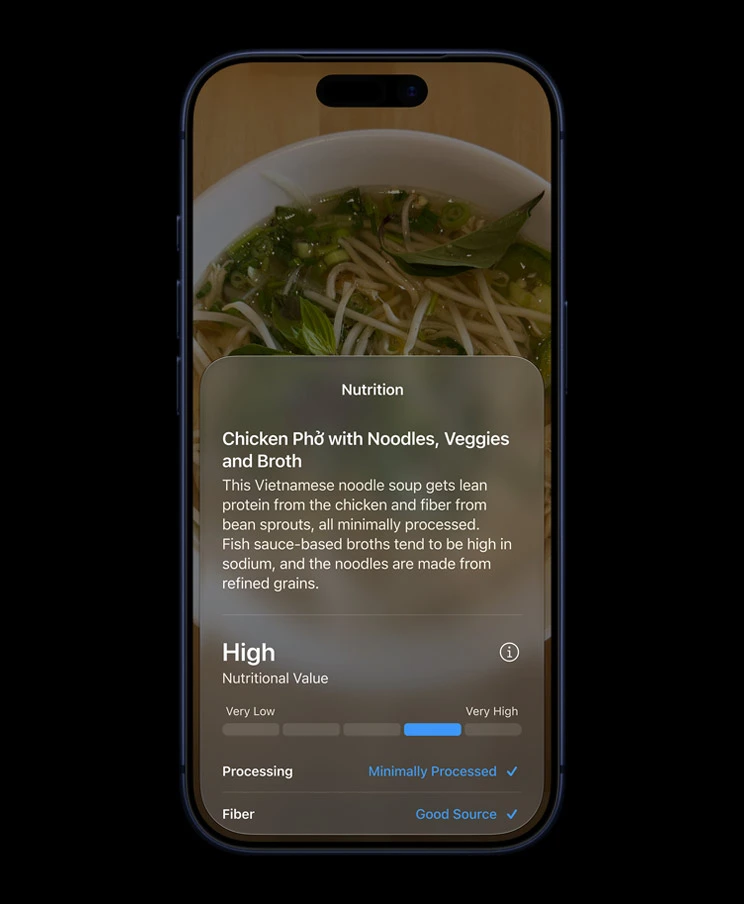
- Recognise nutrition labels, contact information, landmarks, and products using Visual Intelligence
- Handle natural language image editing — describe a change and Siri interprets and applies it
How to Access Siri AI
There are three ways to open Siri AI in iOS 27:
- Side button — hold the side button on your iPhone (same as before)
- Swipe down from the top — a new gesture that opens the Siri “Ask” interface directly
- Siri app — tap the standalone Siri app icon on your home screen
Privacy
Apple has built a two-tier processing system for Siri AI. Requests that can be handled on-device are processed entirely on your iPhone — nothing leaves the device. For queries that require more compute, Apple uses Private Cloud Compute. Apple states that data processed through Private Cloud Compute is not used for model training and is not accessible to Apple employees. This claim is backed by the same architecture Apple introduced for Private Cloud Compute in iOS 18.
Important for EU users: Siri AI is not available on iPhone or iPad in the EU at launch. This is due to Digital Markets Act requirements. Mac, Apple Watch, and Apple Vision Pro users in the EU do get access.
Limitations
- Requires iPhone 15 Pro or newer for Apple Intelligence features (iPhone 11–15 get iOS 27 but not Siri AI)
- Advanced voice customisation is limited to iPhone 17 Pro and iPhone Air or newer
- Third-party app integration (e.g., Gmail, Spotify) is currently limited — Siri AI works best within Apple’s native apps at launch
- EU availability delayed at launch
📖 Siri AI guides on AppleHeadlines:
- How Siri AI Changes iPhone Use in 2026
- How to Get Siri AI: 7 Easy Steps to Unlock the Smartest Assistant
Apple Intelligence Hub
Apple Intelligence is the underlying AI platform that powers Siri AI and every other intelligent feature in iOS 27. Here are the key pillars and where to go deeper:
Writing Tools
Apple Intelligence writing tools in iOS 27 appear across Mail, Notes, Messages, and any text field system-wide. They can proofread, rewrite in different tones, and summarise long documents. New in iOS 27: context-aware tone suggestions that adapt based on who you are writing to.
Image Generation
Image Playground now generates photorealistic images (not just illustrated style). Images automatically include a SynthID watermark. You can generate Lock Screen wallpapers and Contact Posters, choose aspect ratios, and modify generated images using natural language descriptions.
AI Summaries
Apple Intelligence now summarises long email threads, notification stacks, and webpage articles. In iOS 27 the summaries are more accurate and better at capturing the actionable parts of a message — not just the topic, but what the sender actually wants you to do.
AI Notifications
Notification summaries group and prioritise alerts intelligently. In iOS 27, Apple has refined the notification summarisation that launched in iOS 26, reducing the number of inaccurate or confusing AI-generated summaries that some users reported in the previous year.
📖 Full guide: How to Use Apple Intelligence: The Ultimate 2026 Guide
Privacy & Security Features
Apple’s position at WWDC 2026 was clear: “We believe privacy in AI is non-negotiable.” iOS 27 continues Apple’s approach of on-device processing wherever possible, with Private Cloud Compute for queries that require additional compute.
Key privacy additions in iOS 27:
Parental Controls Overhaul — iOS 27 introduces the most significant redesign to Screen Time and parental controls since the feature launched. Highlights include:
- Mandatory child accounts for users under 13 (parents set this up during device setup)
- Ask to Browse: kids request access to blocked websites, parents approve or deny from their own device
- App Schedules: set time windows when specific apps are accessible
- Communication Safety updates: expanded content warnings in Messages and FaceTime
- Time Allowances: flexible daily limits that can vary by day of week
One-tap Password Updating — Safari and Apple Intelligence now work together to identify saved passwords for compromised sites and prompt you to update them in one tap, including auto-generating a new strong password and saving it.
Visual Intelligence Privacy — Visual Intelligence processing uses Private Cloud Compute when a query requires it, with the same no-training, no-Apple-access guarantees as Siri AI processing.
Accessibility Features
iOS 27 brings new capabilities for users who are blind, have low vision, or have motor impairments.
Head Tracking improvements — expanded gesture recognition for controlling iPhone using head movements. iOS 27 adds more customisable action mappings, making it easier to configure for individual needs.
Magnifier enhancements — the Magnifier app gets improved detection for nutrition labels and small text, powered by Visual Intelligence.
Personal Voice updates — the feature that lets users create a synthetic voice from their own recordings gets faster creation time and improved naturalness in iOS 27.
Display accessibility — the new Liquid Glass opacity slider (available system-wide) benefits users who found the translucency of iOS 26 difficult to read, particularly in outdoor or bright-light environments.
Apple has also improved VoiceOver performance and updated its support for Braille displays, though specific details were not detailed in the WWDC keynote.
How to Install iOS 27
When the public release lands in September 2026, installing iOS 27 takes about 15 minutes on a stable Wi-Fi connection.
Before you start:
- Back up your iPhone (Settings → [Your Name] → iCloud → iCloud Backup → Back Up Now)
- Connect to Wi-Fi
- Plug your iPhone in or ensure it has at least 50% battery
- Make sure you have at least 5GB of free storage
How to install:
- Open the Settings app on your iPhone
- Tap General
- Tap Software Update
- If iOS 27 appears, tap Download and Install
- Enter your passcode if prompted
- Tap Agree on the Terms and Conditions
- Your iPhone will download the update, restart, and complete installation
The process typically takes 10–20 minutes depending on your internet speed. Your iPhone will restart once during installation — this is normal.
If the update does not appear: Wait a few hours. Apple staggers rollouts to avoid server overload on release day. If iOS 27 is still not appearing after 24 hours, try going to Settings → General → Software Update and pulling down to refresh.
If installation fails: The most common cause is insufficient storage. Go to Settings → General → iPhone Storage and free up space by removing apps or clearing Photos.
What’s Coming in iOS 27.1
Apple has already signaled the next point release will include:
- Audio Intelligence features for the Apple Watch Series 12 and Ultra 4
- A redesigned Health app with AI-powered insights
- Possible additional software groundwork for the iPhone Duo ahead of its October 23 release
iOS 27 vs. iOS 26
| Feature | iOS 26 | iOS 27 |
|---|---|---|
| Siri | Voice commands, limited AI | Siri AI: dedicated app, screen awareness, English-only at launch |
| Apple Intelligence | Optional, select apps | Ambient, iPhone 15 Pro+ |
| Photos editing | Basic AI clean-up | Extend, Cleanup, Spatial Reframing |
| Foldable support | None | Native iPhone Duo support |
| Parental controls | Screen Time, largely unchanged | Rebuilt: mandatory child accounts under 13, Ask to Browse |
| Supported devices | iPhone 11+ | iPhone 11+ (no drops) |
| EU Siri AI | N/A | Not available at launch |
The headline shift: iOS 26 laid the foundation, iOS 27 completes it. If you were frustrated by the unfinished feel of iOS 26’s AI features, iOS 27 is the version that was implicitly promised at WWDC 2024.
Common Questions
iOS 27 is Apple’s 2026 major iPhone software update, announced at WWDC 2026 on June 8. It rebuilds Siri from scratch with a Google Gemini-powered Siri AI, deepens Apple Intelligence across every core app, delivers significant performance improvements, and overhauling parental controls. It supports iPhone 11 and all newer models.
The public release is expected in September 2026 — most likely around September 15, timed to the iPhone 18 launch. A public beta is coming in July 2026. The developer beta is already available.
Every iPhone that supports iOS 26 also supports iOS 27 — from iPhone 11 up to iPhone 17 Pro Max. No devices have been dropped. However, Siri AI and Apple Intelligence features require iPhone 15 Pro or newer.
Yes. Like every major iOS update, iOS 27 is a free over-the-air update for all supported devices. You install it through Settings → General → Software Update.
Back up your device first, then go to Settings → General → Software Update. When iOS 27 appears in September, tap Download and Install. The process takes 10–20 minutes on Wi-Fi. Full step-by-step guide above.
Yes. Apple confirmed at WWDC 2026 that iPhone 11 is supported. Craig Federighi specifically called it out on stage. However, iPhone 11 does not get Siri AI or Apple Intelligence — those features require iPhone 15 Pro or newer.
Siri AI is a fully rebuilt version of Siri powered by Apple Intelligence and Google Gemini. It has its own standalone app, a new swipe-down gesture interface, persistent conversation history across your Apple devices, and real-time screen awareness. It requires iPhone 15 Pro or newer.
iOS 27 is available in the EU, but Siri AI will not be available on iPhone and iPad in the EU at launch, due to Digital Markets Act compliance requirements. Mac, Apple Watch, and Apple Vision Pro users in the EU do get Siri AI.
Latest iOS 27 News
This section is updated weekly with the latest iOS 27 developments.
From AppleHeadlines:
- 📰 iOS 27 Is Finally Here: 7 Huge Features That Will Change Your iPhone Forever — June 10, 2026
- 📰 iOS 27 Features: 14 Major Upgrades Apple Just Confirmed for Your iPhone — June 11, 2026
- 📰 How Siri AI Changes iPhone Use in 2026 — June 10, 2026
- 📰 How to Get Siri AI: 7 Easy Steps to Unlock the Smartest Assistant — June 10, 2026
- 📰 How to Use Apple Intelligence: The Ultimate 2026 Guide — Updated for iOS 27
- 📰 iOS 26 Features: The Complete Guide to Apple’s Big Update — Reference: what changed in iOS 26
- 📰 iOS 27: 7 Huge Features Changing Your iPhone Right Now — Updated September 15, 2026
- 📰 iOS 27 vs. iOS 26 — Updated September 15, 2026
- 📰 iPhone Duo: Complete Guide
Check back weekly for beta release notes, new feature coverage, bug fix reports, and security update roundups.
Disclaimer: iOS 27 is currently in developer beta. Features described are based on Apple’s official WWDC 2026 announcements and developer beta testing as of June 12, 2026. Some features may change before the public release in September 2026. This guide is updated regularly as new information becomes available. Apple Intelligence and Siri AI features require compatible hardware and may not be available in all regions at launch.
iOS 27 Update History
September 15, 2026
✔ Updated for the official public release. Corrected release date, iPhone Duo naming, Apple Intelligence device tier (iPhone 15 Pro), no base iPhone 18 this cycle, EU/language rollout details, and features that surfaced in later betas (iPhone Handoff, CarPlay additions, Find My updates, iOS 27.1 preview).
July 8, 2026
✔ Added iOS 27 Developer Beta 3 features, Siri improvements, Liquid Glass refinements, and release information.
June 2026
✔ Initial publication covering iOS 27 announcement, major features, supported iPhones, and Apple Intelligence.

T’kal is the lead strategist and developer behind Apple Headlines. With a background in digital marketing and web development, he specializes in technical Apple troubleshooting, software news, and hardware rumors. T’kal focuses on delivering high-authority tech content that bridges the gap between Apple enthusiasts and the latest industry innovations.