Whether you are on a cross-country trek or just commuting, knowing which chains support contactless payments saves time. This guide breaks down exactly where to tap and go.
Read Quick Story
Chevron, Wawa, and Sheetz are the most reliable for pump-side Apple Pay.
Always look for the contactless symbol before you start the process.
Security is the biggest benefit, as it prevents credit card skimming.
If the pump fails, use the station’s official app as a backup.
Why Switching to Apple Pay at the Pump Matters
Security is the primary reason to ditch the plastic. Gas pumps are notorious hotspots for “skimmers.” These are tiny devices thieves hide inside card readers to steal your data.
Apple Pay uses “tokenization.” This means the station never sees your actual card number. Instead, it receives a one-time code.
Even if a hacker intercepts the signal, it is useless.
As tech experts, we recommend Apple Pay as the safest way to buy fuel in 2026. It is faster, cleaner, and protects your bank account from fraud.
The Master List: Gas Stations That Take Apple Pay in 2026
Most major US brands have finally upgraded their hardware. Here is the definitive apple pay gas stations list categorized by how you pay.
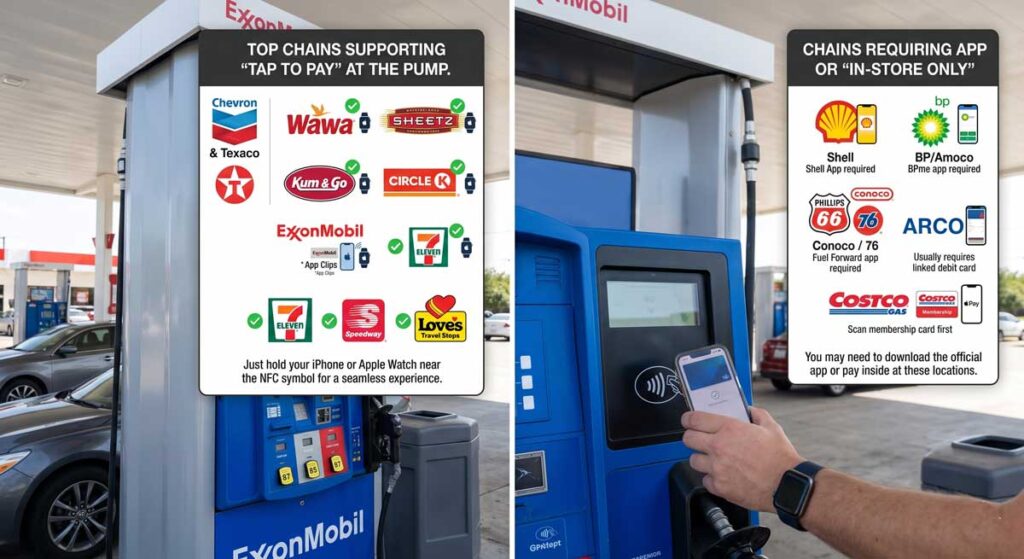
Compare gas stations that support Apple Pay vs those requiring apps
Top Chains Supporting “Tap to Pay” at the Pump
These brands offer the best experience. Just hold your iPhone or Apple Watch near the NFC symbol.
Chevron & Texaco: Most reliable for “Tap to Pay” nationwide.
Wawa: 100% support at both the pump and the register.
Sheetz: Known for tech-forward pumps and easy Apple Pay integration.
Kum & Go: Seamless experience at all locations.
Circle K: Most modern locations support contactless at the pump.
ExxonMobil: Supports NFC and “App Clips” for instant rewards.
7-Eleven: Now widely available at the pump for most 7-Eleven fuel brands.
Speedway: Integrated across most Midwest and East Coast sites.
Love’s Travel Stops: Perfect for long-haul truckers and road trippers.
Chains Requiring an App or “In-Store Only”
Some brands are still catching up. You might need to download their official app and link Apple Pay there.
Shell: Often requires the “Shell App” to trigger the pump via Apple Pay.
BP/Amoco: Use the BPme app for the smoothest experience.
Phillips 66 / Conoco / 76: Use the “Fuel Forward” app.
ARCO: Accepts Apple Pay, but usually requires a linked debit card.
Costco Gas: You can use Apple Pay, but you still need your membership card first.
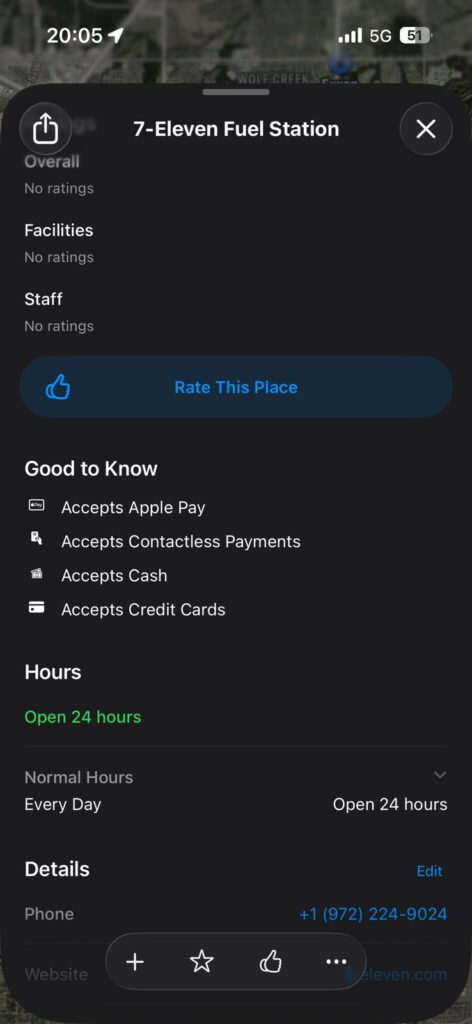
Pro Tip: Use Apple Maps to Filter Open Apple Maps and search for “gas.” Tap a station and scroll to the “Good to Know” section. You will see the Apple Pay logo if they officially support it. This is the fastest way to find gas stations with apple pay while driving.
Use Apple Maps to check if a gas station accepts Apple Pay
How It Actually Works
Think of Apple Pay like a digital handshake. When you tap your phone, your device asks the pump, “Are you safe?” The pump responds with a secret code. Your phone then hands over a “digital key” to unlock the fuel.
This happens in milliseconds. There is no physical contact. This is why it is much safer than “swiping” a magnetic stripe.
Step-by-Step: How to Use Apple Pay at the Pump
Look for the contactless symbol on the pump.
It looks like a hand holding a card near radio waves.
Double-click the side button on your iPhone.
Authenticate with FaceID, TouchID, or your passcode.
Hold the top of your iPhone near the reader.
Wait for the “Done” checkmark and a beep.
Follow the pump screen prompts to select your fuel grade.
The “Zero Wallet” Road Trip
Last summer, our staff writer, Alex, drove from New York to Florida.
He purposefully left his physical wallet in a locked glove box.
By sticking to apple pay gas station locations like Wawa and Chevron, he fueled up 12 times without ever touching a card reader.
He even used his Apple Watch to pay for snacks at Sheetz. The result? He spent zero time worrying about card skimmers or lost plastic.
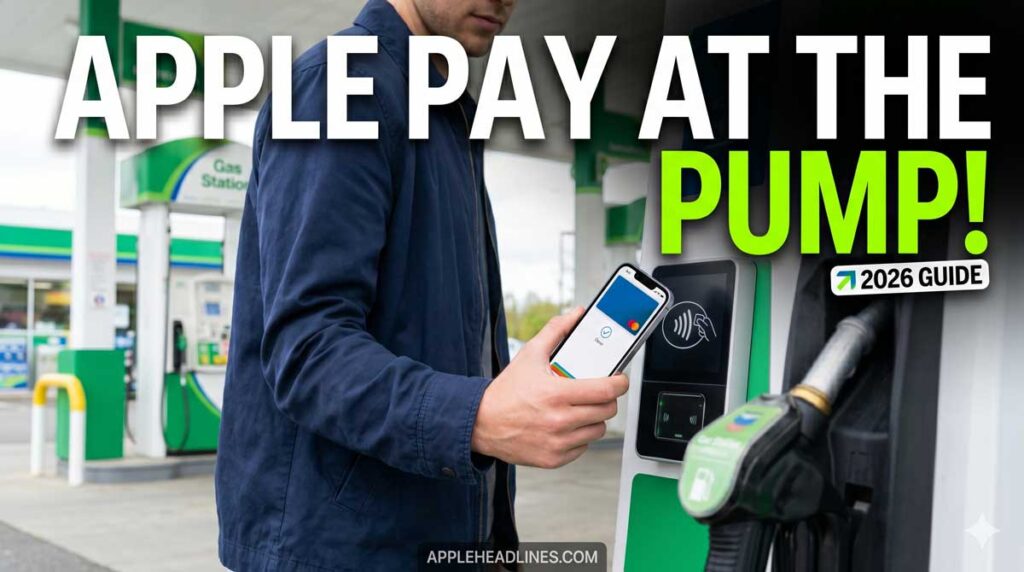
Pay for fuel instantly using Apple Pay at supported gas stations
Troubleshooting: What if it Doesn’t Work?
Sometimes tech fails. If you are at gas stations accepting apple pay and it stalls, try these:
Check for thick cases: Some rugged phone cases block the NFC signal.
Clean the reader: Dirt or ice can interfere with the connection.
Try the App: If the pump tap fails, download the station’s app.
Go Inside: Often, the pump reader is broken, but the indoor register works.
Update your Wallet: Ensure your default card hasn’t expired in your Apple Wallet.
FAQ
Does Chevron accept Apple Pay?
Yes, Chevron was one of the first adopters. Most locations accept it at the pump and inside.
Which gas stations accept Apple Pay near me right now?
The best way to check is via Apple Maps. Search “gas” and look for the Apple Pay icon in the business details.
Can I use Apple Pay for gas at Costco?
Yes, but you must scan your membership card first. Then, tap your iPhone at the payment terminal.
What if I don’t see the NFC logo?
If there is no logo, the station likely doesn’t support tap-to-pay. You may have to pay inside or use a physical card.
Disclaimer:Payment technology varies by franchise. While these chains support Apple Pay corporately, individual store owners may have older equipment. Always have a backup payment method for emergencies.
Ready to upgrade your commute? Subscribe to the AppleHeadlines.com newsletter for more daily tips on mastering your Apple ecosystem!
T’kal is the lead strategist and developer behind Apple Headlines. With a background in digital marketing and web development, he specializes in technical Apple troubleshooting, software news, and hardware rumors. T’kal focuses on delivering high-authority tech content that bridges the gap between Apple enthusiasts and the latest industry innovations.