





Last updated: November 16, 2026
Update log: Nov 16 – added reports of replacement phones cracking, the current iOS version, full repair fees, and the hinge checks. Nov 2 – previous update.
If your iPhone Duo screen cracked down the middle, or a bright white line appeared near the fold, Apple says affected users should contact AppleCare for a replacement.
Several reports indicate affected devices may be eligible for warranty replacement, but Apple has not publicly stated that AppleCare+ is required or not required.
If you bought from Verizon, AT&T or T-Mobile, you still contact Apple, not your carrier.
This guide shows how to tell a crack from the normal crease, what Apple has said so far, and the steps to get a replacement.
It also covers what it costs if Apple decides the damage isn’t the known defect.
Quick Answer
Apple has acknowledged the problem. It says an inner display issue affects “a small number of iPhone Duo units.”
- Contact Apple first: Use getsupport.apple.com, 1-800-APL-CARE (1-800-275-2273) in the US and Canada, or an Apple Store.
- AppleCare+ is not required: Apple has not said AppleCare+ is required. Reports indicate affected users should contact AppleCare for an evaluation and replacement eligibility review.
- No public repair program: No recall or public repair program has been announced. Apple has acknowledged the issue and offered replacements for affected devices.
- Repair costs: If it’s not covered, inner display repair is $999 without AppleCare+ and $99 with it.
- Repeat failures: Some owners say their replacement also cracked. These remain unverified Reddit reports and Apple has not commented on repeat failures.
What an iPhone Duo screen cracked problem looks like
The iPhone Duo went on sale on October 23, 2026. Within days, owners started posting photos of damaged inner displays. Reports share a few signs:


- A crack running down the center of the 7.6-inch inner display, along the hinge line
- A bright white line or band of stuck pixels near the crack
- Lines toward the right side of the inner screen in some reports
- Damage within hours of unboxing, or within a few weeks of normal use
- A cracking or popping sound when opening or closing, in some reports
One owner reported damage after fewer than 20 openings. – According to a Reddit report cited by MacRumors.
The outer 5.4-inch screen is not part of this issue. A cracked outer screen from a drop is normal accidental damage.
iFixit’s testing suggested dust particles could enter hinge components despite the phone’s IP68 rating.
In iFixit’s dust test, some particles got into the hinge and made it crunch.
Real Images From Users
1. iPhone Duo Inner Display Showing Bright Horizontal Lines
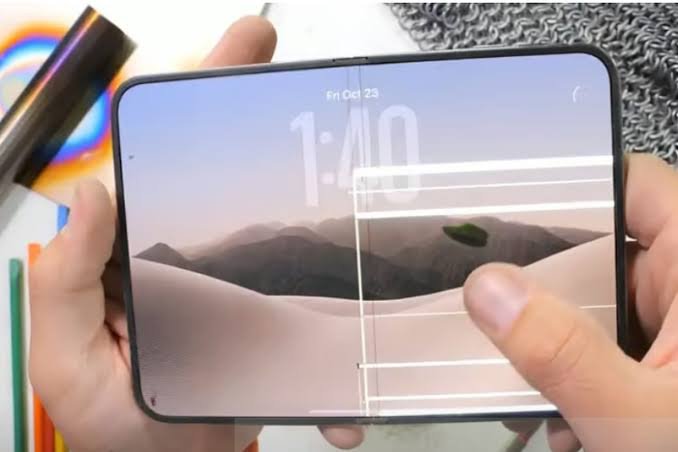
Some iPhone Duo owners have reported unusual horizontal lines appearing across the inner folding display.
As shown in this image, bright lines can become visible across the screen, potentially affecting the viewing experience.
If you notice similar symptoms, contact Apple Support for an inspection.
2. Vertical and Horizontal Lines on the iPhone Duo Screen
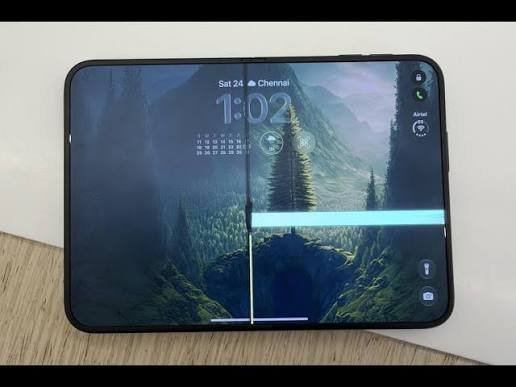
Display problems may not always look the same. Some affected screens show a prominent vertical line through the center alongside a bright horizontal line.
If these lines remain visible during normal use, have the display evaluated by Apple rather than attempting to fix it yourself.
3. Bright Horizontal Line Appearing on the Inner Folding Display
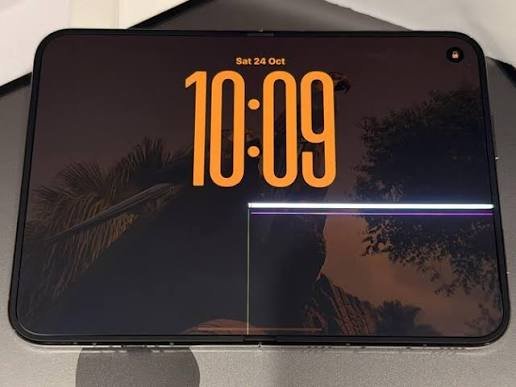
Another reported display symptom is a bright horizontal line appearing across the inner screen. The line may stand out against darker backgrounds and lock screens.
If you notice this issue on your iPhone Duo, document the problem with a photo and contact Apple to discuss repair or replacement eligibility.
Is it a crack or just the crease?
Every foldable has a crease, the soft dip where the screen bends. The crease is normal. A crack is not. Our iPhone Duo crease guide covers it in more detail.
Normal Crease or a Cracked Display?
Look closely at the fold area. These signs can help you identify the difference.
Normal Crease
- A soft wave you can see at an angle
- The display works normally across the fold
- Looks the same from day to day
- You can’t feel an edge
Possible Crack or Defect
- A sharp line, often with white or colored pixels
- Dead, stuck or glowing pixels along the line
- Can spread or get worse
- You may feel a ridge or hear a crack
Important: These visual signs are not a definitive diagnosis. If you notice a sharp line, pixel damage or a changing display, avoid pressing or repeatedly folding the affected area and contact Apple Support.
A 60-second check (our suggestion, not an Apple requirement):
- Set a black wallpaper at full brightness. Look straight on for a bright line or glowing pixels.
- Show a white screen. Look for dark or dead spots along the fold.
- Open and close the phone slowly. Listen for crunching or grinding. Apple’s support documentation includes hinge troubleshooting guidance. Verify the current support page before publication. Read More
- Run a fingertip across the fold. A soft dip is normal. A sharp edge is not.
If you see only the crease, there’s nothing to fix. Don’t press or rub a damaged area. Take it to Apple.
What Apple has said so far
iPhone Duo Display Issue: Timeline of Events
Key dates showing Apple’s response and the latest reports about affected devices.
iPhone Duo Goes on Sale
iPhone Duo goes on sale. Apple publishes support documentation for the device, including hinge-related troubleshooting resources.
Replacement Units Also Face Alleged Problems
Digital Trends reports Reddit claims that some replacement units also developed display problems. Apple had not publicly identified a cause or announced additional corrective action.
As of November 16, 2026, Apple has acknowledged the issue and offered replacements for affected devices, but no public recall has been announced
What’s causing it?
Apple hasn’t said. The leading theory comes from iFixit’s teardown, which used CT scans and a 3D hinge model.
iFixit found the breaks cluster near where the display cable gap meets the central hinge support. It says a hinge part meant to retract may not be doing so. It also lists other possibilities:
- Pressure from inside the phone
- A trapped particle
- Repeated bending
- A manufacturing defect
- A wiring fault that only looks like a broken screen
iFixit gave the phone a provisional repair score of 5 out of 10. MacRumors’ later stories describe iFixit’s theory more firmly than iFixit’s own hedged wording, so treat the cause as unproven.
If the problem starts inside the hinge, it isn’t something you did. That supports a warranty replacement.
Is the replacement really free?
Apple’s public advice is to contact AppleCare for a replacement. 9to5Mac says you don’t need AppleCare+. Apple has said affected users should contact AppleCare for a replacement, but the final eligibility decision is made after inspection.
Your iPhone Duo also has Apple’s one-year limited warranty, which covers defects from normal use. Apple warranty page & Our guide on how to check your warranty.
If Apple decides the damage was accidental, you pay the listed fees:
iPhone Duo Repair Costs
Compare estimated repair costs with and without AppleCare+ coverage.
| Repair Type | Without AppleCare+ | ✦ With AppleCare+ COVERED SERVICE |
|---|---|---|
Inner (folding) display | $999 | $99 |
Outer display | $379 | $29 |
Cover layer | $49 | $19 |
Back glass | $199 | $29 |
Other damage | $1,499 | $99 |
The inner folding display repair is listed at $999 without AppleCare+ compared with $99 with coverage.
Prices shown are subject to eligibility, service terms and Apple’s inspection. Confirm the final repair estimate with Apple before proceeding.
Repair pricing is based on Apple repair estimates reported by multiple publications and should be confirmed with Apple before service.
AppleCare+ was listed at $19.99 a month, $199.99 a year or $399 upfront.
Confirm the final price with Apple before any repair.
How to get your iPhone Duo screen replaced
Step 1: Document the damage
- Take clear photos and a short video with the phone open and half-folded.
- For a white line or stuck pixels, film the screen on a black wallpaper.
- Write down when you first noticed it and what you were doing.
This is our advice, not an Apple requirement. Clear evidence with no outside damage helps show it’s the known defect. Before handing the phone over, remove any third-party case and screen protector. Our iPhone Duo screen protector guide explains why the inner film and factory layer should stay as they are.
Step 2: Back up your iPhone
You may get a new phone, so back up first:
- iCloud: Settings > [your name] > iCloud > iCloud Backup > Back Up Now
- Mac or PC: connect a cable and back up with Finder or the Apple Devices app
[VERIFY: menu paths on iOS 27.2.1] Apple may ask you to turn off Find My before service: Settings > [your name] > Find My > Find My iPhone.
Our guide to moving your data to a new iPhone covers the restore.
Check that your Wallet cards, two-factor apps and eSIM are ready to move.
See also [How to Back Up iPhone – 7 Ways].
Step 3: Contact Apple, not your carrier
- Online: getsupport.apple.com, choose your iPhone Duo and pick the display or repair option.
- Phone: 1-800-APL-CARE (1-800-275-2273) in the US and Canada.
- Apple Support app: sign in and follow the repair steps.
- Apple Store: book a Genius Bar appointment. Our Apple Store screen repair guide covers the options.
Step 4: What to say
Keep it short. For example:
“My iPhone Duo’s inner display cracked along the hinge without a drop. Apple has said it is aware of an inner display issue on a small number of units and that affected customers should contact AppleCare for a replacement.”
Step 5: Inspection and replacement
A technician will look for outside damage, such as dents, drop marks or liquid exposure. Replacement stock has been limited. Some owners got a new phone the same day. Others were told to wait. Ask about a mail-in repair, and ask for a case or repair number in writing.
Can you still return it?
Apple’s return eligibility depends on the current return policy published by Apple at the time of purchase.
Launch-week buyers are now past it. Check whether Apple’s holiday return policy covers a purchase made now.
Carrier and third-party purchases follow that seller’s return policy.
If you want to avoid a foldable, the current non-folding option is the iPhone 18 Pro or iPhone 18 Pro Max.
Apple has not publicly announced revised hardware, so there’s no wrong choice.
What if your replacement cracks too?
Digital Trends reported on Nov 14 that some Reddit owners say a replacement failed within a day or a few days. These are individual, unverified claims.
The article says no reliable count exists and that many people have no problems.
It also says it’s unknown whether newer production batches changed.
If it happens, repeat the steps above. Mention it was a replacement, and keep the case number from the first repair.
How to avoid problems with your iPhone Duo screen
These are common-sense habits, not Apple-confirmed fixes:
- Open and close it gently. Don’t snap it shut with one hand.
- Keep the hinge clean. Avoid lint, sand and crumbs.
- Check for grit before you close it.
- Don’t press the inner screen with fingernails or sharp objects.
- Don’t peel the factory layer or add an inner film.
- Use a case made for the iPhone Duo that doesn’t press on the hinge. See our iPhone Duo cases guide.
- Think about AppleCare+. At $99 for an inner-screen repair against $999 without it, one claim covers the cost. [Price can change, check: AppleCare+ prices]
Related Questions:
Is Apple recalling the iPhone Duo?
No. As of the Oct 30 report, Apple said there is no recall and no public repair program. Apple hasn’t said how many phones are affected.
Do I need AppleCare+ to get my iPhone Duo screen replaced?
No, according to 9to5Mac. Affected owners should contact AppleCare for a replacement. The standard one-year warranty applies. [VERIFY: Apple warranty page]
How much does it cost to fix an iPhone Duo inner screen?
Apple lists $999 without AppleCare+ and $99 with it. If your crack is the known defect and the phone is under warranty, Apple’s guidance is a replacement. [VERIFY: price on 11/16/2026]
I bought my iPhone Duo from Verizon, AT&T or T-Mobile. Who do I contact?
Contact Apple through getsupport.apple.com, 1-800-APL-CARE or an Apple Store. 9to5Mac reports that carrier buyers should go to AppleCare, not the carrier.
Will my replacement have the same problem?
Nobody knows yet. Some Reddit owners say their replacement also cracked, but these claims are unverified. Apple hasn’t announced a hardware change.
Will an iOS update fix a cracked iPhone Duo screen?
No. Apple’s hinge page says there are no software remedies for hinge issues.
Apple has not announced a software update specifically intended to address the reported display-cracking issue.
Can I still return my iPhone Duo?
Only if you’re inside Apple’s 14-day window. Launch-week buyers are past it. Check Apple’s return policy and any holiday extension.
Is the crease on my iPhone Duo a defect?
No. A soft crease is normal on every foldable. A sharp line, dead or glowing pixels, or a crunching hinge is a reason to contact Apple.
Final thoughts
If your iPhone Duo screen cracked without a drop, don’t pay for it and don’t wait. Take photos, back up your phone and contact Apple directly. We’ll update this guide when Apple shares a cause, a repair program or revised units.
Related guides
- iPhone Duo guide: price, specs and what Apple announced
- iPhone Duo crease: is it normal?
- iPhone Duo screen protector guide
- iPhone Duo cases and accessories
- Apple Store screen repair: costs and options
- AppleCare return policy
Sources
- 9to5Mac, “Apple responds to reports of iPhone Duo’s inner display cracking” – – Oct 26, 2026
- MacRumors, “Apple Responds to iPhone Duo Display Cracking Reports” – – Oct 26, 2026
- MacRumors, “Apple Alerts Stores to iPhone Duo’s Display Cracking Issue” – – Oct 30, 2026
- MacRumors, “iFixit iPhone Duo Teardown Points to Possible Cause of Screen Cracks” – Oct 25, 2026
- MacRumors, “iPhone Duo: Skipping AppleCare+ Could Be $1,499 Mistake” – Oct 14, 2026
- Digital Trends, “Apple’s first foldable has a problem that even replacements can’t seem to fix” – Nov 14, 2026
- MacRumors, “iOS 27.2 Features” – – Oct 26, 2026
- Apple Support, “iPhone Duo Troubleshooting Hinge Issues”
- Apple, “iPhone Duo Technical Specifications”
- Fortune, “iPhone Duo screens are cracking within hours for some owners” – – Oct 27, 2026 (headline only)
- Apple Support: https://getsupport.apple.com/
Apple Headlines is not affiliated with Apple Inc. Repair pricing and policies can change. Confirm with Apple Support before your appointment.
Disclaimer: Information in this guide is based on Apple statements, support documentation, and third-party reporting available as of November 16, 2026. Repair pricing, warranty decisions, replacement eligibility, service policies, and support procedures may change. Always confirm the latest information directly with Apple Support before scheduling service.

T’kal is the lead strategist and developer behind Apple Headlines. With a background in digital marketing and web development, he specializes in technical Apple troubleshooting, software news, and hardware rumors. T’kal focuses on delivering high-authority tech content that bridges the gap between Apple enthusiasts and the latest industry innovations.