



Quick Read
Can’t Purchase AppleCare on Your iPhone? Here’s the Fix
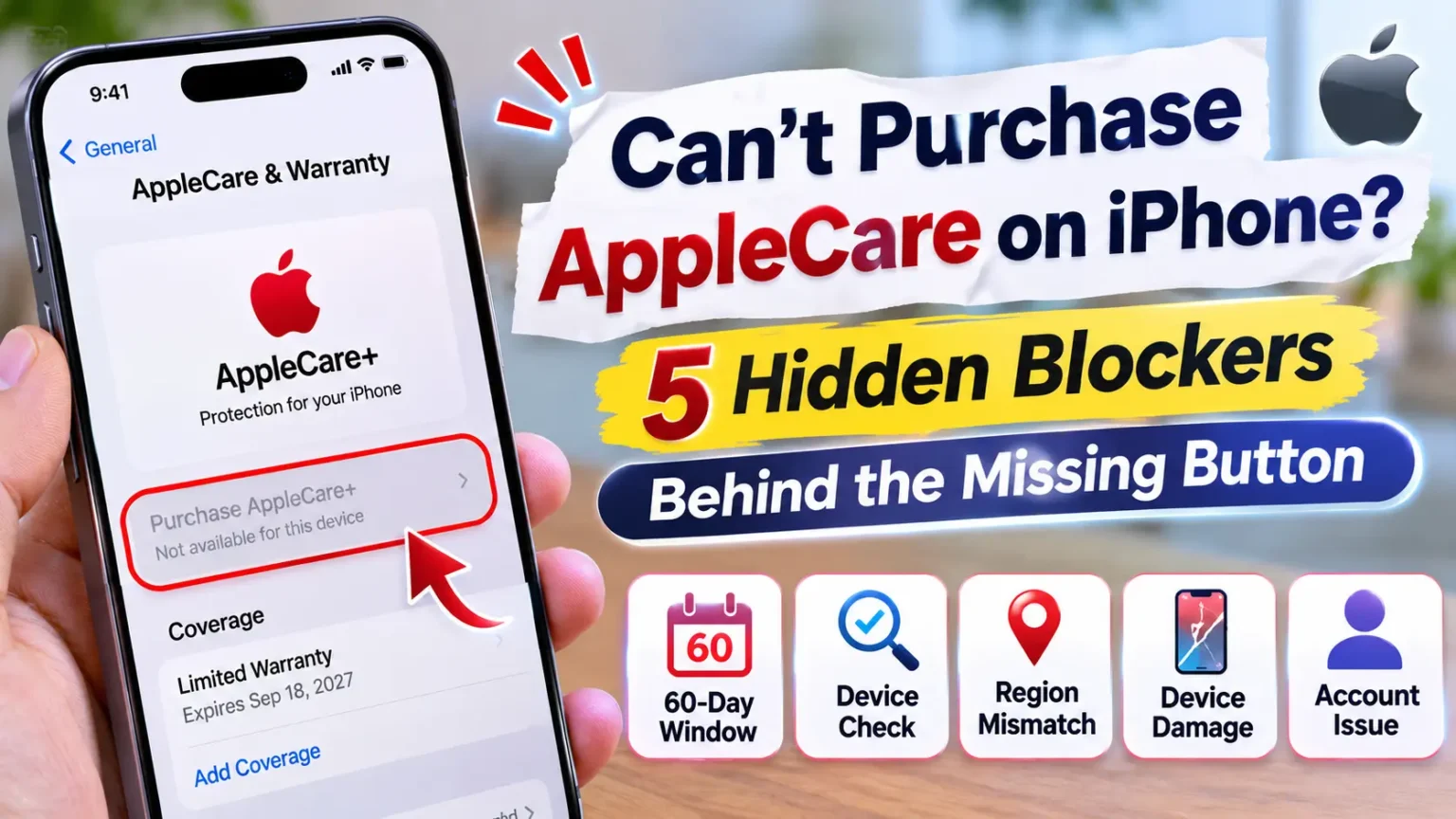
If you can’t purchase AppleCare on your iPhone, the most common reasons are an expired 60-day enrollment window in the U.S. or a failed device eligibility check. Apple needs to confirm that your iPhone qualifies before showing available coverage options.
First, check your eligibility.
Your purchase date, device condition, and Apple Account
can all affect which protection plans appear.
Select your iPhone and check whether Apple offers a plan. If you don’t see an enrollment option, verify your original purchase date and Apple Account. Also check whether your device meets Apple’s condition requirements.
If the standard enrollment window has closed, AppleCare One may be another option if your device qualifies. You can also contact Apple Support and ask them to check your iPhone’s serial number.
You opened Settings expecting a big Buy button.
Instead you got nothing, a grayed-out option, or a message that Apple can’t verify your purchase.
That stings when one cracked screen can cost hundreds of dollars to fix.
Here’s the good news.
This problem has a short list of causes.
Most come down to a date, a condition check, or an account mismatch.
Let’s sort out which one you’re hitting.
Why This Matters More Than You Think
Apple’s standard one-year warranty covers defects.
It does not cover drops and spills. AppleCare+ does, for a fee per incident, and it adds battery coverage and priority support.
The cost of going without is real.
Tom’s Guide put a basic screen repair on the iPhone 18 Pro Max at $379.
Apple is also strict about who can buy.
AppleCare+ works like insurance, so Apple wants proof the phone is in good shape first.
We built this guide from Apple’s own support pages, updated September 14, 2026.
We also read Apple Community threads where real buyers hit these walls.
Where Apple hasn’t spelled something out, we say so.
The Car Insurance Analogy
Think of the 60-day window like a car insurance quote.
You can’t buy a policy after the fender is already crushed.
Apple’s system checks two things: when you bought the phone and what shape it’s in.
Fail either one, and the Buy option can vanish.
Which Problem Are You Seeing?
Different symptoms point to different causes. Find yours first, then jump to the matching fix.
AppleCare Problems: Symptoms, Causes & Quick Fixes
Find your exact error and identify the fastest way to resolve it.
| What You See | Most Likely Cause | Fastest Fix |
|---|---|---|
| AppleCare option missing in Settings | Enrollment window closed, plan already active, or region mismatch. | Check coverage online, then see Blockers 1 and 3 |
| AppleCare purchase unavailable or grayed out | Past 60 days, or a device eligibility check is still required. | Count your days, then see Blocker 2 |
| AppleCare unable to verify purchase | Apple can’t match your iPhone’s serial number to its purchase record. | See Blocker 3 |
| AppleCare coverage not showing after purchase | Coverage may not be linked to your Apple Account yet. | Jump to the linking steps below |
AppleCare Purchase Deadline After Buying iPhone: Do the Math
For U.S. buyers, Apple says you can add AppleCare+ within 60 days of purchase.
The same 60 days applies to AppleCare+ with Theft and Loss on iPhone.
It also applies to AppleCare One if you skipped it at checkout.
Count from the purchase date on your receipt or order email. Not the day you unboxed the phone.
Here are example deadlines. We counted 60 full days from each date.
AppleCare 60-Day Enrollment Deadline Calculator
See when your standard U.S. AppleCare+ enrollment window ends.
| You Bought On | Your 60-Day Window Ends |
|---|---|
September 18, 2026
iPhone 18 Pro launch week | November 17, 2026 |
October 1, 2026 | November 30, 2026 |
October 23, 2026
iPhone Duo ship date | December 22, 2026 |
If you bought around launch day, your window may close in about two weeks.
Check your receipt today.
Your plan may have expired instead?
Apple says you might be able to buy new coverage within 45 days after your old coverage ends.
That new plan has recurring payments.
Check Your Eligibility in Two Minutes
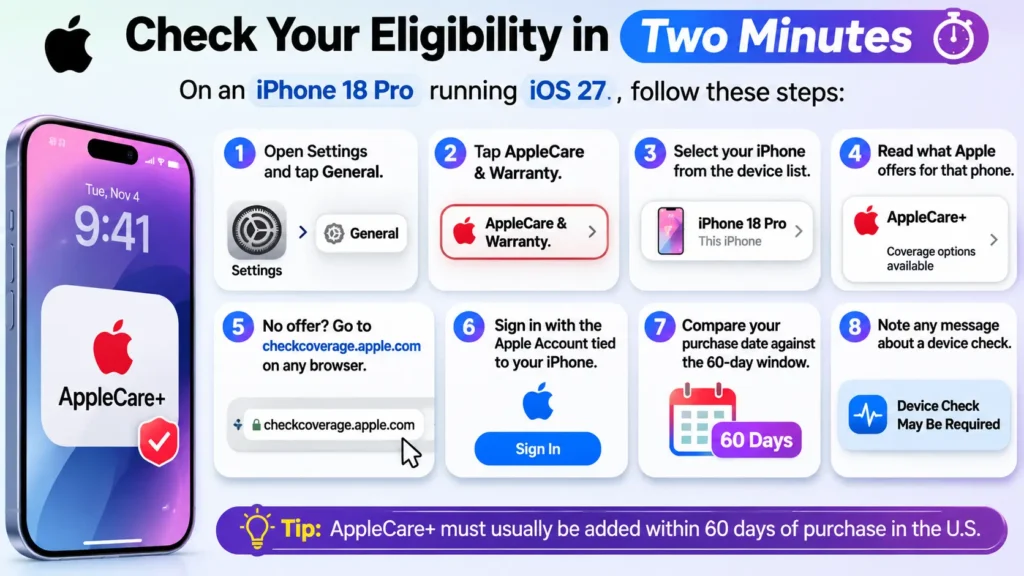
On an iPhone 18 Pro running iOS 27, here’s the path.
- Open Settings and tap General.
- Tap AppleCare & Warranty.
- Select your iPhone from the device list.
- Read what Apple offers for that phone.
- No offer? Go to checkcoverage.apple.com on any browser.
- Sign in with the Apple Account tied to your iPhone.
- Compare your purchase date against the 60-day window.
- Note any message about a device check.
On older iOS versions, some readers found the offer under General > About instead. If you can’t find AppleCare & Warranty, update your iPhone first.
The 5 Hidden Blockers (and How to Clear Each One)
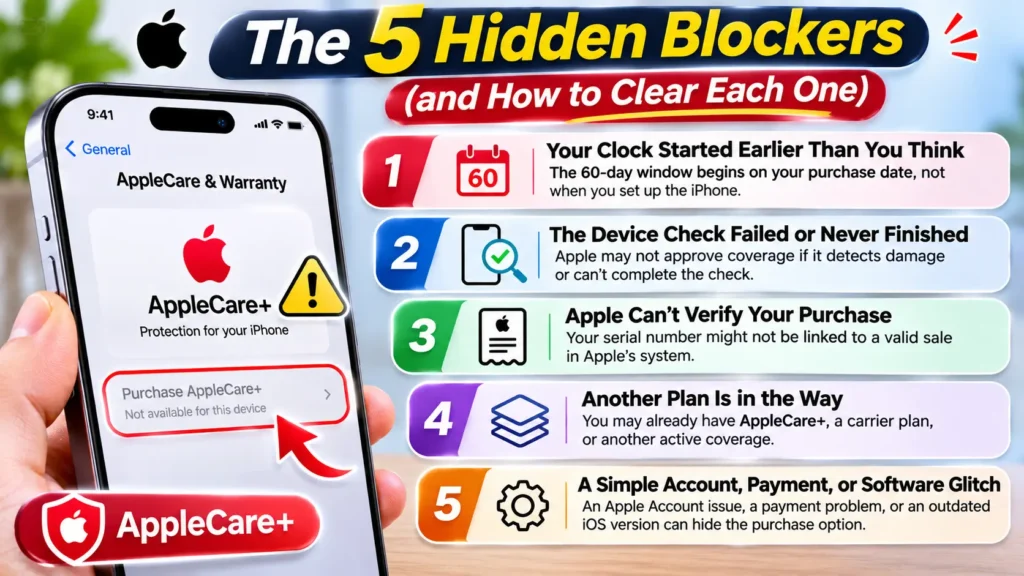
Blocker 1: Your Clock Started Earlier Than You Think
Pre-orders, gifts, and secondhand phones all confuse the date. Apple counts from the purchase, so the clock may have started before you held the phone.
A used phone is the riskiest case. The window may follow the original sale, which can leave little time or none. Always check the serial number online before you pay for a used iPhone.
Fix it:
- Find your receipt or order confirmation email.
- Write down the purchase date.
- Add 60 days in your calendar app.
- If days remain, start the device check today.
- If the window passed, skip to “Missed the Window?” below.
Blocker 2: The Device Check Failed or Never Finished
This is the blocker most people miss. For a late purchase, Apple may ask you to prove your phone is in good condition. Apple says that can mean a remote device check, photos of the phone, or an Apple Store visit.
The photo step needs a second iPhone or iPad. It needs iOS or iPadOS 18.5 or later and a 12 MP camera. Wi-Fi must be on for both devices. You don’t need to sign in to your Apple Account on the camera device.
Cracked glass or visible damage can stop the process. Apple says a damaged phone might become eligible after an Apple-certified repair.
Start your AppleCare eligibility check at least one week before your 60-day deadline. If Apple flags your iPhone for physical damage, you may need a certified repair before coverage can be purchased. That process can take time, so don’t leave it until the last minute.
Why act early? A device inspection or repair requirement could delay your enrollment. Give yourself enough time to resolve any issues.
Pass the cosmetic check:
- Grab a second iPhone or iPad with a 12 MP camera.
- Turn on Wi-Fi on both devices.
- Remove the case and any stickers.
- Take off a damaged screen protector.
- Wipe the screen and back with a soft cloth.
- Raise the screen brightness to maximum.
- Place the phone on a flat surface in bright, indirect light.
- Follow the prompts on the phone you’re checking.
Got a foldable? If you own an iPhone Duo and see a crack, read our guide on what to do about a cracked iPhone Duo screen before you start.
Blocker 3: Apple Can’t Verify Your Purchase
When Apple can’t confirm where or when your phone was sold, the offer can disappear. That’s the usual story behind “AppleCare unable to verify purchase.”
Three things commonly cause it. The serial number may not match a sale record. You may be signed in to a different Apple Account. Or the phone may belong to another country’s market.
Region matters. In one Apple Community thread, a user bought an iPhone in the U.S. and then traveled to India. A top-ranked reply said the plan is tied to the country of purchase. That’s a community answer, not an Apple policy page, so confirm it with Apple.
Fix it:
- Open Settings > General > About and note the serial number.
- Enter the serial number at checkcoverage.apple.com.
- Check that the country matches where you bought the phone.
- Confirm you’re using the right Apple Account.
- Dig out your receipt or order email.
- If details look wrong or missing, contact Apple Support with that receipt.
Apple Account trouble can look like a purchase problem. If Apple keeps asking you to verify your sign-in, see our guide on Apple verification codes you didn’t request.
Blocker 4: Another Plan Is in the Way
An existing plan can block a new one. Apple lists a few cases.
- iPhone Upgrade Program: You must contact Apple Support to cancel AppleCare+ before the phone can join AppleCare One.
- AppleCare Services plans: You need to contact your AppleCare Services vendor first.
- A plan on another Apple Account: Your coverage may be linked to the account that bought it.
Fix it:
- Open Settings and tap your name at the top.
- Tap Subscriptions and look for an AppleCare plan.
- Sign out and check any other Apple Account you’ve used.
- On a carrier or business plan, ask that provider about AppleCare options.
- On the Upgrade Program, call Apple Support before buying again.
Blocker 5: A Simple Account, Payment, or Software Glitch
Sometimes nothing is wrong with your phone or your date. Apple says a plan may need terms accepted on your Apple Account. It also says a failed payment can cancel a recurring plan.
Fix it:
- Go to Settings > General > Software Update and install any update.
- Restart your iPhone.
- Connect to stable Wi-Fi.
- Confirm you’re signed in to the right Apple Account.
- Accept any pending terms and conditions.
- Check that your payment method is valid.
- Open AppleCare & Warranty again and retry.
A Real-World Example
This is an illustrative reader scenario, not a single named case.
Picture a reader who bought an iPhone 18 Pro on launch day, September 18. On November 14, she remembers she skipped AppleCare+. She opens Settings and starts the process. Apple asks for a device check.
Her first photo attempt fails. A cracked screen protector was still on the phone, and she’d left her case on. She had three days left on her window.
She removed both, wiped the phone, and moved to a bright window. Then she shot the photos on her old iPad. The check passed, and she bought the plan with two days to spare.
The lesson: the “can’t buy” wall wasn’t about the date. It was about the phone’s condition. Start early, and prep the phone before you shoot.
Paid, but Your Coverage Isn’t Showing?
This is the AppleCare coverage not showing after purchase problem. It’s often a linking issue, not a lost payment.
One thing first. Don’t buy a second plan. In one Apple Community thread, a buyer who ordered an iPhone 17 with AppleCare+ saw nothing in Settings after delivery. A helpful reply urged patience and a check with Apple Support before buying again.
Link your plan:
- Open Settings > General > AppleCare & Warranty.
- Look for a device marked Finish AppleCare+ Setup.
- Tap it and follow the prompts.
- Choose Link Plan to Your Apple Account.
- No luck? Open mysupport.apple.com/link on the web.
- Check Subscriptions in your Apple Account for the plan.
- Try any other Apple Account you’ve used.
Still nothing?
Contact Apple Support.
Have your AppleCare agreement number, your serial number, and your original receipts ready.
Missed the Window? Your Real Options
If 60 days really have passed, Apple’s U.S. policy says you can’t just buy AppleCare+ later. A veteran Apple Community contributor said the same in November 2025. But you still have paths.
Option 1: Check AppleCare One
AppleCare One covers up to three devices for $19.99 per month. Extra devices cost $5.99 per month each. A Family plan costs $49.99 per month and covers up to six people, according to MacRumors. Theft and Loss is included for iPhone, iPad, and Apple Watch.
Apple says its eligibility screen sorts devices into Ready to Add and Action Needed. Some devices aren’t eligible and won’t show up at all. So we can’t promise an older iPhone will qualify. You’ll need iOS 18.5 or later to start a plan.
To look, open AppleCare & Warranty, select a device, and tap the eligible devices link under AppleCare One.
Option 2: Carrier Insurance
Many carriers sell phone insurance at almost any time. It isn’t Apple’s plan, and repairs may not go through Apple. Some people dislike that. Compare deductibles and theft coverage before you sign.
Option 3: Credit Card Protection
Some premium cards offer purchase protection or extended warranties. Rules vary a lot. Read your card’s benefits guide before you count on it.
Option 4: Self-Insure
Skip the monthly fee and set money aside. This works if you rarely drop your phone. Just know a single screen repair can hit $379.
Does It Change by iPhone Model or iOS Version?
The core path is the same across current iPhones. A few details differ.
AppleCare Eligibility by iPhone Model
Check your iPhone generation, software version, and next step.
| iPhone Model | Software | What to Expect |
|---|---|---|
| iPhone Duo | iOS 27 | Check device condition |
| iPhone 18 Pro / Pro Max | iOS 27 | Act now |
| iPhone 17 Series & Earlier | iOS 26 or 27 | Check AppleCare One |
| Older iPhones on Older iOS | Pre-18.5 | Check software version |
Buying for an Apple Watch or AirPods? The 60-day rule shows up there too. For an Apple Watch device check, use the iPhone it’s paired with.
What If This Doesn’t Work?
You’ve tried the fixes and the button still isn’t there. Work down this ladder.
- Try checkcoverage.apple.com on a laptop, not your phone.
- Update iOS and restart again.
- Book an in-store check. Our Genius Bar appointment guide shows how to skip the wait.
- Call Apple Support and ask what options remain for your serial number.
- Have your receipt, serial number, and Apple Accounts ready.
- Ask whether AppleCare One is possible for this phone.
- If Settings itself acts strangely, try Reset All Settings. It keeps your photos and data.
If you’re stuck at step 4, don’t argue about the date. Ask for options instead. That question gets better answers.
Key Takeaways
- The most common cause is the 60-day purchase window for U.S. buyers.
- Launch-week iPhone 18 Pro buyers may run out of time around November 17.
- A failed device check can block you even inside the window.
- The photo check needs a second iPhone or iPad with iOS or iPadOS 18.5 or later.
- Cracked glass may need an Apple-certified repair first.
- “Unable to verify” usually means a serial, account, or region mismatch.
- If coverage isn’t showing, link your plan and don’t buy twice.
- Past 60 days? Check AppleCare One, carrier plans, or card benefits.
FAQ
In the U.S., Apple says you can add AppleCare+ within 60 days of purchase. If your old plan expired, you might get 45 days to buy new coverage.
Apple’s current U.S. guidance says no for AppleCare+ outside the window. AppleCare One may still be possible, depending on your device’s eligibility. Check the AppleCare & Warranty screen.
Apple likely can’t match your serial number to a sale record. It may also see a different Apple Account or region. Check your serial online, then contact Apple Support with your receipt.
Apple’s pages we reviewed don’t spell this out. The window may follow the original purchase, so time is often short. Run the serial number at checkcoverage.apple.com before you buy.
Carrier insurance, credit card benefits, and saving your own repair money are common choices. Each has trade-offs, so compare deductibles and repair options.
Sources
- Apple Support, “Get AppleCare coverage for your Apple device” (published September 14, 2026):
- Apple Support, “Check device eligibility for AppleCare coverage” (September 14, 2026):
- Apple Support, “Get AppleCare One to cover your devices” (September 14, 2026):
- Apple Support, “If you can’t find your AppleCare plan” (May 4, 2026):
- MacRumors, “AppleCare One Family Launches at $49.99 Per Month” (September 14, 2026):
- Apple Community, “Purchasing AppleCare+ after 60 days of buying a new iPhone” (November 2025):
- Apple Community, “No Option is showing for purchasing the Apple care for my phone” (February 2024):
- Apple Community, “apple care+ missing on new iPhone 17”:
Disclaimer
This article is for general information. AppleCare terms, prices, and eligibility rules vary by country, device, and purchase channel, and Apple can change them at any time. Always confirm your options with Apple Support or on apple.com before you buy. AppleCare One prices and coverage limits come from reported sources and may change. Apple Community replies reflect user and moderator opinions, not official Apple policy. Appleheadlines.com is not affiliated with Apple Inc. Nothing here is legal or financial advice.
Check Your Window Today
Don’t let day 60 sneak up on you. Open Settings > General > AppleCare & Warranty right now and see what Apple shows for your iPhone. Then bookmark this page and browse more iPhone troubleshooting guides from Apple Headlines.
More Reading:

T’kal is the lead strategist and developer behind Apple Headlines. With a background in digital marketing and web development, he specializes in technical Apple troubleshooting, software news, and hardware rumors. T’kal focuses on delivering high-authority tech content that bridges the gap between Apple enthusiasts and the latest industry innovations.