


Your iPhone screen just shattered. Your MacBook took a swim in your coffee. Or maybe your Apple Watch vanished during your morning commute.
You need to know exactly what AppleCare+ covers, how much it costs, and—most importantly – how to use it right now.
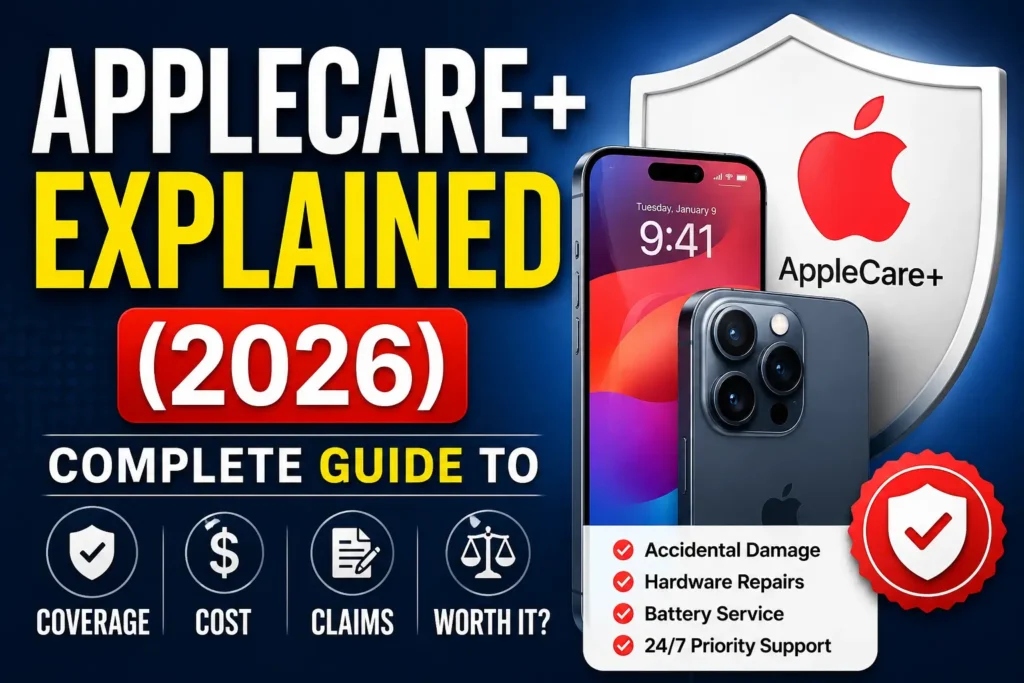
Here’s the direct answer: AppleCare+ is Apple’s extended warranty and accidental damage protection plan.
For iPhone users, it typically costs $9.99–$13.99/month (or $199–$279 upfront for two years) and covers unlimited accidental damage incidents with fixed service fees of $29 for screen damage** and **$99 for other damage.
Theft and Loss coverage adds $3.99/month . You have 60 days from device purchase to add coverage.
Quick Takeaway
- Devices covered: iPhone, iPad, Mac, Apple Watch, Vision Pro, Apple TV, HomePod, AirPods, Beats headphones
- Purchase window: Within 60 days of new device purchase (can add via Settings > General > AppleCare & Warranty)
- Time to complete: 5–10 minutes to check coverage or add a plan; 15–30 minutes to file a claim via the Apple Support app
- Service fees (2026): $29 screen/back glass, $99 other damage, $149 theft/loss deductible
What Is AppleCare+? (And How It Differs from the Standard Warranty)
Every new Apple device comes with a one-year limited warranty covering manufacturing defects and 90 days of complimentary technical support . This covers you if the battery fails due to a defect, the storage drive stops working, or a component malfunctions through no fault of your own .
AppleCare+ is different. It’s paid protection that covers accidental damage – drops, spills, cracked screens, and liquid exposure . Think of it as Apple’s own insurance policy rather than a simple warranty extension .



| Feature | Standard Limited Warranty | AppleCare+ |
|---|---|---|
| Duration | 1 year | 2–3 years (or monthly subscription) |
| Manufacturing defects | Covered | Covered |
| Accidental damage (drops, spills) | Not covered | Covered (with service fees) |
| Screen repair cost | $279–$429+ | $29 |
| Other damage repair | $329–$599+ | $99 |
| Theft/Loss | Not covered | Covered (with add-on) |
| Priority tech support | 90 days | Full term |
AppleCare+ Pricing 2026: What You’ll Actually Pay
Apple raised AppleCare+ prices for Macs and iPads in July 2026, increasing monthly subscriptions by $0.50** and annual plans by **$5 . Existing subscribers were grandfathered at their original rates .
iPhone AppleCare+ Pricing
| iPhone Model | 2-Year Upfront | Monthly | Theft & Loss Add-on |
|---|---|---|---|
| iPhone 17e | ~$119 | ~$5.99/mo | +$3.99/mo |
| iPhone 17 / iPhone 16 | $199 | $9.99/mo | +$3.99/mo |
| iPhone 17 Pro / Pro Max | $279 | $13.99/mo | +$3.99/mo |
Mac AppleCare+ Pricing (2026)
| Mac Model | Monthly | Annual |
|---|---|---|
| 13-inch MacBook Air | $7.99 | $79.99 |
| 14-inch MacBook Pro | $10.99 | $109.99 |
| 16-inch MacBook Pro | $15.99 | $159.99 |
| Mac mini | $4.49 | $44.99 |
| Mac Studio | $6.99 | $69.99 |
| Mac Pro | $18.49 | $184.99 |
Important: These price increases apply only to new purchases. If you already have an active AppleCare+ plan, your pricing remains unchanged .
iPad AppleCare+ Pricing (2026)
| iPad Model | Monthly | Annual |
|---|---|---|
| iPad / iPad mini | ~$6.99 | ~$69.99 |
| iPad Air | ~$7.99 | ~$79.99 |
| 11-inch iPad Pro (M5) | $10.99 | $109.99 |
| 13-inch iPad Pro (M5) | $11.99 | $119.99 |
Apple Watch Pricing
| Apple Watch Model | 2-Year Plan | Monthly |
|---|---|---|
| Apple Watch SE | ~$59 | $2.99 |
| Apple Watch Series 10/11 | ~$79 | ~$3.99 |
AppleCare One: The Multi-Device Bundle
Launched in 2025, AppleCare One bundles coverage for up to three Apple devices under a single subscription . It’s now rolling out globally—France and Germany gained access in July–August 2026 .
- Price: ~$19.99–$20.99/month (varies by region)
- Covers: Up to 3 devices (iPhone, iPad, Mac, Apple Watch, etc.)
- Add extra devices: ~$5.99/month per additional device
- Savings: Can save up to ~$11–$13/month compared to individual plans
What AppleCare+ Covers (Complete Breakdown)
Covered Incidents (Unlimited, with service fees)
- Screen or back glass damage: $29 service fee
- Other accidental damage (drops, liquid spills, enclosure damage): $99 service fee
- Battery replacement: Free if battery retains less than 80% of original capacity
- Theft or loss: $149 deductible (requires Theft & Loss add-on; available for iPhone 14 and newer)
What’s NOT Covered
- Cosmetic damage that doesn’t affect function (scratches, scuffs)
- Pre-existing damage
- Modifications or unauthorized service
- Loss or theft without the Theft & Loss add-on
- Burglary or theft without Find My enabled on the device
Key 2026 Coverage Updates
- July 14, 2026: New terms for AppleCare+ with Theft and Loss took effect
- July 22, 2026: Theft and Loss coverage expanded from iPhone to include iPad and Apple Watch
- New annual subscription options now available alongside monthly plans
How to Check Your AppleCare+ Coverage Status
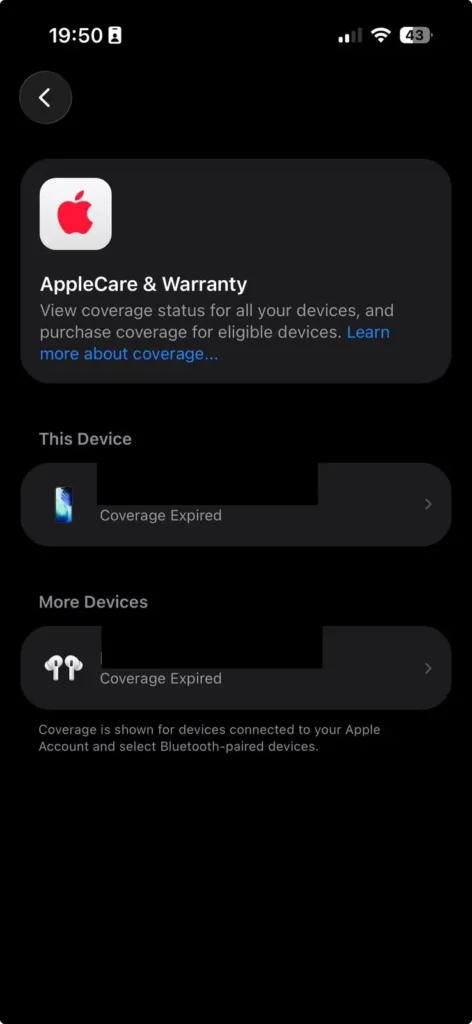
Step 1: Open Settings on your iPhone or iPad.
Step 2: Tap General.
Step 3: Select AppleCare & Warranty .
Step 4: Tap the device you want to check. You’ll see the coverage expiration date—or “Expired” if coverage has ended .
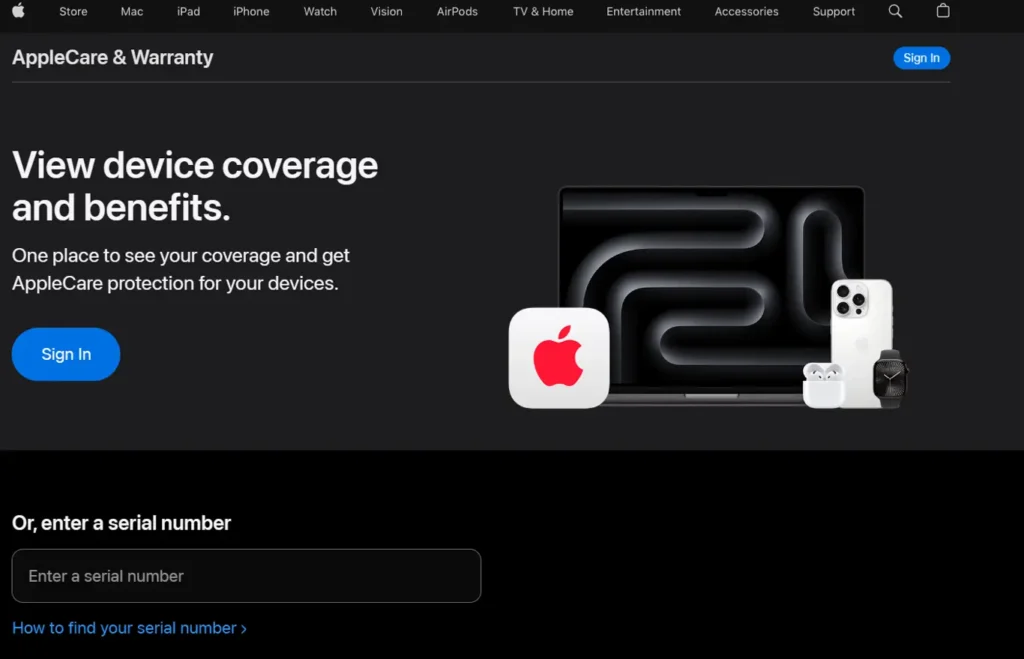
Alternative method: Visit checkcoverage.apple.com in any browser and enter your device’s serial number .
To check via Subscriptions: Go to Settings > [Your Apple Account] > Subscriptions to see active AppleCare+ plans .
How to Add AppleCare+ to Your Device
You have 60 days from the date of purchase to add AppleCare+ coverage .
Method 1: Directly on Your Device (Easiest)
- Open Settings on your iPhone, iPad, or Mac.
- Tap General.
- Tap AppleCare & Warranty.
- Select the device you want to cover.
- Follow the onscreen steps to purchase and add coverage .
Method 2: Online
Visit checkcoverage.apple.com, enter your device’s serial number, and follow the prompts to purchase .
Method 3: At Purchase
Add AppleCare+ when buying a new device directly from Apple or an authorized retailer.
How to File an AppleCare+ Claim (Step-by-Step)
Step 1: Back Up Your Device (Critical)
Before any service, protect your data:
- iCloud: Settings > [Your Apple Account] > iCloud > iCloud Backup > Back Up Now
- Mac: Connect your device to a Mac, open Finder, and click Back Up Now
Warning: If your device needs replacing and you haven’t backed up, you will lose your data .
Step 2: Verify Your AppleCare+ Status
Confirm your coverage is active:
- Settings > [Your Apple Account] > Subscriptions > AppleCare+
- Or Settings > General > About > AppleCare+ Coverage
Step 3: Start Your Claim
Choose one of these three methods:
| Method | Best For | How To |
|---|---|---|
| Apple Support app | Fastest, most convenient | Download from App Store, sign in, select device, describe issue |
| Online | Mac/desktop users | Visit getsupport.apple.com, sign in, choose device, file claim |
| Phone | Complex issues | Call 1-800-MY-APPLE |
Step 4: Choose Your Service Option
Apple presents these repair options after you file:
Step 5: Pay Service Fee at Time of Service
AppleCare+ Theft and Loss Coverage: What You Need to Know
Added for iPhones in 2025 and expanded to iPads and Apple Watches in July 2026, Theft and Loss coverage protects you if your device is stolen or lost .
Key requirements:
- Find My must be enabled on the device at the time of loss
- You must mark the device as lost via Find My app or iCloud.com/find before filing a claim
- Up to two incidents per year
- $149 deductible per claim
- Available for iPhone 14 and newer
To file a Theft and Loss claim:
- Mark your device as lost in Find My.
- Sign in to your Apple Account at the insurer’s website .
- Have your Apple ID and device serial number ready .
- You may need a police report for stolen devices .
Is AppleCare+ Worth It? The 2026 Math
The “Break-Even” Calculation
For an iPhone Pro with AppleCare+ at $279 for two years:
- Out-of-warranty screen repair: $329–$429
- AppleCare+ screen repair: $29
- Savings per screen repair: $300–$400
- Break-even point: One accident in two years
Statistically: About 4 in 10 iPhone owners damage their phone within two years . For most users, AppleCare+ offers positive expected value.
When AppleCare+ Makes the Most Sense
- You go caseless or use minimal protection
- You’re clumsy or have a history of dropping devices
- You own an expensive MacBook Pro (repairs are costly)
- You’re a frequent traveler or city dweller (theft/loss risk)
- You have kids or pets who might damage your devices
When You Can Skip It
- You use a rugged case + screen protector and never drop devices
- You upgrade every year (less time for accidents to happen)
- You have home/renters insurance with an electronics rider
- You’re highly risk-tolerant and can afford out-of-pocket repairs
Troubleshooting: Common AppleCare+ Issues and Fixes
Issue 1: “AppleCare+ Coverage Expired” When You Just Bought It
Symptoms: Settings > General > AppleCare & Warranty shows expired coverage, but you purchased recently.
Solution:
- Wait 24–72 hours—new coverage can take time to propagate through Apple’s systems.
- Check your purchase receipt and verify the plan was actually added.
- Contact Apple Support at 1-800-MY-APPLE with your proof of purchase.
- The 60-day purchase window is from device purchase date, not the date you add coverage —so you can still add it even if the status hasn’t updated yet.
Issue 2: Cannot Add AppleCare+ — “Device Not Eligible”
Symptoms: The option to add AppleCare+ doesn’t appear in Settings, or you get an eligibility error.
Causes and fixes:
- More than 60 days have passed since device purchase — you’re outside the window .
- Device was purchased refurbished or second-hand — AppleCare+ may not be transferable or may already be expired.
- Device has pre-existing damage — Apple won’t cover damage that occurred before purchase.
- Check your coverage online at checkcoverage.apple.com to confirm eligibility .
Issue 3: Claim Denied or Service Fee Higher Than Expected
Symptoms: You filed a claim but were told it’s not covered, or the fee was higher than $29/$99.
Possible reasons:
- Damage was pre-existing — AppleCare+ only covers damage that occurs after purchase .
- Cosmetic damage only — scratches, scuffs, or dents that don’t affect function aren’t covered .
- Unauthorized modifications or third-party repairs — voids coverage .
- For Theft/Loss claims: Find My must have been enabled at the time of loss . Without it, the claim will be denied.
- You’ve exceeded the two-incident-per-year limit for Theft/Loss claims .
What to do: Contact Apple Support to appeal or clarify why the claim was denied. Have your device serial number and Apple ID ready.
Questions Related to AppleCare+
Can I transfer AppleCare+ to a new owner if I sell my device?
Yes. AppleCare+ is transferable to a new owner. The new owner must contact Apple Support to transfer the plan. The coverage follows the device, not the person—so if you sell your iPhone with an active AppleCare+ plan, the buyer inherits the remaining coverage.
Does AppleCare+ cover battery replacement?
Yes—if the battery retains less than 80% of its original capacity during the coverage period . If your battery simply wears out through normal use, it’s covered at no additional charge. If you just want a new battery but it’s above 80%, you’d pay the $99 “other damage” fee.
Does AppleCare+ cover liquid damage?
Yes. Liquid damage is considered “other accidental damage” and is covered with a $99 service fee. The standard limited warranty does NOT cover liquid damage—so this is one of the biggest reasons to get AppleCare+.
How many claims can I make per year?
For standard AppleCare+ (damage only): Unlimited incidents. For Theft and Loss coverage: Up to 2 incidents per year.
Can I cancel AppleCare+ and get a refund?
Yes. AppleCare+ monthly subscriptions can be canceled at any time. For upfront (2-year or 3-year) plans, you can cancel and receive a pro-rata refund for the unused portion, minus any service fees already paid.
Do I need AppleCare+ if I have phone insurance through my carrier?
Maybe not. Carrier insurance often covers theft and loss by default but may use third-party repair parts and have higher deductibles. AppleCare+ uses genuine Apple parts and Apple’s repair network . Compare the costs and coverage carefully—many users find AppleCare+ offers a better experience even if the price is similar .
Final Verdict
AppleCare+ isn’t cheap, but for most iPhone and Mac users, it’s worth the investment. One cracked screen on an iPhone Pro—a $329–$429 repair out-of-pocket—becomes a $29 fix with AppleCare+ . Add in free battery replacement when it degrades below 80%, unlimited accidental damage coverage, and now theft/loss protection for iPhones, iPads, and Apple Watches, and you have a safety net that pays for itself with a single accident .
If you’re within your 60-day purchase window, head to Settings > General > AppleCare & Warranty and add coverage now. If you’re past that window, consider it for your next Apple device—and don’t wait.

T’kal is the lead strategist and developer behind Apple Headlines. With a background in digital marketing and web development, he specializes in technical Apple troubleshooting, software news, and hardware rumors. T’kal focuses on delivering high-authority tech content that bridges the gap between Apple enthusiasts and the latest industry innovations.