This guide gives you Apple-official steps, expert tips, and the one battery mistake that trips up thousands of users every year.
Replacement Guide
Battery type: CR2032 lithium 3V coin battery — available almost everywhere.
How long does an apple AirTag battery last: 1 year on average; up to 2 years with light use.
The swap process: Press + rotate counterclockwise, replace battery (+ side up), rotate cover clockwise. Done.
Listen for the chime: No sound = something’s wrong. Check battery orientation or wipe off bitterant coating.
Check battery level: Open Find My → Items tab → Tap your AirTag → Look for “Low Battery.”
Best batteries: Duracell CR2032 (AirTag-compatible with bitter coating) or Panasonic CR2032.
AirPods are different: AirPod batteries are not user-replaceable. AirTag batteries are.
Pro move: Keep 4–8 spare CR2032 batteries at home. Cheap insurance for all your AirTags.
Why Your AirTag Battery Matters More Than You Think
An AirTag is only as reliable as the battery inside it.
It doesn’t matter if you have Precision Finding, Ultra Wideband, or 800 million Find My devices in Apple’s network backing you up — the moment that CR2032 coin cell dies, your tracker goes dark.
You’ll know when to buy spares, what brands actually work, and how to avoid the frustrating experience of installing a battery that looks fine but doesn’t connect.
This article is built on Apple’s official support documentation (updated January 2026), hands-on testing, and the most common real-world issues reported by AirTag users across Apple community forums.
How Long Do AirTag Batteries Last?
Before we get to the swap, let’s talk AirTag battery life expectancy — because the numbers might surprise you.
Apple’s official claim: approximately 1 year under normal use.
Real-world experience: It varies significantly.
Light use (stationary items like luggage, rarely pinging): 18–24 months
Average use (keys, backpacks, checked occasionally): 10–14 months
Heavy use (frequent “Play Sound” pings, Precision Finding sessions): 6–9 months
The “Play Sound” feature is the biggest battery drain.
Every time you tap that button in Find My, your AirTag speaker fires up and consumes a noticeable chunk of power.
If you’re playing sound every few days, don’t expect your battery to last a full year.
How to Check Your AirTag Battery Level
Checking how to check AirTag battery level is simpler than most people expect — but Apple’s interface here isn’t perfect.
Open the Find My app on your iPhone or iPad.
Tap the Items tab at the bottom of the screen.
Tap the name of the AirTag you want to check.
Look just below the AirTag’s name. If you see “Low Battery” in red — it’s time to replace it.
Important: The Find My app does NOT show a percentage. It only shows a low battery warning when the battery is critically depleted. There’s no “50% remaining” indicator. Apple also sends a push notification to your iPhone when the battery first goes low — but it’s easy to miss or accidentally dismiss.
Pro Tip: Set a yearly reminder in your iPhone Calendar app every October to check and proactively replace all your AirTag batteries. Swapping them before they die is far less stressful than scrambling to find a CR2032 at midnight.
What Battery Does an AirTag Use?
Every AirTag uses a single CR2032 lithium 3V coin battery. This is one of the most common battery sizes in the world — you’ll find it at Target, CVS, Walgreens, Amazon, Best Buy, and most grocery stores.
Think of the CR2032 like a AA battery for small devices. It’s the same size used in car key fobs, medical devices, and many watches.
The “CR” stands for the battery chemistry (lithium manganese dioxide), “20” is the diameter in millimeters, and “32” is the thickness.
Recommended brands for apple AirTag battery replacement:
Duracell CR2032 with Bitter Coating — Apple specifically recommends this. The bitter coating discourages accidental ingestion by children while maintaining full compatibility.
Panasonic CR2032 — Excellent reliability and widely available.
Energizer CR2032 — Solid performance, widely available in multipacks.
Avoid no-name or ultra-cheap bulk packs. Voltage inconsistency in off-brand batteries can cause your AirTag to falsely report “Low Battery” within days of a fresh swap.
How to Change AirTag Battery: Step-by-Step
Here’s the complete process for replacing battery in apple AirTag. This takes under 60 seconds once you’ve done it once.
What You’ll Need
One new CR2032 lithium 3V coin battery
Your hands (no tools required)
A clean, flat surface
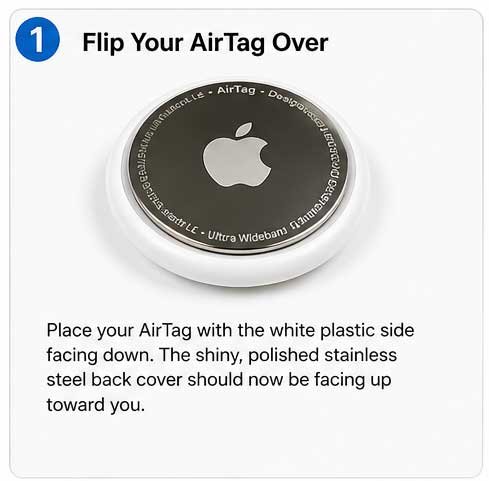
Step 1 – Flip Your AirTag Over
Place your AirTag with the white plastic side facing down. The shiny, polished stainless steel back cover should now be facing up toward you.
Place the AirTag face down so the metal cover is visible before opening.
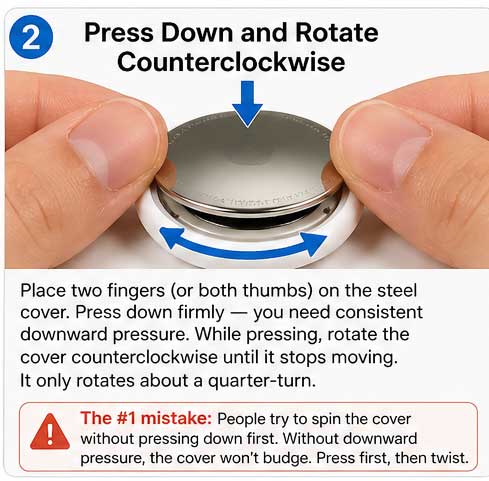
Step 2 — Press Down and Rotate Counterclockwise
Place two fingers (or both thumbs) on the steel cover. Press down firmly — you need consistent downward pressure. While pressing, rotate the cover counterclockwise until it stops moving. It only rotates about a quarter-turn.
Press firmly and rotate the cover left to unlock the AirTag.
The #1 mistake: People try to spin the cover without pressing down first. Without downward pressure, the cover won’t budge. Press first, then twist.
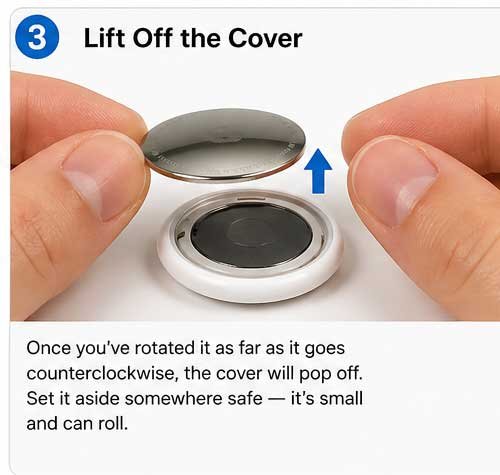
Step 3 – Lift Off the Cover
Once you’ve rotated it as far as it goes counterclockwise, the cover will pop off. Set it aside somewhere safe — it’s small and can roll.
Remove the loosened cover after rotating it fully.
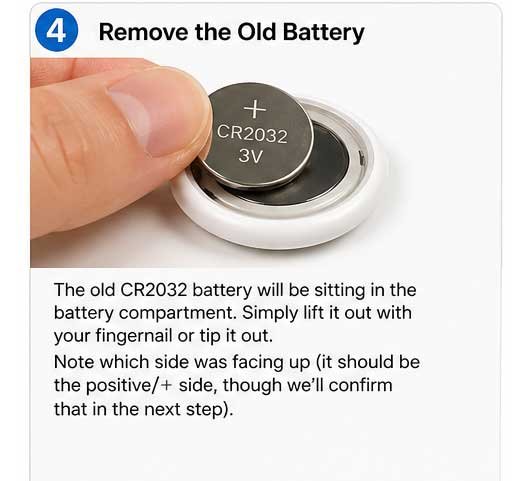
Step 4 – Remove the Old Battery
The old CR2032 battery will be sitting in the battery compartment. Simply lift it out with your fingernail or tip it out. Note which side was facing up (it should be the positive/+ side, though we’ll confirm that in the next step).
Take out the old battery from the AirTag.
Step 5 – Insert the New Battery
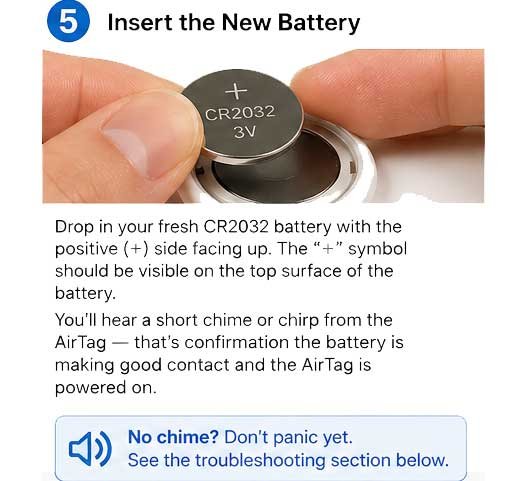
Drop in your fresh CR2032 battery with the positive (+) side facing up. The “+” symbol should be visible on the top surface of the battery. You’ll hear a short chime or chirp from the AirTag — that’s confirmation the battery is making good contact and the AirTag is powered on.
No chime? Don’t panic yet. See the troubleshooting section below.
Insert the new battery with the positive side facing up.
Step 6 – Replace the Cover
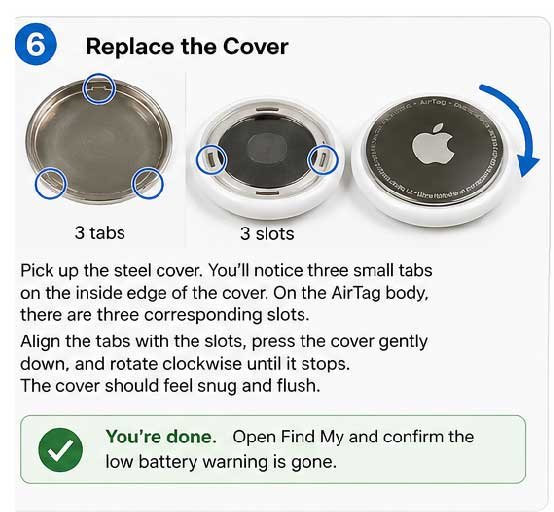
Pick up the steel cover. You’ll notice three small tabs on the inside edge of the cover. On the AirTag body, there are three corresponding slots. Align the tabs with the slots, press the cover gently down, and rotate clockwise until it stops. The cover should feel snug and flush.
You’re done. Open Find My and confirm the low battery warning is gone.
Align and lock the cover by rotating clockwise.
The Bitterant Battery Problem (And How to Fix It)
Here’s something the top Google results often gloss over — and it trips up a lot of people.
Some CR2032 batteries are coated with a bitterant — a safe but intensely bitter-tasting chemical designed to discourage children from swallowing them. The problem? This coating can interfere with the electrical connection inside your AirTag.
If you install a bitterant-coated battery and hear no chime, or if your AirTag keeps reporting low battery immediately after replacement, the coating is likely the culprit.
The fix:
Remove the battery.
Wipe the top and bottom surfaces of the battery firmly with a clean, dry cloth or paper towel.
Reinsert it. In most cases, this clears the coating from the contact points and the AirTag chirps to life.
Apple specifically recommends the Duracell CR2032 with Bitter Coating as a child-safe option that’s been tested for AirTag compatibility. If you’re buying child-safe batteries, look for packaging that says “Compatible with Apple AirTag”.
What If the AirTag Doesn’t Work After Battery Replacement?
Troubleshooting replacing battery in apple AirTag issues is usually straightforward. Here’s what to check:
❌ No chime after inserting battery
Battery may be inserted upside down (positive side must face UP).
Bitterant coating may be blocking contact — wipe the battery and retry.
Battery may be dead or defective — try a different battery from a fresh pack.
❌ AirTag still shows “Low Battery” in Find My after replacement
Give it 5–10 minutes. The Find My app can be slow to refresh battery status.
Force-quit and reopen the Find My app.
Toggle Bluetooth off and back on from your iPhone’s Control Center.
❌ Cover won’t go back on properly
Check that all three tabs align with all three slots before pressing and twisting. Forcing it with misaligned tabs can damage the threading.
❌ AirTag not detected in Find My at all
Hold the AirTag close to your iPhone and check Find My.
If it still doesn’t appear, try a factory reset: remove the battery, reinsert it, and press down on the battery five times with about one second between each press. The AirTag will play a sound sequence indicating it has reset.
How Does AirTag Battery Replacement Compare to AirPods?
People sometimes search how to change AirPod battery expecting a similar process. It’s worth clearing this up: AirPods use internal rechargeable lithium-ion batteries that are not user-replaceable at home. Apple handles AirPod battery service through its repair program (typically $49–$99 per earbud depending on model).
AirTags, by contrast, were deliberately designed with a user-replaceable CR2032 — a smart choice by Apple that saves users both time and money. One CR2032 battery costs roughly $1–$3. An AirPod battery service costs 20–50x that amount.
If you’re looking for the apple AirTag battery swap process specifically, you’re in the right place. The AirPod process is entirely different and not DIY-friendly.
Frequently Asked Questions
Q: How often should I replace my AirTag battery?
Apple recommends checking once a year. In practice, replace it when you receive a low battery notification or when the Find My app shows “Low Battery” under your AirTag’s name. Proactive annual replacement every October is a smart habit.
Q: Can I use a rechargeable CR2032 battery in my AirTag?
Technically yes, but it’s not recommended. Rechargeable CR2032 batteries typically output 3.0V when new but drop to around 2.7V quickly, which can cause your AirTag to report low battery prematurely or behave erratically. Stick with standard non-rechargeable lithium batteries.
Q: My AirTag made a sound during battery replacement. Is that normal?
Yes — completely normal. When the battery makes contact, the AirTag plays a confirmation chime. You may also hear sounds if you press on the battery multiple times during insertion. This is just the AirTag confirming power connection.
Q: Will replacing the battery erase my AirTag’s settings or pairing?
No. Removing and replacing the battery does not unpair or reset your AirTag. It will reconnect to your Apple ID and Find My automatically once it has power. Only a deliberate factory reset (pressing the battery 5 times) will erase pairing.
Q: What’s the best place to buy CR2032 batteries for my AirTag?
Amazon, Target, Walmart, CVS, and Best Buy all carry them. Buying a multipack (8–12 count) is the most cost-effective option, especially if you own multiple AirTags.
Start Tracking Smarter Today
Now you know exactly how to change AirTag battery — the right way, with no guesswork and no tools. Grab a pack of CR2032 batteries today and toss a few in your travel bag, junk drawer, and desk. When that next low battery alert hits, you’ll be ready in under a minute.
Have an AirTag tip or a battery brand you swear by? Drop it in the comments — our readers love real-world recommendations.
This article was updated in April 2026 to reflect the latest Apple support documentation (published January 26, 2026) and current battery compatibility information.
Disclaimer: This article is intended for informational purposes only. Always follow Apple’s official safety guidelines when handling coin cell batteries. CR2032 batteries pose a serious ingestion hazard to small children and pets — keep all batteries out of reach of children. If you are unsure about any step in this process, visit an Apple Authorized Service Provider. AppleHeadlines.com is not responsible for any damage to devices resulting from battery replacement. Apple, AirTag, and Find My are trademarks of Apple Inc.
T’kal is the lead strategist and developer behind Apple Headlines. With a background in digital marketing and web development, he specializes in technical Apple troubleshooting, software news, and hardware rumors. T’kal focuses on delivering high-authority tech content that bridges the gap between Apple enthusiasts and the latest industry innovations.