



Music brings families together.
Whether you’re driving to soccer practice, cooking dinner, or relaxing at home, the right soundtrack makes every moment better.
Apple Music Family Plan offers a smart way for families to enjoy unlimited music without breaking the bank.
Instead of paying for multiple individual subscriptions, you can share one plan with up to six family members.
This guide explains everything you need to know about family plan music from Apple, including pricing, setup, and tips to maximize your experience.
Short Story
What Is Apple Music Family Plan?
The Apple Music Family Plan is a subscription service that allows up to six people to access Apple Music under one account.
Each family member gets their own personal music library, recommendations, and playlists.
Unlike the individual plan, which costs $10.99 per month, the family plan costs just $16.99 monthly.
Think of it like splitting a pizza. One individual plan feeds one person.
But a family plan serves six people for just $6 more per month.
That’s enormous savings if you have two or more music lovers in your household.
The family apple music plan includes:
Apple Music Family Plan Price: Is It Worth It?
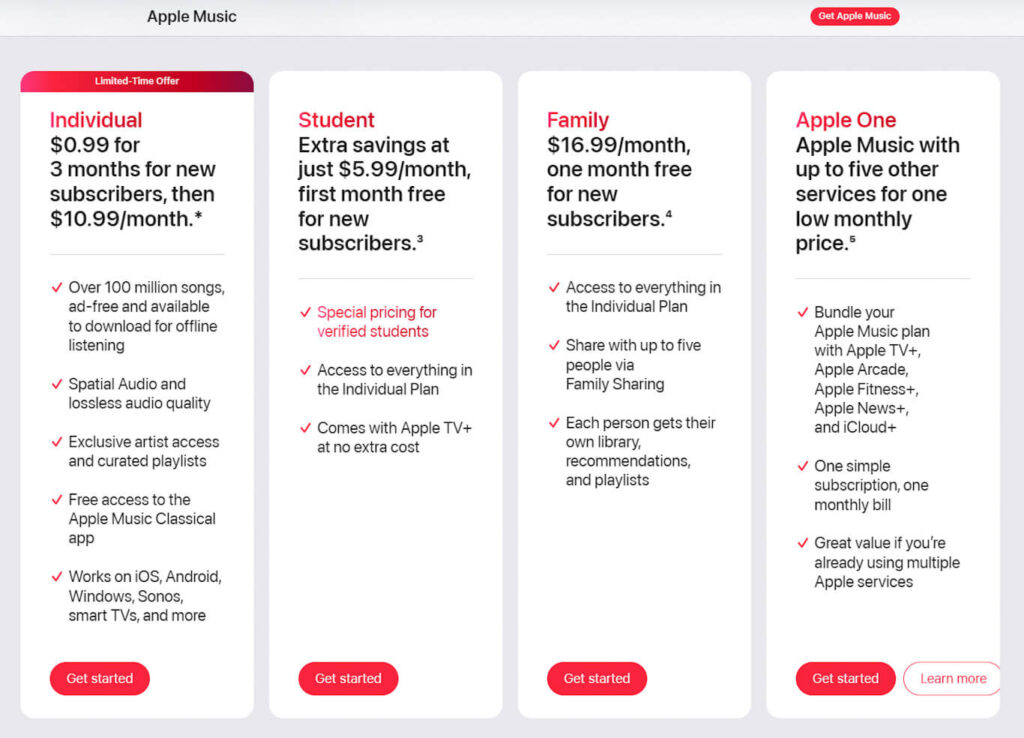
Let’s talk numbers. The apple music family plan price is $16.99 per month in the United States. Compare this to buying individual subscriptions:
If two people in your family subscribe individually, you’d pay $21.98 monthly. With the family plan, you save $5 per month or $60 annually. Add more family members, and the savings multiply.
Consider Sarah, a mom of three teenagers. Before discovering the family plan, she paid for her own subscription while her kids shared a different service. She was spending over $25 monthly across different platforms. Switching to Apple Music Family Plan cut her costs by 32% and gave everyone access to the same music library.
Family Plan vs. Individual Plan: Key Differences
The main differences between plans include: (Apple Music Plans)
- Number of Users: Individual supports 1 person; Family supports up to 6
- Price: $10.99 vs. $16.99 monthly
- Privacy: Each family member maintains separate libraries and preferences
- Setup: Family requires Apple Family Sharing setup
How to Share Apple Music with Family: Step-by-Step Setup
Setting up Apple Music family sharing takes about five minutes. Here’s how to add family to Apple Music:
Step 1: Set Up Family Sharing
Before you can share music, you need to enable Family Sharing on your device.
Family members will receive an invitation via Messages or email. They must accept the invitation to join your family group.
Step 2: Subscribe to Apple Music Family Plan
Once Family Sharing is active, upgrade to the family plan:
Your subscription activates immediately. All family members in your Family Sharing group can now access Apple Music.
Step 3: How to Add Someone to Apple Music Family Plan
To add new members after initial setup:
Remember, you can only have six total members, including yourself. Choose wisely!
Only For You





How Does Apple Music Family Plan Work?
Understanding how the system operates helps you maximize its benefits. Here’s what happens behind the scenes:
Individual Music Libraries
Each family member maintains a completely separate music library.
Your teenage daughter’s K-pop obsession won’t interfere with your classic rock playlists. Everyone gets personalized recommendations based on their listening habits.
This separation ensures privacy. Family members cannot see what songs you’ve downloaded or which artists you follow. Your listening history remains yours alone.
Shared Payment, Private Experience
The family organizer pays for the subscription. All six members enjoy full access without needing their own payment methods. This makes management simple and cost-effective.
However, if someone leaves your family group, they lose access immediately. Their music library and playlists remain intact, but they’ll need their own subscription to continue listening.
Device Compatibility
Apple Music works across all your devices:
Family members can stream on different devices simultaneously. Your kids can listen on their iPads while you use your iPhone during your commute.
Apple One Family Plan: The Ultimate Bundle
The AppleOne family plan bundles multiple Apple services into one subscription. For $22.95 monthly, you get:
- Apple Music (family access for up to 6 people)
- Apple TV+ (streaming service with original shows and movies)
- Apple Arcade (unlimited gaming across devices)
- 200GB iCloud+ storage (shared among family)
If you already subscribe to multiple Apple services, Apple One saves money. Buying these services separately would cost $29.96 monthly. The bundle saves you $7.01 per month or $84 annually.
Consider your family’s needs. If you only want music, stick with the standalone family plan. But if you watch Apple TV+ shows or need extra storage, Apple One provides better value.
How Much Is Apple Music Family Plan? Breaking Down the Value
At $16.99 per month, how much is apple music family plan really worth? Let’s calculate:
Per Person Cost:
With six members, you’re paying less than a single coffee per person monthly for unlimited music access. That’s exceptional value.
Annual Comparison:
A family of six saves $587.40 annually by choosing the family plan over individual subscriptions. That’s enough for a nice family vacation!
Tips and Best Practices for Apple Music Family Sharing
Maximize your family plan experience with these practical tips:
Choose the Right Family Organizer
The family organizer controls the subscription and manages members. Select someone responsible who won’t forget to pay the bill. Late payments pause everyone’s access.
Enable Purchase Sharing Carefully
Family Sharing can include purchase sharing for apps, movies, and books. If you enable this, consider setting up Ask to Buy for children. This prevents surprise charges from unauthorized purchases.
Create Family Playlists
Make collaborative playlists for road trips or family gatherings. Everyone can add their favorite songs, creating a mix that keeps everyone happy. It’s a fun way to discover music your family members love.
Download Music for Offline Use
Going on a flight or camping trip? Download songs before you leave. Each family member can store thousands of songs on their device. No internet connection required for playback.
Use Parental Controls
Apple Music includes explicit content filters. Parents can restrict explicit songs and videos for children’s accounts. Set this up in Screen Time settings under Content & Privacy Restrictions.
Common Questions About Family Apple Music
Can Family Members See My Playlists?
No. Your playlists, listening history, and music library remain completely private unless you explicitly share them. Each person’s account operates independently within the shared subscription.
What Happens If I Leave a Family Group?
When you leave, you lose access to the family plan immediately. Your music library and playlists stay intact, but you can’t stream or download new songs. You’ll need to subscribe individually or join another family group to continue listening.
Can I Switch from Individual to Family Plan?
Yes, switching is simple. Follow the subscription management steps outlined earlier. Your existing library transfers automatically. Apple prorates any unused time from your individual plan toward the family subscription.
Do Family Members Need Apple Devices?
Family Sharing requires an Apple device to set up and manage. However, once added, family members can use Apple Music on Android devices or web browsers. They just need to sign in with their Apple ID.
Troubleshooting Common Issues
Family Member Can’t Access Apple Music
First, verify they accepted the Family Sharing invitation. Check Settings > [Your Name] > Family Sharing to see active members. If their name appears, they should restart their device and sign out and back into Apple Music.
Payment Declined Error
Update your payment method in
Settings >
[Your Name] >
Payment & Shipping.
Ensure your credit card isn’t expired and has sufficient funds. Contact your bank if the problem persists.
Songs Won’t Download
Check your device storage. If space runs low, downloads fail. Also verify your internet connection is stable. Try switching between Wi-Fi and cellular data.
Alternatives to Apple Music Family Plan
While Apple Music excels for Apple device users, other services offer family plans too:
- Spotify Premium Family: $16.99/month for 6 accounts with similar features
- YouTube Music Family: $22.99/month for 5 members, includes YouTube Premium
- Amazon Music Unlimited Family: $16.99/month for 6 members
Apple Music stands out for its seamless integration with Apple devices, superior audio quality, and extensive catalog. If your family primarily uses iPhones, iPads, and Macs, it’s the natural choice.
Related Questions
Can I have more than 6 people on Apple Music Family Plan?
No, Apple limits Family Sharing to six members total. This includes the family organizer and five additional members. If you need more accounts, consider purchasing an additional family plan under a different Apple ID.
Does Apple Music Family Plan work internationally?
Yes, family members can live in different countries and still share one plan. However, the organizer’s country determines available content. Some songs or features may vary by region due to licensing restrictions.
Can I switch between family plans without losing my music?
Yes, your personal music library, playlists, and preferences remain intact when switching between plans or family groups. Only your active subscription status changes. Your saved content stays with your Apple ID regardless of plan type.
Is there a student discount for Apple Music Family Plan?
No, the student discount ($5.99/month) only applies to individual plans. Students cannot get discounted family plans. However, if a family member qualifies for the student rate, they might prefer that over joining a family plan.
What audio quality does Apple Music Family Plan offer?
All plans, including family plans, provide lossless audio quality at no extra cost. You also get Spatial Audio with Dolby Atmos on supported devices. This matches the audio quality of individual and student plans.
Ready to Start Your Apple Music Family Journey?
The Apple Music Family Plan transforms how families enjoy music together while respecting individual privacy. At just $16.99 monthly, it delivers exceptional value for households with multiple music lovers.
Start by setting up Family Sharing on your iPhone or iPad today. Invite your family members, subscribe to the family plan, and unlock access to over 100 million songs. Whether commuting, exercising, or relaxing at home, everyone gets their perfect soundtrack.
Don’t forget to explore Apple One if your family uses multiple Apple services. The bundled savings might surprise you.
What are you waiting for? Set up your Apple Music Family Plan now and bring your household together through the power of music.
Disclaimer
This article provides informational guidance about Apple Music Family Plan as of December 2025. Prices, features, and availability may change without notice. Apple controls all subscription terms, policies, and content licensing. We are not affiliated with Apple Inc. For the most current information, visit apple.com/apple-music. Individual results and experiences may vary. Always review subscription terms before purchasing.

Virginia J. Alfonso is a seasoned technology writer with a passion for all things digital. With over a decade of experience covering the latest in tech innovation, gadgets, and software, Virginia brings a unique blend of technical expertise and accessible writing to her work. Her articles focus on making complex tech topics easy to understand for readers of all levels.