


We have all been there.
You accidentally swipe left and tap delete.
Suddenly, a vital work thread or a precious memory is gone.
Your heart sinks. You need that information back right now.
Don’t panic yet.
As an Apple tech expert, I have helped thousands of users navigate this exact nightmare.
Finding those “lost” texts is often easier than you think. In this guide, I will show you exactly how to find deleted messages on iphone using the latest 2026 methods.
Quick info
- Act Fast: The “Recently Deleted” folder is your best friend for 30 days.
- Stay Offline: If you realize a mistake, put your phone in Airplane Mode.
- Check the Mac: Your computer might have a copy your phone “forgot.”
- Automate: Ensure iCloud Backup is “On” in your settings every single night.
- Distinguish: Remember that iMessage and SMS are handled differently by carriers.
Why Your Deleted Messages Aren’t Truly “Gone” Yet
In the world of data, “deleted” is a relative term.
When you delete a message, Apple doesn’t immediately scrub it from the flash storage.

Instead, the system marks that space as “available.”
It is like moving a file to a digital basement. The box is still there. You just need to know which door leads to it.
Modern iOS versions (like iOS 18 and iOS 26) have built-in safety nets. These nets protect you from simple mistakes.
Time is your biggest enemy.
The longer you wait, the higher the chance new data overwrites your old messages. We need to act fast to retrieve deleted messages from iPhone before they vanish forever.
Method 1: Use the “Recently Deleted” Folder (The 30-Day Safety Net)
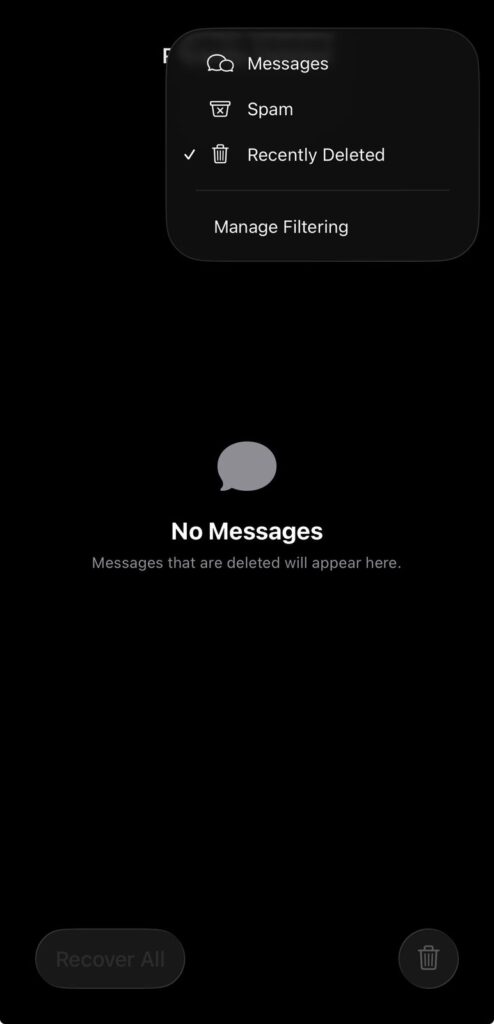
This is the fastest way to find deleted texts on iPhone. Apple introduced this feature to mimic the “Trash” on a Mac. It is your first line of defense.
Pro Tip: The 40-Day Grace Period While Apple officially states 30 days, the system often holds data for up to 40 days. If you are on day 35, check anyway. You might find a pleasant surprise waiting for you in that folder.
Method 2: Check Your Other Apple Devices
The Apple ecosystem is a powerful tool.
If you use Messages in iCloud, your texts sync across your devices.
Sometimes, a “delete” command on your iPhone hasn’t reached your Mac or iPad yet.
This is a common “glitch” that works in your favor.
The “Postal Service” Analogy
Think of iCloud like a central post office.
Your iPhone, iPad, and Mac are local mailboxes. When you “delete” a letter in one mailbox, the postman usually tells the others.
But if a mailbox is locked (offline), it keeps the letter.
Checking your other devices is like checking a mailbox the postman hasn’t reached yet.
Method 3: Recover Permanently Deleted Messages via iCloud Backup
If the message is not in “Recently Deleted,” we must go deeper.
You can recover permanently deleted messages if you have a backup. This method involves “rolling back” your phone to an earlier time.
Warning: This process will remove any data added after that backup date. Always save recent photos or files before doing this.
Method 4: How to Find Deleted Messages Using a Mac or PC
Many people still use their computer to back up their phones.
This is the most reliable way to recover permanently deleted text messages on iPhone. It bypasses the cloud entirely.
Case Study: The Landlord Dispute (2025)
Last year, a reader named Sarah contacted me.
She had accidentally deleted a text from her landlord. This text proved she had paid her security deposit in full.
She didn’t have a recent iCloud backup. She was terrified she would lose $2,000.
I told her to check her old MacBook Pro she hadn’t opened in months.
Because the laptop was tucked away, it never received the “delete” sync command.
She opened the lid, found the message, and saved the proof. This illustrates why the “Ecosystem Check” is so powerful.
Always check your oldest, least-used Apple devices first!
Method 5: Contacting Your Cellular Carrier
Many people ask, “Can you retrieve deleted text messages from your carrier?”
The answer is: Maybe.
Carriers like Verizon, AT&T, and T-Mobile keep logs. Usually, they only store the metadata (who you texted and when).
They rarely store the actual content of SMS messages for long.
If you are in a legal battle, a subpoena can sometimes surface these records. For the average user, this is a long shot.
It only works for traditional green-bubble SMS, not blue-bubble iMessages. iMessages are end-to-end encrypted. Your carrier cannot read those even if they wanted to.
Troubleshooting: What if These Steps Don’t Work?
If you have tried everything above and still can’t recover deleted messages from iPhone, here are three reasons why:
Expert Insight: Third-Party Recovery Software
You will see many ads for “iPhone Data Recovery” software.
Be very careful. Most of these tools simply scan your “Recently Deleted” folder—which you can do for free.
Only use reputable brands if you are desperate. Never pay for software that doesn’t offer a “free preview” of the deleted data it claims to find.
Related: Do Messages Deliver When Phone Is Dead? Here’s What Actually Happens (2026)
FAQ: Frequently Asked Questions
Q: Can I recover messages deleted years ago?
A: Generally, no. Unless you have an old backup from that specific time, the data is long gone. Digital storage is recycled constantly.
Q: Does “Undo Send” mean the message is in Recently Deleted?
A: No. If you use the “Undo Send” feature (within 2 minutes of sending), the message is scrubbed. It does not go to the recovery folder.
Q: Will restoring a backup delete my new photos?
A: Yes. Restoring a backup replaces everything currently on your phone. Upload your new photos to a separate service like Google Photos before restoring.
Q: Can I recover just one message thread without a full restore?
A: With native Apple tools, no. You must restore the whole phone. Some third-party Mac apps (like iMazing) allow you to browse backups and pull specific threads.
Disclaimer
This guide is for informational purposes. Data recovery is never 100% guaranteed. AppleHeadlines.com is not responsible for any data loss that occurs during the restoration process. Always ensure you have a secondary backup before erasing your device.
Have you found your missing messages? If this guide helped you, share it with a friend who might be panicking right now! For more Apple tips and 2026 tech secrets, subscribe to our AppleHeadlines Channels

T’kal is the lead strategist and developer behind Apple Headlines. With a background in digital marketing and web development, he specializes in technical Apple troubleshooting, software news, and hardware rumors. T’kal focuses on delivering high-authority tech content that bridges the gap between Apple enthusiasts and the latest industry innovations.