



By using this site, you agree to the Privacy Policy and Terms of Use.
Accept
Apple Headlines Logo Image Apple Headline's White Logo
  • 🔥 Trending:
  • Apple Tech
  • How to Fix
  • Readers Space
  • iPhone
  • iOS
  • Mac
  • Apple Watch
  • iPadOS
  • AirPods
  • Contact Us
Reading: What is Best Idle Temperature for Mac Mini M4?
Apple HeadlinesApple Headlines
Font ResizerAa
  • iPhone
  • iOS
  • Mac
  • Apple Watch
  • iPadOS
  • AirPods
  • Contact Us
Search
  • iPhone
  • iOS
  • Mac
  • Apple Watch
  • iPadOS
  • AirPods
  • Contact Us

Must Read

Only one AirPod working while the other is not connecting

Only One AirPod Working? How to Fix AirPods Connection & Pairing Issues Fast

Apple iOS 27 beta 5 release with iPadOS 27, macOS 27, watchOS 27, tvOS 27, and visionOS 27

Apple Releases iOS 27 Beta 5 and More on August 10: Here’s What Changed

iPhone keyboard lag and delay fix guide

How to Fix iPhone Keyboard Lag and Delay (Stop Stuttering While Typing)

Apple CarPlay dashboard showing Maps, Music, Phone, and Messages

How to Use Apple CarPlay: Complete Step-by-Step Guide

Woman looking at an iPhone with the App Store missing

Where Did My App Store Go? The 5-Minute Fix to Get It Back on iPhone

Follow US
© Apple Headlines. All Rights Reserved.
Apple Headlines > Mac > What is Best Idle Temperature for Mac Mini M4?
Mac

What is Best Idle Temperature for Mac Mini M4?

Virginia J. Alfonso By Virginia J. Alfonso Last updated: January 21, 2025
3 Min Read
SHARE

The Mac Mini M4 is a powerful and compact desktop computer introduced by Apple in 2024.

Understanding its idle temperature is crucial for maintaining optimal performance and longevity.

This article provides comprehensive information on the idle temperature of the Mac Mini M4, including FAQs.

Highlights

Idle Temperature: 39-40°C under normal conditions.

Main Topics
HighlightsWhat is idle temperature for mac mini m4?Idle Temperature for Mac Mini M4Discussion on macrumorsFactors Affecting Idle TemperatureMonitoring and Managing Idle TemperatureFAQsDisclaimer

Factors: Ambient temperature, airflow, and usage patterns.

Monitoring: Use TG Pro for accurate monitoring.

What is idle temperature for mac mini m4?

Idle temperature refers to the temperature of a computer’s CPU when it is not under heavy load or performing intensive tasks.

It is an important metric for assessing the thermal management and efficiency of a computer.

More Read

Apple iOS 27 beta 5 release with iPadOS 27, macOS 27, watchOS 27, tvOS 27, and visionOS 27
Apple Releases iOS 27 Beta 5 and More on August 10: Here’s What Changed
MacBook displaying macOS with highlighted Command, C, and V keys promoting 60 Mac keyboard shortcuts to boost productivity in 2026.
60 Mac Keyboard Shortcuts That’ll Instantly Speed Up Your Workflow (2026)
iPhone showing FaceTime and Photos app illustrating where FaceTime photos are saved, found, and recovered on iPhone.
Where Do FaceTime Photos Go? The Complete Guide to Finding, Saving, and Recovering Them

Idle Temperature for Mac Mini M4

The Mac Mini M4 typically maintains an idle temperature of 39-40°C under normal ambient conditions.

This temperature ensures that the system remains cool and stable, even when it is not actively processing tasks.

Discussion on macrumors


To find the idle temperature for the Mac Mini M4, you can check user forums like MacRumors. Many users share their experiences and temperature readings under different conditions.

For instance, users report idle temperatures around 39-40°C under normal ambient conditions.

You can also use third-party applications like TG Pro to monitor the temperature on your own device.
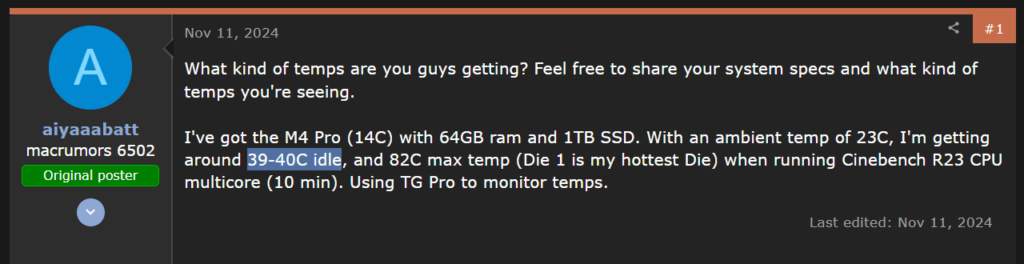
source: forums.macrumors

Factors Affecting Idle Temperature

Several factors can influence the idle temperature of the Mac Mini M4, including:

Ambient Temperature: The surrounding temperature can impact the internal temperature of the computer.

Airflow: Proper ventilation and airflow around the computer help in dissipating heat effectively.

Usage Patterns: Frequent usage and background processes can slightly increase the idle temperature.

apple official screenshot of requirements of M4

Monitoring and Managing Idle Temperature

To monitor the idle temperature of your Mac Mini M4, you can use third-party applications like TG Pro.

Managing the idle temperature involves ensuring proper ventilation, keeping the computer in a cool environment, and avoiding dust buildup.
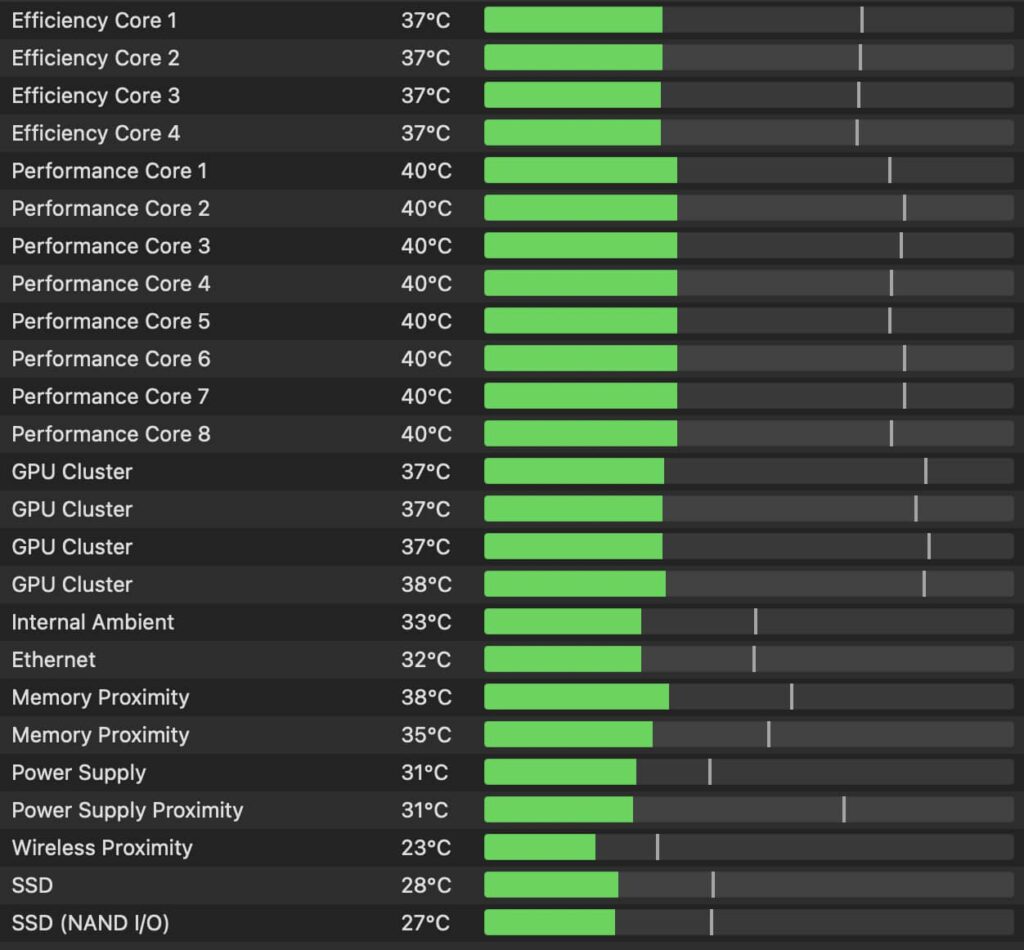
Managing the idle temperature
base model running temperature image

FAQs

Q: What is the normal idle temperature for the Mac Mini M4?
A: The normal idle temperature is around 39-40°C.

Q: How can I monitor the idle temperature?
A: You can use applications like TG Pro to monitor the temperature.

Q: What factors affect the idle temperature?
A: Ambient temperature, airflow, and usage patterns can influence the idle temperature.

Disclaimer

The information provided in this article is based on general observations and user experiences. Actual temperatures may vary depending on individual usage and environmental conditions.

I hope this article provides valuable insights into the idle temperature of the Mac Mini M4! If you have any more questions or need further assistance, feel free to ask.

Virginia smiling face image
Virginia J. Alfonso

Virginia J. Alfonso is a seasoned technology writer with a passion for all things digital. With over a decade of experience covering the latest in tech innovation, gadgets, and software, Virginia brings a unique blend of technical expertise and accessible writing to her work. Her articles focus on making complex tech topics easy to understand for readers of all levels.

Share This Article
Facebook Twitter Pinterest Whatsapp Whatsapp LinkedIn Reddit Threads Email Copy Link
Previous Article todo list screenshot and text visible How to Use Todoist Voice Capture Siri Shortcut
Next Article iMessage Needs to be Enabled to Send This Message How to Fix “iMessage Needs to be Enabled to Send This Message” Error

Follow Us On Social

FacebookLike
InstagramFollow
YoutubeSubscribe

Our Published Video

Must Read

Only one AirPod working while the other is not connecting

Only One AirPod Working? How to Fix AirPods Connection & Pairing Issues Fast

Apple iOS 27 beta 5 release with iPadOS 27, macOS 27, watchOS 27, tvOS 27, and visionOS 27

Apple Releases iOS 27 Beta 5 and More on August 10: Here’s What Changed

iPhone keyboard lag and delay fix guide

How to Fix iPhone Keyboard Lag and Delay (Stop Stuttering While Typing)

Apple CarPlay dashboard showing Maps, Music, Phone, and Messages

How to Use Apple CarPlay: Complete Step-by-Step Guide

Woman looking at an iPhone with the App Store missing

Where Did My App Store Go? The 5-Minute Fix to Get It Back on iPhone

iPhone displaying a Safari error page with troubleshooting icons for fixing Safari not working on iPhone in 2026.

Safari Not Working on iPhone: The Complete 2026 Repair Guide (11 Tested Fixes)

Apple Headlines Logo Image

Apple Headlines delivers fresh, reliable Apple news, how-to guides, and tips for every Apple user.

Topics

  • iOS
  • iPhone
  • Mac
  • Apple News
  • Apple Watch
  • iPadOS
  • AirPods

Quick Links

  • Home
  • About Us
  • Privacy Policy
  • Terms of Service
  • Contact Us
Apple Headlines Logo Image

Designed By Apple Headlines

appleheadlines.com