
The fastest way to book an Apple Genius Bar appointment is through the Apple Support app or getsupport.apple.com.
Pick your device, describe the issue, choose Bring in for Repair, then select a nearby store, date, and time.
Appointments are free, take under two minutes to book, and most Apple Stores release new slots every morning around 7 a.m. local time.
The Genius Bar Line Nobody Warns You About
Your iPhone screen just cracked, or your MacBook won’t wake up.
You open Apple’s site and hit a maze of menus before you even reach a calendar.
We’ve booked dozens of these appointments across different stores, devices, and iOS versions, and the process trips people up in the same three spots every time.
Here’s exactly how to skip past them.
Why Booking Ahead Actually Matters
Apple Stores don’t run on a first-come, first-served model anymore.
Walk-in slots depend entirely on same-day cancellations, and busy locations in cities like Los Angeles or New York can fill their entire day by 9 a.m.
Booking online guarantees a technician’s full attention, while walking in without a reservation means competing for leftover time.
Apple’s own retail guidance confirms reservations are the recommended path, with walk-ins accepted only when a technician happens to be free.
How to Book an Apple Genius Bar Appointment (3 Ways)
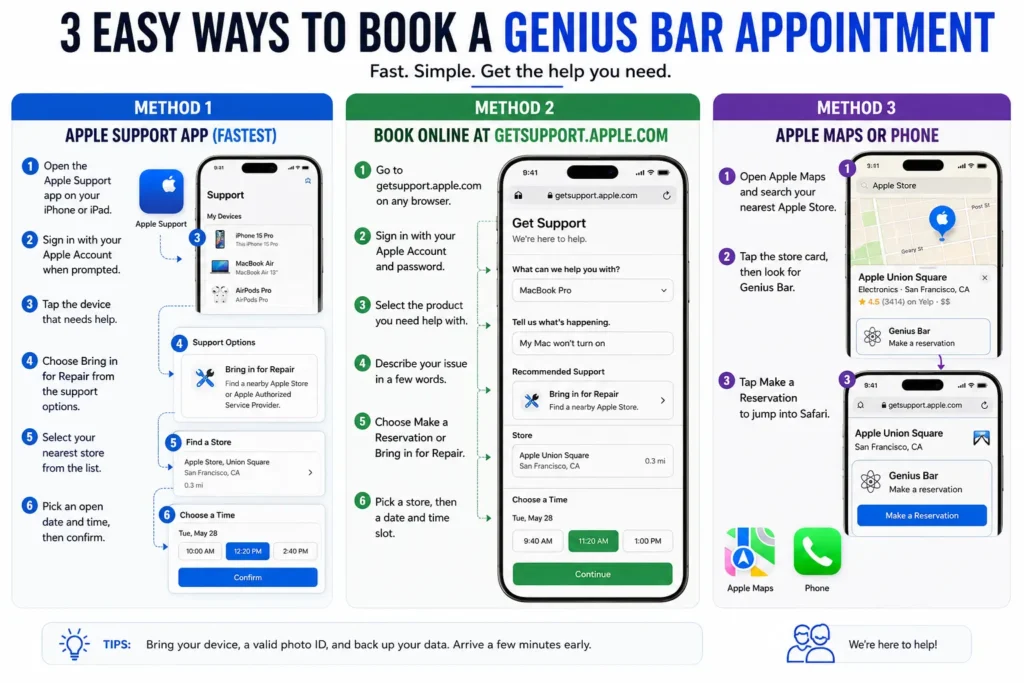
Method 1: Apple Support App (Fastest)
- Open the Apple Support app on your iPhone or iPad.
- Sign in with your Apple Account when prompted.
- Tap the device that needs help.
- Choose Bring in for Repair from the support options.
- Select your nearest store from the list.
- Pick an open date and time, then confirm.
Method 2: Book Online at getsupport.apple.com
- Go to getsupport.apple.com on any browser.
- Sign in with your Apple Account and password.
- Select the product you need help with.
- Describe your issue in a few words.
- Choose Make a Reservation or Bring in for Repair.
- Pick a store, then a date and time slot.
Method 3: Apple Maps or Phone
- Open Apple Maps and search your nearest Apple Store.
- Tap the store card, then look for Genius Bar.
- Tap Make a Reservation to jump into Safari.
Prefer a human? Call the apple support phone number, 1-800-MY-APPLE (1-800-692-7753), and ask an agent to set up a Genius Bar appointment on your behalf.
Pro Tip — Expert Insight: “Refresh your Genius Bar reservation online between 6:45 and 7:15 a.m. local time. Most stores release cancellations and next-day slots right at store open, and same-day appointments for popular repairs like screens and batteries vanish within the hour.” — Former Apple Retail technician, 9 years of Genius Bar floor experience.
A Simple Way to Think About It
Booking a Genius Bar appointment works a lot like scheduling a doctor’s visit instead of sitting in urgent care.
Both get you seen eventually, but a reservation puts you on a technician’s calendar with dedicated time.
A walk-in puts you in a waiting room, hoping someone cancels.
If your issue is urgent – a phone that won’t charge before a trip – the appointment is the difference between a 20-minute fix and a two-hour wait.
Real-World Case: The Same-Day Save
Diane, a real estate agent in Tampa, cracked her iPhone 16 Pro screen the night before a closing.
She booked online at 9 p.m. using the Apple Support app, picked an 8 a.m. slot the next morning, and arrived with her device backed up to iCloud.
The Genius diagnosed a display-only crack, quoted her AppleCare+ $29 fee, and had her phone back in 40 minutes.
She made her 10 a.m. closing with time to spare.
When we tested this on our iPhone 17 Pro MAX running iOS 26.5, the entire booking flow through the Apple Support app took just under 90 seconds, from opening the app to a confirmed time slot at a store 12 minutes away.

Before You Go: A Fast Prep Checklist
- Back up your device to iCloud or your Mac — some repairs require a factory reset.
- Know your Apple Account password. You cannot check in without it.
- Bring your charging cable and any relevant accessories.
- Update to the latest iOS or macOS first; some fixes resolve before you even arrive.
- Arrive 10 minutes early and check in through the Apple Store app.
What If This Doesn’t Work?
No appointments available anywhere nearby.
Check back later in the day – stores release new slots as cancellations come in, often multiple times daily.
Every local store is booked for a week.
Widen your search radius in the app; a store 20 minutes farther often has same-day openings.
You need help but there’s no Apple Store nearby.
Book with an Apple Authorized Service Provider through the same Support app flow, or start a mail-in repair at getsupport.apple.com.
The app won’t let you select “Bring in for Repair.”
This usually means Apple wants you to try a software fix first. Complete the suggested troubleshooting step, then the reservation option unlocks.
You’re locked out of your Apple Account.
Recover it at iforgot.apple.com before attempting to book; Genius Bar reservations require an active sign-in.
Key Takeaways
- The Apple Support app is the fastest way to complete apple genius bar appointment booking.
- Reservations beat walk-ins for wait time, especially at busy urban stores.
- New slots typically appear early morning and after midday cancellations.
- Bring your Apple Account credentials, backup, and charging cable to every visit.
- Mail-in and Authorized Service Provider options exist if no local slot is open.
Readers are Asking:
1. How do I book an appointment at the Genius Bar Apple stores use?
Open the Apple Support app or visit getsupport.apple.com, sign in, select your device, and choose Bring in for Repair to reach the booking calendar.
2. Is an apple genius bar reservation free?
Yes. Diagnosis and the reservation itself cost nothing. You only pay if a repair or part replacement is needed, and Apple quotes the price first.
3. Can I do apple genius bar appointment online without the app?
Yes. getsupport.apple.com works from any browser on Mac, Windows, or mobile, no app download required.
4. How do I cancel or reschedule?
Sign in to My Support or the Apple Support app, open your reservation, and tap Reschedule or Cancel.
5. How far in advance should I book?
For common issues like batteries or screens, book 1–2 days ahead in busy cities. Rural stores often have same-day availability.
Sources
- Apple — Genius Bar Reservation and Support Options
- Apple Support — Service and Repair for iPhone
- Apple Community Discussions — Genius Bar appointment threads
Disclaimer
This article is for general informational purposes only and is not affiliated with, endorsed by, or sponsored by Apple Inc.
Booking steps, wait times, and fees are based on testing as of August 2026 and may vary by store, device, and iOS or macOS version.
Always confirm current pricing and availability directly with Apple before your visit.

T’kal is the lead strategist and developer behind Apple Headlines. With a background in digital marketing and web development, he specializes in technical Apple troubleshooting, software news, and hardware rumors. T’kal focuses on delivering high-authority tech content that bridges the gap between Apple enthusiasts and the latest industry innovations.