
Quick Answer:
You cannot use a serial number to track the live GPS location of lost AirPods.
Your serial number is critical for warranty claims, police reports, and verifying ownership.
To locate lost AirPods, use Apple’s Find My app — it’s the only official tracking method Apple provides.
Keep reading to learn how to find your serial number & what to do when your AirPods go missing.
You just realized your AirPods are gone. Maybe they slipped out of your gym bag. Maybe someone took them.
Your first instinct is to Google “find AirPods by serial number” — hoping that magic string of numbers holds the answer.
You are not alone.
Millions of AirPods users search this exact phrase every month, and most articles give you a half-answer.
This guide gives you the full picture: where the serial number lives, what it can actually do, what it can’t do, and the exact steps to take right now.
Quick Info
What Your AirPods Serial Number Actually Does (And Doesn’t Do)
Let’s clear up the biggest misconception right away.
A serial number is like a VIN number on a car — it identifies the vehicle and proves you own it, but it doesn’t tell anyone where the car is parked right now.
The same logic applies to AirPods.
Your AirPods serial number:
To actually locate your AirPods, you need the Find My app — which uses Bluetooth proximity and the Find My network. More on that in a moment.
How to Find Your AirPods Serial Number: 6 Methods
Whether your AirPods are sitting right in front of you or already missing, here are every place the serial number lives.
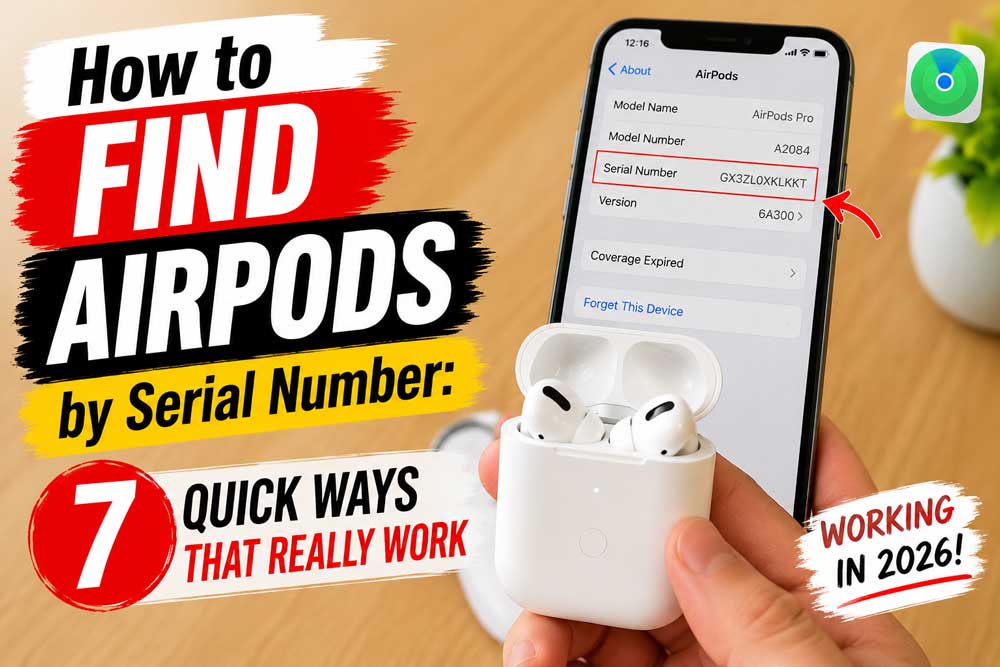
Method 1: Check Your iPhone or iPad Settings (Easiest)
This works when your AirPods have been paired with your device at least once.
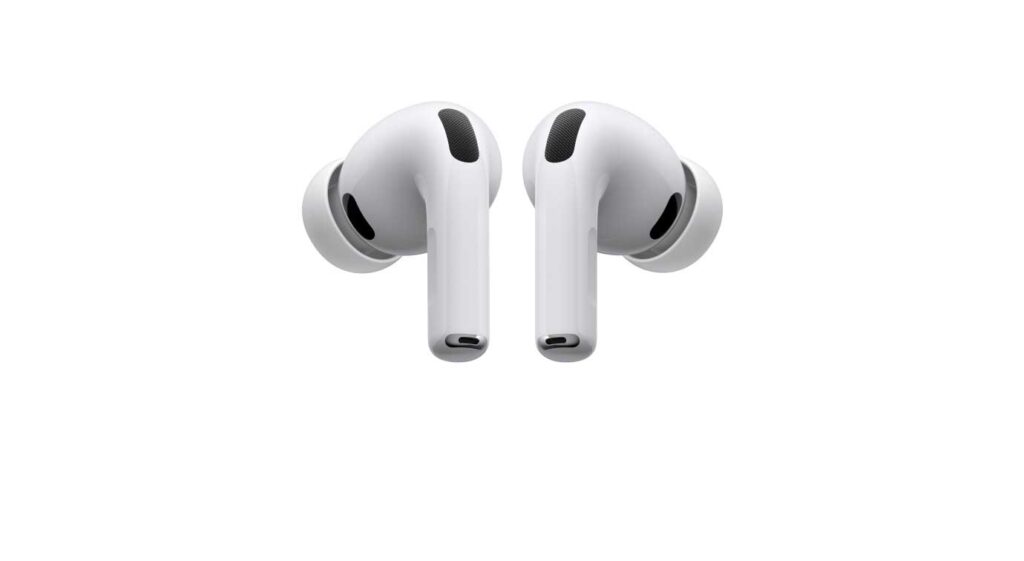
Works on: iOS 14 and later, iPadOS 14 and later. For older iOS versions, go to Settings > General > About, scroll until you see your AirPods listed, then tap the name.
Method 2: Check the Charging Case Lid (Physical)
Every AirPods case has the serial number printed on it.
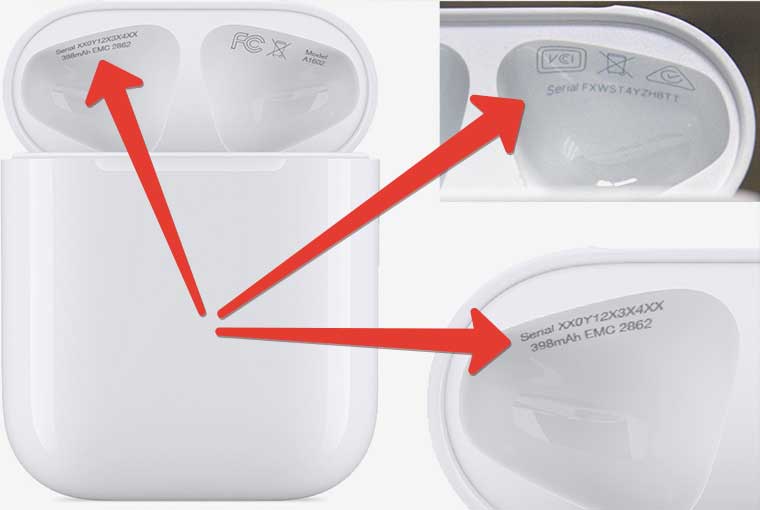
Note: The serial number is the same for the case and the earbuds as a set. Apple treats them as one unit.
Method 3: Check Each Individual AirPod (Physical)
This is useful if you have the earbuds but lost the case.
AirPods Max users: Remove the left ear cushion. The serial number is printed on the metal cup behind it.
Method 4: Check the Original Box
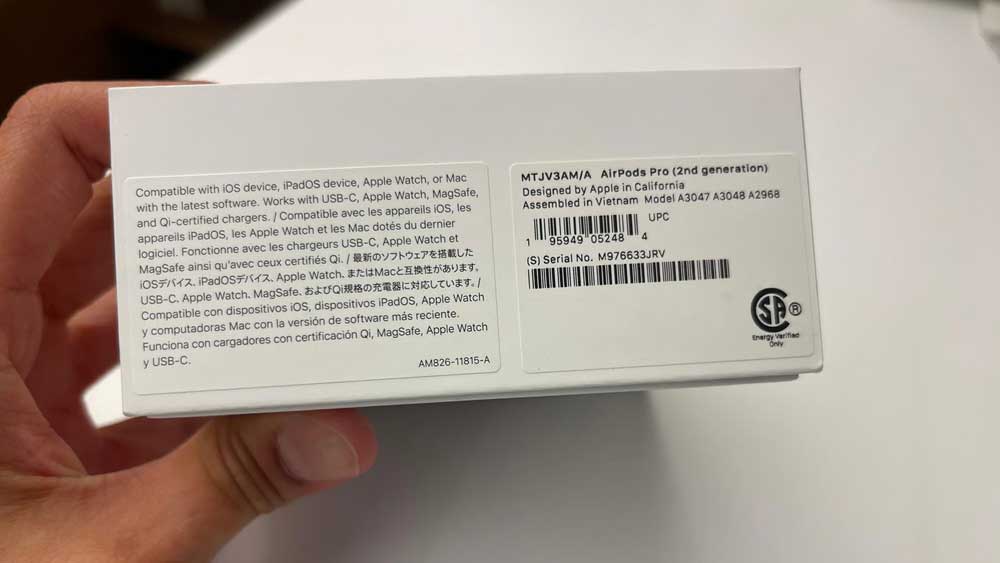
Pro Tip: Take a photo of your AirPods box right when you buy them. Store it in your Notes app or iCloud Photos. This 10-second habit can save you hours of stress later.
Method 5: Check Your Apple Account Online
If your AirPods were registered or paired with your Apple ID, Apple logs the serial number.
Method 6: Check Your Purchase Receipt or Apple Order History
Serial Numbers by AirPods Model: Quick Reference (2026)
Here’s a fast-reference chart for all current AirPods models and their model numbers — because knowing your model helps you navigate Apple Support faster.
| Model | Model Number | Year |
|---|---|---|
| AirPods Pro 3 | A3063, A3064, A3065 | 2025 |
| AirPods 4 (ANC) | A3056, A3055, A3057 | 2024 |
| AirPods 4 | A3053, A3050, A3054 | 2024 |
| AirPods Max (USB-C) | A3184 | 2024 |
| AirPods Pro 2 (USB-C) | A3047, A3048, A3049 | 2023 |
| AirPods 3 | A2565, A2564 | 2021 |
| AirPods Pro 1 | A2084, A2083 | 2019 |
| AirPods 2 | A2032, A2031 | 2019 |
Source: Apple Support (updated 2026). The model number starts with “A” and is different from the serial number, which is a longer alphanumeric string.
How to Add AirPods to Find My iPhone (Step-by-Step)
This is the actual tracking method that works.
If your AirPods support Find My, here’s how to make sure they’re set up before you lose them.
AirPods 3, 4, Pro 1, Pro 2, Pro 3, and AirPods Max all support Find My.
How to Enable Find My for AirPods
Where is Find My in iPhone Settings? Go to Settings > [Your Name] > Find My > Find My iPhone. That’s it.
How to Add AirPods to Find My When You Don’t Have the AirPods Present
Read More: How to Add AirPods to Find My iPhone – (All Models + Easy Fixes)
You cannot add AirPods to Find My without the physical device. They must be paired to your iPhone first. Once paired, they appear automatically — there’s no separate “add” step.
Exception: If your AirPods were previously paired but are now gone, they still show in Find My as long as they were connected at some point. They’ll display their last known location.
How to Turn On Find My from Another Device
What to Do When Your AirPods Are Lost or Stolen
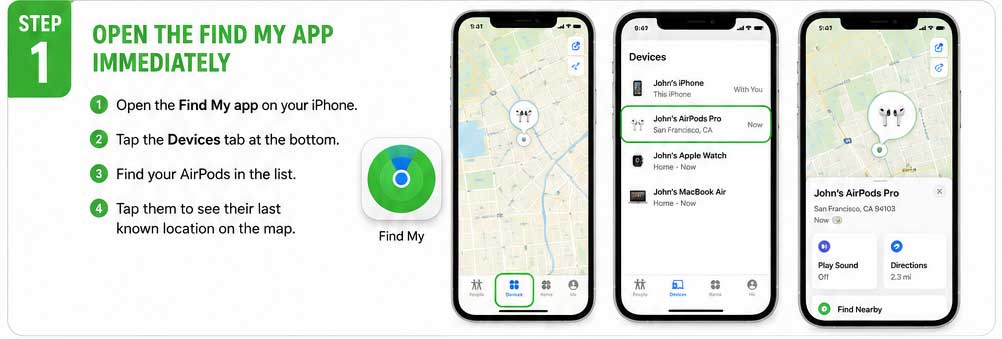
Step 1: Open the Find My App Immediately
Step 2: Play a Sound
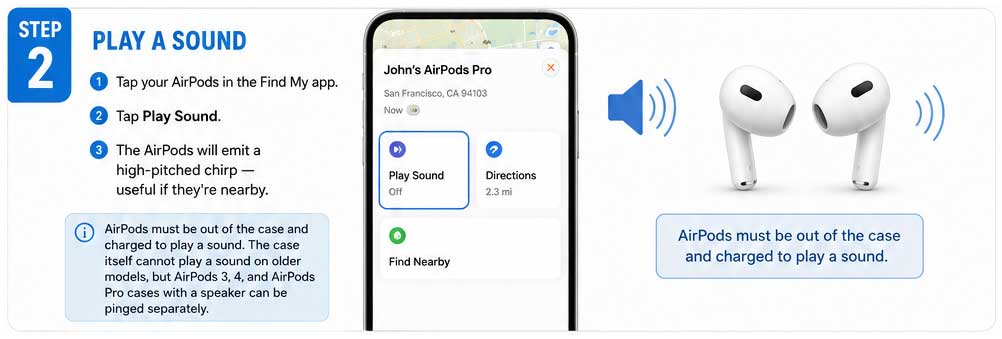
AirPods must be out of the case and charged to play a sound. The case itself cannot play a sound on older models, but AirPods 3, 4, and AirPods Pro cases with a speaker can be pinged separately.
Step 3: Mark as Lost
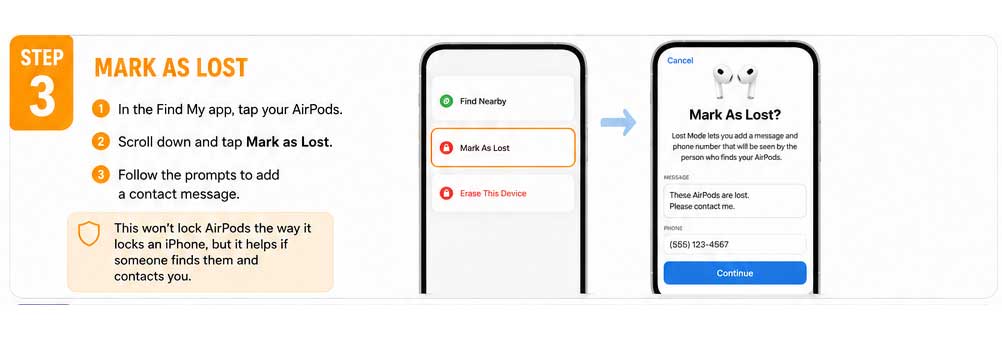
This won’t lock AirPods the way it locks an iPhone, but it helps if someone finds them and contacts you.
Step 4: Report to Apple Using Your Serial Number
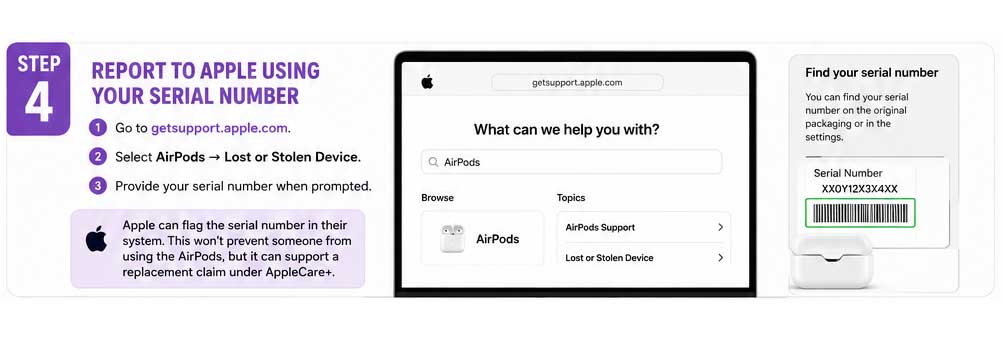
Apple can flag the serial number in their system. This won’t prevent someone from using the AirPods, but it can support a replacement claim under AppleCare+.
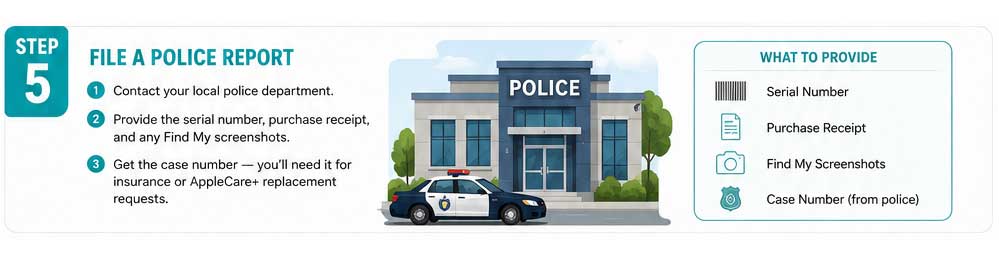
Step 5: File a Police Report
💡 Expert Insight
“The serial number is your paper trail, not your tracker.” Apple’s Find My network is a crowdsourced Bluetooth mesh — millions of Apple devices anonymously relay the last seen location of your AirPods. As of 2026, AirPods Pro 3 and AirPods 4 have improved Precision Finding that works even when the earbuds are separated from the case. Always keep Find My enabled before you need it. Turning it on after they’re gone is too late.
How Sarah Recovered Her AirPods Pro 2
Sarah, a college student in Austin, Texas, left her AirPods Pro 2 on a library table in January 2026. She didn’t notice for two hours. Here’s what she did:
Total recovery time: 47 minutes. The serial number wasn’t used to find them, but it was already documented — ready for a police report if needed.
AirPods Not Showing in Find My? Here’s Why
If your AirPods aren’t appearing in the Find My app, here are the most common reasons and fixes:
Reason 1: AirPods Were Never Paired to Your Apple ID
Fix: AirPods must be paired to an iPhone signed into your Apple ID. If you bought them secondhand and they were never linked to your account, they won’t appear.
Reason 2: Find My Was Disabled
Fix: Go to Settings > [Your Name] > Find My > Find My iPhone and toggle it on. Re-pair your AirPods afterward.
Reason 3: AirPods Are Out of Battery
Fix: Nothing you can do in real time — the last known location will remain visible until they’re charged and reconnected.
Reason 4: AirPods Are an Older Model (AirPods 1 or 2)
Fix: AirPods 1 and 2 have limited Find My functionality. They show last known location but cannot play a sound reliably when in the case.
Reason 5: You Removed Them from Your Apple Account
Fix: If you reset the AirPods or removed the device from your Apple ID, they won’t appear. Add them back by pairing them again.
How to Verify AirPods Authenticity Using the Serial Number
Bought AirPods secondhand? Use the serial number to confirm they’re genuine Apple products.
If the page says “We’re sorry, but this serial number is not valid” — the AirPods are likely counterfeit. Do not buy them.
This is also how you verify the warranty status before making a claim. Apple’s warranty checker uses the serial number as the primary identifier.
How to Add AirPods Pro 3 to Find My (2025–2026 Model)
AirPods Pro 3, released in late 2025, supports the most advanced Find My features to date.
iOS version note: Precision Finding for AirPods Pro 3 requires iOS 18.2 or later. If you’re running an older version, update first.
Found Someone Else’s AirPods? Here’s What to Do
If you find a pair of AirPods and want to return them to the owner:
Frequently Asked Questions
No. The serial number is an identifier, not a GPS tracker. To track stolen AirPods, you need the Find My app, and the AirPods must have been previously paired to your Apple ID with Find My enabled.
Go to Settings > Bluetooth > ⓘ on your iPhone while the AirPods are connected. The serial number appears there. Alternatively, check your Apple ID account at appleid.apple.com under Devices. You can also check your original purchase email from Apple.
If you previously removed your AirPods from Find My or your Apple ID, simply re-pair the AirPods to your iPhone. They’ll automatically appear in the Find My app again once paired to an Apple ID with Find My enabled.
Check that Find My is enabled under Settings > [Your Name] > Find My > Find My iPhone. Confirm the AirPods are paired to the same Apple ID. If they’re out of battery, they’ll show the last known location but won’t update in real time.
No. Apple does not provide remote tracking services using the serial number. Apple’s official recommendation is to use the Find My app. In cases of theft, Apple Support and law enforcement can use the serial number as a reference in their systems, but they cannot actively locate the device for you.
One Last Thing Before You Go
If your AirPods are currently safe and sound: take 30 seconds right now and do two things. First, open Settings > Bluetooth > ⓘ and screenshot your serial number. Second, open Settings > [Your Name] > Find My and make sure Find My is on.
Future you will be grateful.
→ Did this help? Share this guide with anyone who just bought new AirPods — especially those AirPods Pro 3 and AirPods 4 owners who haven’t set up Find My yet.
Have questions about a specific AirPods model or iOS version not covered here? Drop your question in the comments below.
Disclaimer: This article is for informational purposes only. Apple’s features, policies, and iOS interfaces may change with software updates. Always verify current functionality at apple.com/support or through your device’s Settings. AppleHeadlines.com is not affiliated with Apple Inc. Serial number tracking capabilities are subject to Apple’s privacy policies and technical limitations. If your AirPods have been stolen, contact local law enforcement in addition to Apple Support.

T’kal is the lead strategist and developer behind Apple Headlines. With a background in digital marketing and web development, he specializes in technical Apple troubleshooting, software news, and hardware rumors. T’kal focuses on delivering high-authority tech content that bridges the gap between Apple enthusiasts and the latest industry innovations.