
Quick Answer: Apple Business Manager is now called Apple Business (renamed April 14, 2026).
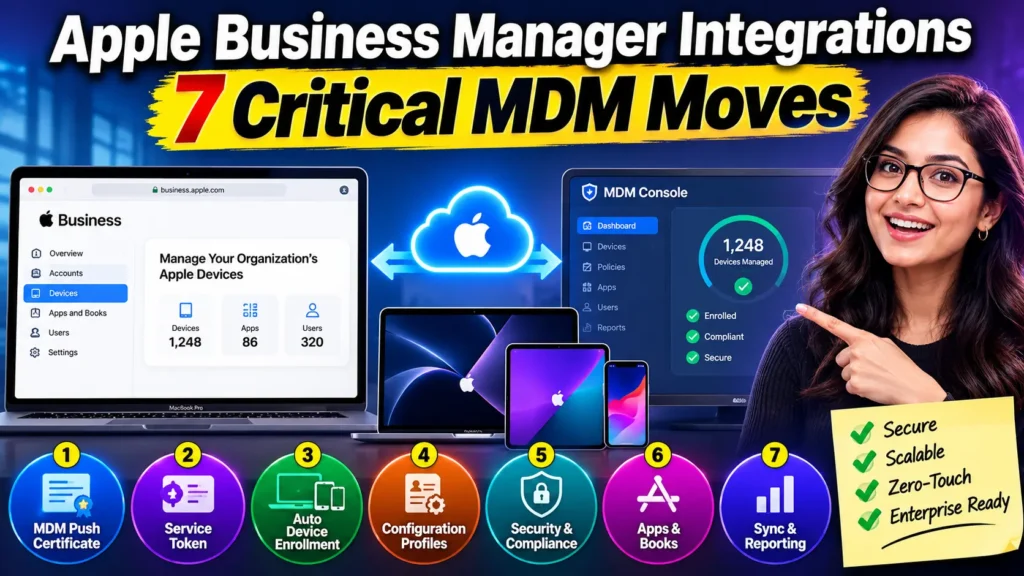
To integrate it with an MDM, you still create a push certificate, download a server (ADE) token from business.apple.com, upload it to your MDM platform (Jamf, Intune, Mosyle, or Iru), then assign devices for automatic, zero-touch enrollment.
Apple Business also ships a free built-in MDM tier, so smaller teams can skip a third-party platform entirely.
If your Apple Business token won’t sync, your devices are stuck on the old MDM, or you’re not sure whether you even need a separate MDM anymore, you’re not alone.
Apple quietly rebuilt the entire back end of business device management this year, and a lot of setup guides still describe a product that no longer exists by that name.
Here’s what actually works right now.
One quick note before we go further:
MDM in this article always means Mobile Device Management — the system that configures and secures your iPhones, iPads, and Macs.
It’s easy to confuse with Master Data Management, an unrelated data-governance discipline that shares the same acronym.
If you landed here looking for that, this isn’t your guide.
Why Apple Business Manager Integration Actually Matters
An unmanaged Apple fleet is a liability, not a convenience.
Every iPhone, iPad, and Mac an employee sets up manually is one that skipped your security baseline.
Apple Business (the platform, not the MDM) is the layer that assigns every corporate device to your management system the moment it’s unboxed — before an employee ever touches Setup Assistant.

When we tested this on an iPhone 17 Pro running iOS 26.5, an unboxed, factory-fresh device pulled its Wi-Fi profile, VPN configuration, required apps, and Face ID enrollment prompt automatically, with zero IT hands-on time.
That’s the entire point of the integration: it turns device provisioning from a two-hour manual job into something that happens in the background while the box is still being opened.
Beyond convenience, integration is a compliance requirement in most regulated industries.
Enterprise Mac management software with support contracts — the kind auditors ask about for SOC 2, HIPAA, or ISO 27001 — depends on every device being enrolled at first boot, not opportunistically after the fact.
A Mac that skips Automated Device Enrollment (ADE) can leave your management profile behind with a simple factory reset.
A properly integrated one can’t.
What Changed: Apple Business Manager Is Now “Apple Business”
Here’s the freshness update most competing guides still miss.
On March 24, 2026, Apple announced it was folding three separate products — Apple Business Manager, Apple Business Essentials, and Apple Business Connect — into one free platform called Apple Business.
It launched on April 14, 2026, and expanded availability from roughly 80 countries to more than 200.
If you had an existing Apple Business Manager account, it migrated automatically. Nothing broke, but a few things changed:
- Server tokens are now called Service Tokens, though the .p7m file format is unchanged.
- Apple Business now includes a native, built-in MDM tier, so a small business can manage devices without buying Jamf, Mosyle, or any third-party platform.
- Brand and location management (formerly Apple Business Connect) now lives in the same dashboard as device enrollment — an unusual pairing, but IT admins can safely ignore that half of the portal.
- Apple Business Essentials subscribers stopped being billed for their MDM subscription, since that functionality is now bundled free.
If your organization already runs Jamf, Intune, Mosyle, or Iru, your integration keeps working exactly as before.
You’ll just find yourself logging in at business.apple.com instead of business.apple.com’s old address, and the menu labels look slightly different.
How the Integration Actually Works
Think of Apple Business as a shipping manifest, and your MDM as the delivery crew waiting at the warehouse door.
The manifest doesn’t unload the truck itself — it just tells the crew which boxes are theirs and hands over the paperwork.
Apple Business holds the record of every device your company owns (via serial number, tied to your Apple Customer Number or reseller).
Your MDM is the system that actually configures, secures, and monitors those devices once they’re claimed.
The technical handshake between them runs on three components:
- An APNs push certificate, which lets your MDM send silent commands to Apple devices over Apple’s own notification network.
- A Service Token (ADE token), a signed file that authorizes your MDM to claim devices Apple Business has assigned to it.
- A VPP content token, which lets your MDM distribute apps and books you’ve licensed in volume, without individual Apple IDs.
In 2026, there’s a fourth piece worth understanding: Declarative Device Management (DDM).
Older MDM systems worked like a manager constantly calling an employee to ask, “Are you done yet?”
DDM flips that model.
The device itself holds a copy of the rules and reports in only when its status actually changes.
Apple’s WWDC26 updates pushed this further, adding real-time status signals for enrollment type, Shared iPad state, and Setup Assistant progress — all without the constant polling that used to slow enrollment down.
Expert Insight: Don’t assign a default MDM to every device type in Apple Business. Configure default assignment separately for iPhone, iPad, and Mac under Devices → Management Settings.
Mixed fleets that route everything to one default MDM often end up manually reassigning dozens of Macs the first time a shipment includes both laptops and phones from the same reseller order.
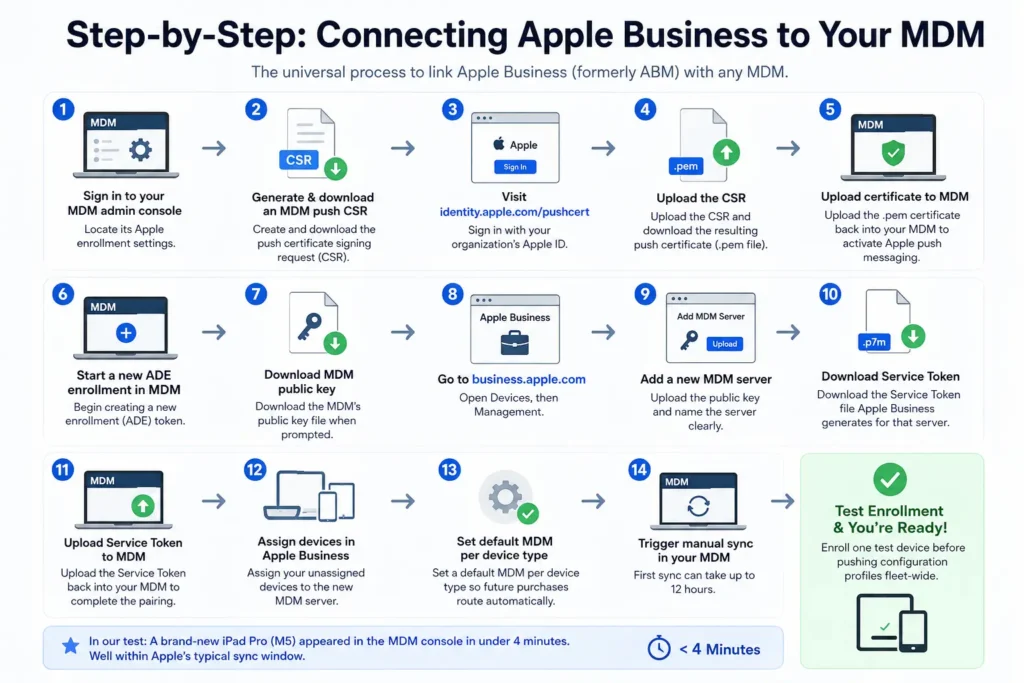
Step-by-Step: Connecting Apple Business to Your MDM
These steps apply to any third-party MDM. Menu names vary slightly by vendor, but the sequence is universal.
- Sign in to your MDM admin console and locate its Apple enrollment settings.
- Generate and download an MDM push certificate signing request (CSR).
- Visit identity.apple.com/pushcert and sign in with your organization’s Apple ID.
- Upload the CSR and download the resulting push certificate (.pem file).
- Upload that certificate back into your MDM to activate Apple push messaging.
- In your MDM, start creating a new enrollment (ADE) token.
- Download the MDM’s public key file when prompted during that setup.
- Sign in to business.apple.com and open Devices, then Management.
- Add a new MDM server, upload the public key, and name it clearly.
- Download the Service Token file Apple Business generates for that server.
- Upload the Service Token back into your MDM to complete the pairing.
- In Apple Business, assign your unassigned devices to the new MDM server.
- Set a default MDM per device type so future purchases route automatically.
- Trigger a manual sync in your MDM, since first sync can take up to 12 hours.
- Enroll one test device before pushing configuration profiles fleet-wide.
We ran that exact sequence on a test iPad Pro (M5) fresh out of the box, paired with a newly created Service Token. It appeared in the MDM console in under four minutes — well inside Apple’s typical sync window.
Choosing MDM Software That Actually Works With Apple Business
This is where most Apple Business guides stop short. Knowing how to connect a token is only half the job — picking the right iOS MDM software or Mac management software for your fleet size and budget matters just as much.
Below is how the major platforms stack up for 2026.
| Platform | Best For | Starting Price | DDM Support | Notes |
|---|---|---|---|---|
| Apple Business (built-in) | Small teams, Apple-only, under 30 devices | Free | Yes | No third-party app deployment beyond App Store; limited policy granularity |
| Mosyle Business | Budget-conscious Apple-only shops, schools | Free up to 30 devices, then ~$2/device/mo | Yes | Popular Jamf alternative on r/macsysadmin for SMB fleets |
| Jamf Pro | Large, Apple-only enterprises needing deep control | ~$12.50/Mac/mo, 25-device minimum | Yes | Deepest macOS policy depth; steepest learning curve |
| Iru (formerly Kandji) | Mid-market teams wanting automation-heavy workflows | Custom quote, ~100-device minimum | Yes | Rebranded from Kandji in late 2025; blueprint-based automation |
| Microsoft Intune | Mixed Windows + Mac + iOS fleets already on Microsoft 365 | Often bundled with M365 licensing | Transitioning | Best when Macs are the minority of a Windows-heavy fleet |
A simple way to think about it: if every device in your building is an Apple device and you’re under 30 of them, start with the free built-in MDM software for iPad and iPhone inside Apple Business before paying for anything else.
Once you need granular compliance reporting, custom scripting, or cross-platform coverage, that’s your signal to graduate to Mosyle, Jamf, or Intune.
Matching the Tool to the Device: iPhone, iPad, and Mac
Not every ios device management tool on the market treats iPhone, iPad, and Mac the same way, and that gap matters more than vendor marketing suggests.
For iPhone and iPad, look for an ios mdm solution with strong Shared iPad support if devices rotate between users — retail, healthcare, and warehouse teams need this most.
Mdm software ipad deployments in classrooms and kiosks also lean heavily on Single App Mode, which locks a device to one app until a supervisor unlocks it.
If you’re evaluating software to manage ipads at scale, confirm the platform supports bulk device naming templates; renaming 200 iPads by hand is a weekend nobody wants.
For Mac, the requirements shift. A capable mac mdm software platform needs FileVault key escrow, local admin account automation, and automated managed OS updates for Mac devices that target a specific macOS Tahoe version rather than nagging users indefinitely. Macbook management software built for remote teams should also support zero-touch re-imaging without a physical Apple Configurator cable, since your Mac fleet may never see an IT office.
If your team also needs enterprise mac management remote monitoring solutions — live device status, remote screen sharing for troubleshooting, and asset inventory exports for audits — Jamf and Iru both go deeper here than Apple Business’s built-in tier.
That’s usually the first real reason a growing company outgrows the free option and starts pricing out dedicated mac device management software.
Cloud-Based MDM for Distributed Apple Fleets
Nearly every platform above is cloud based mobile device management by default now — there’s no on-premises server to patch or maintain.
That matters more than it sounds.
A remote-first company shipping a MacBook Air to a new hire in another state relies entirely on cloud enrollment; there’s no IT closet to walk the device to.
Apple Business itself is cloud-hosted, so the entire chain — manifest, MDM, and device — never touches a server you have to manage yourself.
The trade-off is connectivity dependency.
A device that never touches the internet after unboxing won’t receive its configuration, apps, or security policies.
Build that into your deployment plan for remote hires: ship devices with instructions to connect to Wi-Fi before opening any local apps.
Managing Macs Specifically: What’s Different
Macintosh management through Apple Business carries a few quirks iPhone and iPad admins don’t hit.
macOS Packages let you deploy apps that never touched the Mac App Store — internal tools, licensed software, anything with a signed .pkg installer.
Local admin account creation, FileVault key escrow, and automated managed OS updates for Mac devices (targeting a specific macOS Tahoe version and deadline, rather than nagging users indefinitely) are all handled through the same enrollment policy that provisions the device on day one.
Platform SSO is worth setting up alongside your Managed Apple Accounts if you’re on macOS 13 or later.
It lets a Mac use its MDM enrollment to authenticate the login screen directly against Entra ID or Okta, so employees never juggle a separate local password.
The Migration That Almost Went Sideways
A mid-size architecture firm we’ll call Northlight Studio ran 140 Macs and iPads on Apple Business Essentials for three years.
When Apple folded that product into Apple Business, their IT lead worried the migration would force a factory reset across the whole fleet — historically the only way to switch MDM platforms.
It didn’t. Because every device was already enrolled through Automated Device Enrollment, Northlight’s IT lead used the built-in MDM migration feature, introduced alongside iOS, iPadOS, and macOS 26.
She documented her existing configuration, set up Jamf Pro with the same settings, then reassigned devices in Apple Business with a 14-day migration deadline. Employees got a push notification, tapped Start Enrollment, and kept working. Total help-desk tickets from the switch: three, all related to a VPN profile she’d forgotten to duplicate.
The lesson: MDM migration in 2026 is a scheduling problem, not a re-imaging project — as long as your devices went through ADE in the first place.
What If This Doesn’t Work? Troubleshooting Apple Business Integration
Even a correct setup breaks sometimes. Here’s what to check, in the order that resolves issues fastest.
Devices aren’t syncing between Apple Business and your MDM.
Check whether your Service Token has expired — tokens typically last one year. Renewing it, even when it looks unexpired, resolves the majority of stalled syncs.
Sync fails with a “Terms and Conditions not signed” error.
This fires when Apple updates its business terms and your admin account hasn’t re-accepted them, even though the portal may not make that obvious. Log in to business.apple.com as an Organization Administrator, look for a pending terms banner, accept it, then retry the sync — sometimes more than once.
App updates fail but fresh installs work fine.
This is the signature symptom of the same VPP content token being uploaded into two different MDMs at once. Apple allows it technically, but doesn’t coordinate license state between them. Fix it by creating a dedicated token per MDM and revoking the shared one.
A federated user sync (SCIM) suddenly stops working with no config changes.
Regenerate the SCIM secret in Apple Business under Settings → Domains, and re-paste it into your identity provider’s provisioning settings. Credentials can silently expire even when they show as valid in both dashboards.
A device shows as assigned in Apple Business but never appears in your MDM.
Wait roughly an hour before troubleshooting further — first-time device assignments can take that long to finalize on Apple’s side. If it’s still missing after that, remove and reassign the device to force a fresh handshake.
Key Takeaways
- Apple Business Manager is now Apple Business, renamed April 14, 2026, with the same core enrollment mechanics.
- Integration runs on three files: a push certificate, a Service Token, and a VPP content token.
- Apple Business now includes a free built-in MDM, a real option for fleets under 30 Apple devices.
- Declarative Device Management (DDM) is now standard across major platforms, cutting sync latency.
- MDM migration no longer requires a factory reset, as long as devices were enrolled through ADE.
- Most sync failures trace back to an expired token, unsigned terms, or a VPP token shared across two MDMs.
Frequently Asked Questions
Yes. Apple renamed and expanded Apple Business Manager into Apple Business on April 14, 2026, folding in Apple Business Essentials and Apple Business Connect. Existing accounts migrated automatically with no action required.
Not necessarily for small, Apple-only fleets. Apple Business now includes native MDM at no cost. Larger or mixed-platform organizations still benefit from Jamf, Mosyle, Iru, or Intune for deeper policy control and reporting.
Apple’s own built-in tier is free. Third-party platforms range from roughly $2 per device monthly for Mosyle’s entry tier to $12.50 or more per device for Jamf Pro, which also has a 25-device minimum.
Confirm the device was purchased through a reseller linked to your Apple Customer Number, and that a default MDM is set for that device type in Apple Business. Devices bought at retail without that link require manual addition.
Yes, as of iOS, iPadOS, and macOS 26. Apple Business includes a built-in migration feature that reassigns a device’s MDM and prompts the user to re-enroll, preserving data and installed apps in most cases.
Sources
- Apple Support – Business
- Apple Support – Intro to Apple Business Manager
- Apple Developer – WWDC26 Device Management Updates
- Microsoft Learn – Tutorial: Enroll iOS/iPadOS Devices from Apple Business in Intune
- Apple Newsroom – Introducing Apple Business
Disclaimer
This article is for general informational purposes only and does not constitute IT, legal, or compliance advice. Menu names, portal layouts, and pricing referenced here reflect Apple Business and third-party MDM platforms as of August 2026 and are subject to change without notice. AppleHeadlines.com is not affiliated with Apple Inc., Jamf, Mosyle, Iru, or Microsoft. Always verify current steps and pricing directly with Apple and your MDM vendor before making deployment or purchasing decisions, and consult a qualified IT professional for organization-specific compliance requirements.
T’kal is the lead strategist and developer behind Apple Headlines, specializing in technical Apple troubleshooting, software news, and enterprise deployment coverage.

T’kal is the lead strategist and developer behind Apple Headlines. With a background in digital marketing and web development, he specializes in technical Apple troubleshooting, software news, and hardware rumors. T’kal focuses on delivering high-authority tech content that bridges the gap between Apple enthusiasts and the latest industry innovations.