




iOS 26.3 Release Date and Rollout
Apple officially released iOS 26.3 on February 11, 2026, following several weeks of beta testing and a release candidate phase.
The update rolled out globally to all eligible iPhones, with a staged release over several days to ensure stability and minimize server congestion.
As with previous updates, users could download iOS 26.3 over the air by navigating to Settings > General > Software Update on their devices.
The release came nearly two months after iOS 26.2, and while it is not as feature-packed as some earlier versions,
Apple emphasized its importance due to critical security fixes and regulatory compliance, especially in the European Union.
What’s New in iOS 26.3: Features and Changes
While iOS 26.3 is not a major feature overhaul, it introduces several meaningful improvements that enhance user experience, privacy, and interoperability.
Here’s a breakdown of the most notable additions:
1. Transfer to Android: Smoother Cross-Platform Switching
Perhaps the most headline-grabbing feature is the new Transfer to Android tool.


This addition allows users to move their data—including photos, messages, notes, apps, passwords, and phone numbers—from an iPhone to an Android device simply by placing the two devices side by side.
The process is wireless, streamlined, and does not require any third-party apps, marking a significant improvement over previous, more cumbersome methods.
Photos, messages, contacts, notes, apps, passwords, and phone numbers.
Health data, Bluetooth-paired devices, and locked notes remain on the iPhone for privacy and security reasons.
This feature is available worldwide, not just in the EU, reflecting a broader industry move toward easier device switching and user empowerment.
2. Weather Wallpapers: More Personalization
iOS 26.3 introduces a dedicated Weather wallpaper section in the Lock Screen customization options.
Previously, Weather and Astronomy wallpapers were grouped together, but now Weather has its own category with three pre-designed, live-updating wallpapers.
These wallpapers reflect real-time weather conditions and offer different font and widget styles for added personalization.
3. Limit Precise Location: Enhanced Privacy Controls
A new privacy feature, Limit Precise Location, allows users to restrict how accurately their location is shared with cellular networks.
When enabled, carriers can only determine the general neighborhood rather than the exact street address of the device.
This setting is available only on iPhones with Apple’s C1 or C1X modems (currently the iPhone 16e and iPhone Air) and requires carrier support.
Supported carriers:
Boost Mobile (US), EE and BT (UK), Telekom (Germany), AIS and True (Thailand).
How to enable:
Go to Settings > Cellular > Mobile Data Options > Limit Precise Location. A device restart is required after toggling the setting.
This feature does not affect emergency services or app-based location sharing, focusing solely on limiting what mobile networks can access.
4. Notification Forwarding (EU Only): Third-Party Wearable Support
To comply with the EU’s Digital Markets Act, iOS 26.3 introduces Notification Forwarding for third-party wearables, such as Android smartwatches.
This feature allows iPhone notifications to be forwarded to a single non-Apple device at a time.
When enabled, notifications will not appear on the Apple Watch, ensuring users must choose their primary wearable.
How it works:
Enable via Settings > Notifications > Notification Forwarding. Select which third-party device should receive notifications.
Limitations:
Only one device can receive notifications at a time. Notification content, including app names and message previews, is forwarded, raising some privacy considerations.
This change is currently limited to EU users and is part of Apple’s efforts to address antitrust concerns and promote interoperability.
5. Proximity Pairing (EU Only): AirPods-Like Setup for Third-Party Accessories
Another EU-specific feature is Proximity Pairing for third-party headphones and smartwatches.
This allows users to pair non-Apple accessories with their iPhone using a simple, one-tap process by bringing the accessory close to the device—similar to how AirPods pair.
Who benefits?
EU users with third-party headphones or smartwatches, such as JBL earbuds or Pebble watches, can now enjoy a seamless pairing experience previously reserved for Apple products.
6. High-Bandwidth Peer-to-Peer Wi-Fi and Expanded NFC (EU Only)
iOS 26.3 also lays the groundwork for high-bandwidth peer-to-peer Wi-Fi connections and expanded NFC access for third-party apps in the EU.
These changes allow developers to create AirDrop-like features and enable tap-to-pay or transit card functionality outside of Apple Wallet, further opening the iOS ecosystem to competition and innovation.
7. Other Small Changes and Visual Tweaks
Wallpaper Gallery:
Weather and Astronomy wallpapers are now separated for easier browsing and selection.
Privacy Dashboard:
A new dashboard shows recent sensor access and allows users to set expiration dates for health data (reported in some sources, may be region-specific or phased rollout).
Minor UI Refinements:
Subtle changes in the Settings app and notification management improve usability and clarity.
Security Updates and Bug Fixes

Security is the central focus of iOS 26.3.
Apple addressed over 35 vulnerabilities, including a critical zero-day exploit in the dyld dynamic link editor (CVE-2026-20700), which had been actively used in sophisticated attacks against targeted individuals on earlier iOS versions.
Key Security Fixes
| Vulnerability/Component | Impact | CVE/Details |
|---|---|---|
| dyld (Dynamic Link Editor) | Arbitrary code execution; exploited in the wild | CVE-2026-20700 |
| CoreAudio | App termination via malicious media file | CVE-2026-20611 |
| Game Center | Sensitive information exposure | CVE-2026-20649 |
| Messages | Sandbox bypass via shortcut | CVE-2026-20677 |
| Photos | Lock Screen photo access | CVE-2026-20642 |
| Kernel | Privilege escalation, network traffic interception | Multiple CVEs |
| Bluetooth | Denial-of-service via crafted packets | CVE-2026-20650 |
| WebKit | Denial-of-service, memory handling, tracking via extensions | Multiple CVEs |
Apple’s official security notes confirm that these and other vulnerabilities were patched across iOS, iPadOS, macOS, watchOS, tvOS, and visionOS.
The company strongly recommends all users update immediately to reduce exposure to potential attacks.
Bug Fixes and Stability Improvements
Beyond security, iOS 26.3 delivers:
Performance enhancements: Faster app loading, smoother animations, and improved multitasking, especially on newer devices.
Battery optimizations: Some users report better battery life after updating, though experiences vary by device and usage patterns.
System stability: Reduced crashes and glitches, with under-the-hood refinements for a more reliable experience.
Region-Specific Features: EU-Only Changes
A significant portion of iOS 26.3’s new features are exclusive to the European Union, driven by the Digital Markets Act (DMA) and regulatory requirements.
EU-Only Features
Notification Forwarding: Forward iPhone notifications to a third-party wearable (e.g., Android smartwatch).
Only one device can receive notifications at a time, and enabling this disables Apple Watch notifications.
Proximity Pairing: One-tap pairing for third-party headphones and smartwatches, similar to AirPods setup.
Expanded NFC Access: Third-party apps can use NFC for tap-to-pay and transit cards, no longer limited to Apple Wallet (pending regulatory approval).
High-Bandwidth Peer-to-Peer Wi-Fi: Enables AirDrop-like data transfer and accessory communication for third-party devices.
These features are not available in the US or other regions, reflecting Apple’s compliance with EU regulations and ongoing antitrust scrutiny.
Compatibility and Supported Devices
iOS 26.3 is available for all iPhones that support iOS 26. This includes:
Some features, such as Limit Precise Location, require newer hardware (C1/C1X modems) and specific carrier support.
How to Update to iOS 26.3
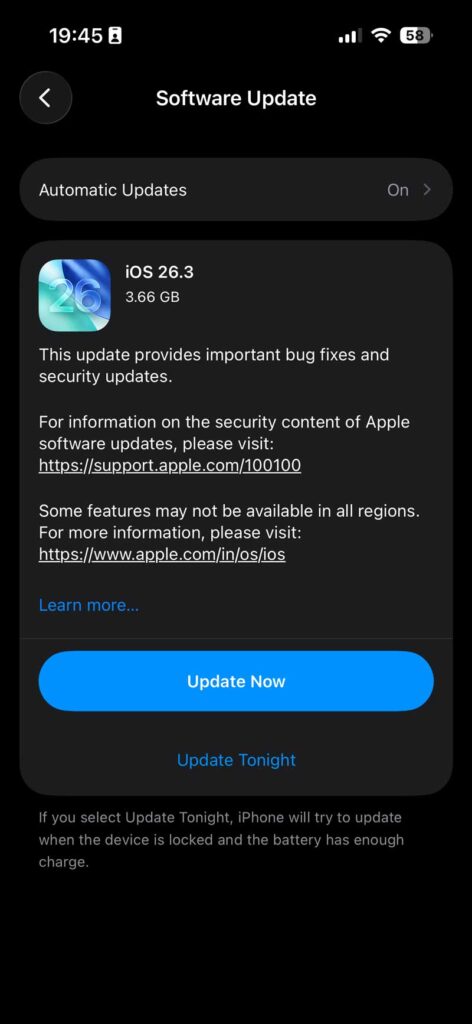
Updating is straightforward:
Tips before updating:
User Reactions and Known Issues
User Feedback
General sentiment around iOS 26.3 is that it’s a “must-have” update for security, but not a game-changer for features.
Many users appreciate the smoother Android transfer process and privacy enhancements, while others note the update feels incremental compared to previous releases.
Positive reactions:
Security focus: Users value Apple’s commitment to patching vulnerabilities quickly.
Performance: Reports of improved battery life and smoother animations, especially on newer devices.
Personalization: The new Weather wallpapers are a small but welcome touch for customization fans.
Common complaints:
Large update size: Some users are frustrated by the large download size (10GB+), especially on devices with limited storage.
Feature limitations: Many new features are hardware- or region-specific, leaving some users feeling left out.
Continuity bugs: Beta testers reported broken Continuity features (like iPhone Mirroring and AirPlay) on the latest devices, though these issues appear to have been resolved in the final release.
Ongoing keyboard issues: Some users continue to report keyboard glitches that have persisted since iOS 26.1, though these are not directly addressed in 26.3.
Known Issues and Warnings
Notification Forwarding privacy: Forwarded notifications include full content, raising privacy concerns if sent to third-party devices.
Feature delays: Some EU-specific features, such as Notification Forwarding and Proximity Pairing, may be delayed or limited in the initial rollout and could see further refinement in iOS 26.4.
Storage requirements: The update may prompt for more free space than previous versions, but actual download size is often smaller than displayed.
What’s Coming in iOS 26.4
Apple is already preparing the next major update, iOS 26.4, expected to enter beta later in February 2026 and launch publicly in March or April. Here’s what’s rumored and confirmed:
1. Siri’s AI Overhaul
iOS 26.4 is set to deliver a major upgrade to Siri, powered by Google’s Gemini AI technology. This will bring:
Personal context awareness: Siri will understand user-specific information and context.
On-screen awareness: Siri can interact with content currently displayed on the device.
Hundreds of new in-app and cross-app actions: Expanding Siri’s usefulness across the iPhone ecosystem.
While these changes are significant, some advanced features may be delayed to iOS 26.5 or iOS 27 due to development challenges.
2. New Emoji
Following Apple’s tradition, iOS 26.4 is expected to add nine new emoji, including Apple Core, Ballet Dancers, Distorted Face, Fight Cloud, Hairy Creature, Landslide, Orca, Trombone, and Treasure Chest.
3. Freeform App Enhancements
The Freeform collaboration app will likely gain folder support and new organizational tools, making it easier to manage boards and content.
4. Expanded AutoFill and Apple TV Features
AutoFill for credit cards may be extended to third-party apps, and the Apple TV app could see a new “Sports Tier” for expanded sports content.
5. Device Integrity Checks
A new validation system may check device integrity before allowing Apple ID and iCloud login, potentially restricting access for jailbroken or modified devices.
6. Further EU Compliance
Additional EU-specific features, such as full Notification Forwarding and Proximity Pairing, may be refined and expanded in iOS 26.4.
Summary Table: iOS 26.3 at a Glance
| Feature/Change | Description | Availability |
|---|---|---|
| Transfer to Android | Wireless, app-free data transfer to Android devices | Global |
| Weather Wallpapers | Dedicated Weather section with live, customizable wallpapers | Global |
| Limit Precise Location | Restricts carrier location tracking to neighborhood level | Select devices/carriers |
| Notification Forwarding | Forward notifications to third-party wearables (one device at a time) | EU only |
| Proximity Pairing | AirPods-like one-tap pairing for third-party accessories | EU only |
| High-Bandwidth Peer-to-Peer Wi-Fi | Enables AirDrop-like features for third-party devices | EU only |
| Expanded NFC Access | Third-party apps can use NFC for tap-to-pay and transit cards | EU only |
| Security Fixes | 35+ vulnerabilities patched, including critical zero-day exploit | Global |
| Performance & Stability | Smoother animations, better battery life, reduced crashes | Global |
| Supported Devices | iPhone 11 and newer, iPhone SE (2nd/3rd gen), iPhone Air | Global |
Final Thoughts
iOS 26.3 is a security-focused update that quietly but meaningfully improves the iPhone experience.
Its standout feature is the new, seamless Transfer to Android tool, which, alongside privacy enhancements and EU-specific interoperability changes, signals Apple’s willingness to adapt to both user needs and regulatory demands.
While not a flashy release, the update is essential for maintaining device security and preparing for bigger changes—especially the much-anticipated Siri overhaul—coming soon in iOS 26.4.
Should you update?
Absolutely.
The security patches alone make iOS 26.3 a must-have for all eligible iPhone users.
Even if you’re not planning to switch to Android or use third-party wearables, the performance, privacy, and stability improvements are worth the quick upgrade.
Ready to update?
Go to Settings > General > Software Update and install iOS 26.3 today to keep your iPhone secure, private, and ready for what’s next.

Virginia J. Alfonso is a seasoned technology writer with a passion for all things digital. With over a decade of experience covering the latest in tech innovation, gadgets, and software, Virginia brings a unique blend of technical expertise and accessible writing to her work. Her articles focus on making complex tech topics easy to understand for readers of all levels.