







Managing a fleet of Apple devices across an organization can feel overwhelming without the right tools.
You’re an IT administrator overseeing hundreds of iPhones or a small business owner managing a handful of iPads, Apple device management provides the framework you need to configure, secure, and monitor devices remotely—all without touching them physically.
Apple’s built-in Mobile Device Management (MDM) framework has revolutionized how organizations handle their Apple ecosystem.
From pushing security updates to remotely wiping lost devices, this powerful system ensures your company’s data stays protected while keeping employees productive.
In this comprehensive guide, we’ll explore everything you need to know about Apple device management, from basic concepts to advanced deployment strategies.
What is Apple Device Management?
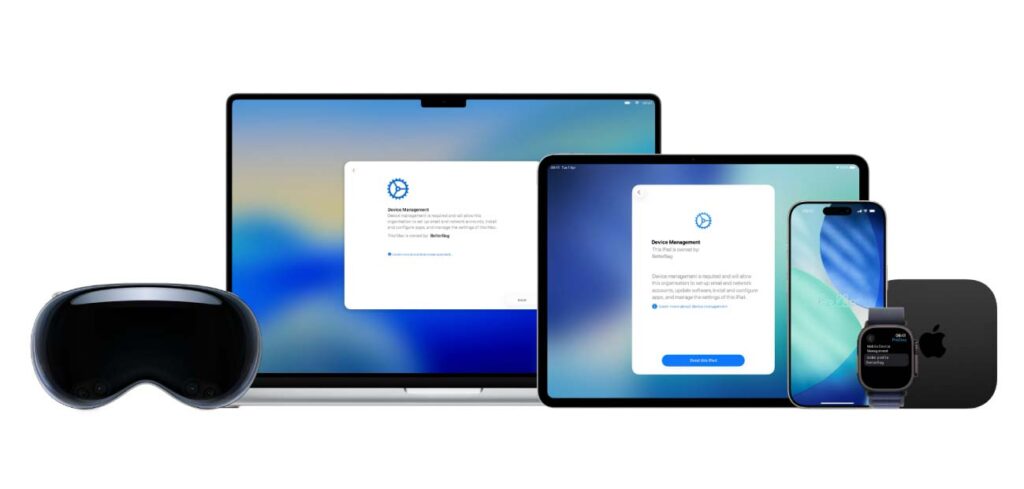
Apple device management, commonly referred to as Mobile Device Management (MDM), is Apple’s native framework that allows IT administrators to remotely configure, secure, and manage Apple devices including iPhones, iPads, Macs, and Apple TVs.
Think of it as a centralized control center for your entire Apple device fleet.
Unlike consumer-level device management, MDM operates at the system level.
It integrates directly with iOS, iPadOS, macOS, and tvOS, giving administrators unprecedented control over device settings, applications, and security policies.
This isn’t about surveillance, it’s about creating a secure, compliant, and efficient work environment.
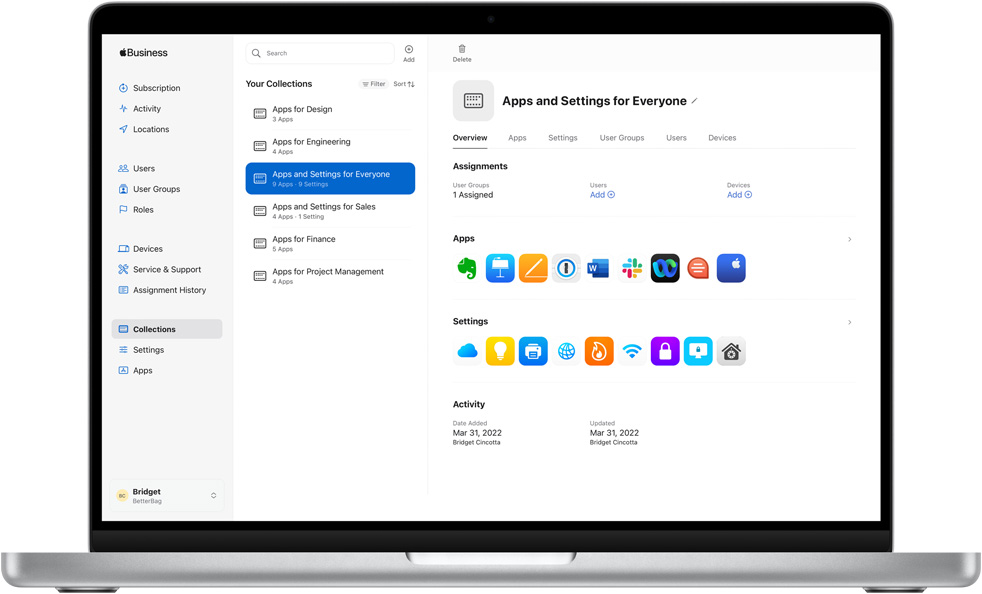
The system works seamlessly with Apple Business Manager and Apple School Manager, which serve as enrollment portals for organizations and educational institutions respectively.
These services enable automated device enrollment the moment a device is purchased from Apple or an authorized reseller.
How Apple Device Management Works
Understanding the technical workflow helps demystify how your IT team maintains control over distributed devices.
The Four-Step Process
1. Device Enrollment
Devices enter the management ecosystem through either automated enrollment (via Apple Business/School Manager) or manual user enrollment.
Automated enrollment is the gold standard—devices are pre-assigned to your organization at the point of purchase, ensuring they connect to your MDM server during initial setup.
2. MDM Server Connection
Once enrolled, devices communicate with an MDM server.
This could be a third-party solution like Jamf Pro, Cisco Meraki, Microsoft Intune, or VMware Workspace ONE.
The MDM server acts as the command center, storing all your policies and configurations.
3. Profile and Command Distribution
The MDM server sends configuration profiles (bundles of settings) and commands (specific actions) to devices through Apple’s Push Notification Service (APNS).
This encrypted channel ensures secure communication between your server and every managed device.
4. Device Execution
Devices receive and automatically apply the profiles or execute commands.
Users might see a new Wi-Fi network appear, email accounts configure themselves, or security restrictions activate—all happening seamlessly in the background.
Features of Apple Device Management
Modern apple device manager solutions offer extensive capabilities that go far beyond basic oversight.
Configuration and Security Management
- Network Settings: Automatically configure Wi-Fi, VPN, and cellular settings across all devices
- Email and Calendar: Push corporate email accounts and calendar configurations without user intervention
- Security Policies: Enforce passcode requirements, encryption standards, and authentication methods
- Privacy Controls: Manage Privacy Preferences Policy Control (PPPC) to grant or restrict app permissions
Software and Application Control
- Deploy approved apps silently to devices without user interaction
- Push iOS, iPadOS, and macOS updates on your schedule
- Distribute licensed content including books and educational materials
- Restrict or disable access to App Store, iTunes, and iCloud services based on policy
Remote Device Actions
IT administrators gain powerful remote capabilities:
- Lock devices remotely if lost or stolen
- Wipe devices completely to protect sensitive data
- Locate devices using real-time GPS tracking
- Send messages to display on lock screens (useful for lost device recovery)
- Restart or shut down devices remotely
Automated Enrollment and Zero-Touch Deployment
Apple Business Manager and Apple School Manager enable truly automated deployment. Devices can be:
- Pre-configured before employees receive them
- Automatically enrolled during out-of-box setup
- Prevented from being activated without MDM enrollment
- Configured with mandatory supervision for maximum control
Pros and Cons of Apple Device Management
Advantages
Enhanced Security and Compliance
Organizations can enforce industry-specific compliance requirements (HIPAA, GDPR, SOC 2) through granular security controls. Lost devices can be wiped instantly, preventing data breaches.
Reduced IT Workload
Zero-touch deployment means devices arrive ready to use. Employees unbox their devices, and configurations apply automatically. This saves countless IT hours previously spent on manual setup.
Consistent User Experience
Every employee gets the same corporate settings, approved apps, and security policies. This standardization reduces support tickets and improves productivity.
Cost Efficiency
Automated processes reduce the need for hands-on IT intervention.
Remote troubleshooting capabilities minimize downtime and eliminate travel costs for distributed teams.
Scalability
Managing 10 devices or 10,000, the process remains the same.
As your organization grows, your device management scales effortlessly.
Disadvantages
Initial Setup Complexity
Implementing MDM requires technical expertise.
Organizations need to configure their MDM server, integrate with Apple Business Manager, obtain APNS certificates, and create policies—a process that can take weeks.
Cost Considerations
While Apple’s frameworks are free, MDM server solutions require licensing fees.
Enterprise-grade platforms can cost $3-10 per device monthly, plus implementation costs.
User Privacy Concerns
Employees may feel uncomfortable with management capabilities, especially on personal devices.
Clear communication about what IT can and cannot see is essential.
Internet Dependency
MDM relies on internet connectivity. Devices offline for extended periods won’t receive updates or commands until they reconnect.
Learning Curve
IT teams need training on their chosen MDM platform. The feature depth can overwhelm newcomers, requiring dedicated time for skill development.
Apple Device Management vs. Traditional IT Management
| Feature | Apple Device Management | Traditional IT Management |
|---|---|---|
| Deployment Method | Over-the-air, automated | Manual, hands-on |
| Physical Access Required | No | Yes |
| Setup Time per Device | Minutes | Hours |
| Remote Capabilities | Extensive (lock, wipe, configure) | Limited |
| User Experience | Seamless, invisible | Disruptive, noticeable |
| Scalability | Highly scalable | Labor-intensive |
| OS Integration | Native, deep integration | Third-party tools |
| Security Updates | Pushed remotely | Manual installation |
Real-World Use Cases
Healthcare Organizations
Hospitals deploy iPads to nurses for patient record access.
MDM ensures devices meet HIPAA requirements by enforcing encryption, automatic screen locks, and restricting data sharing. If a device goes missing,
IT can remotely wipe it within minutes.
Educational Institutions
Schools managing thousands of iPads for students use Apple School Manager for automated enrollment.
Teachers receive pre-configured devices with educational apps installed, classroom restrictions enabled, and shared iPad support for multiple student logins.
Retail Environments
Retail stores use MDM to configure point-of-sale iPads in kiosk mode, restricting access to only the payment app.
Devices automatically join store Wi-Fi, and managers can remotely update pricing information across all locations simultaneously.
Corporate BYOD Programs
Companies implementing Bring Your Own Device (BYOD) policies use user enrollment to manage corporate apps and data while respecting employee privacy.
Work email and documents remain separate from personal content.
Remote Workforce Management
Organizations with distributed teams rely on automated enrollment to ship devices directly to employees’ homes.
Workers unbox their MacBooks, and corporate settings configure automatically—no IT visit required.
How to Check if Your Device is Managed
Wondering if your Apple device is under MDM control? Here’s how to verify:
On iPhone or iPad:
- Open the Settings app
- Navigate to General
- Look for VPN & Device Management
- If present, tap it to see management profiles and the managing organization
On Mac:
- Click the Apple menu (top-left corner)
- Select System Settings
- Choose General
- Click Device Management
- View the management profile and organization details
If you don’t see these options, your device isn’t currently managed. Corporate-owned devices typically display this clearly during setup.
More Read
Choosing the Right MDM Solution
Selecting an apple device manager platform depends on your organization’s specific needs.
Popular MDM Platforms
Jamf Pro – The industry leader for Apple-focused organizations, offering the deepest feature set for macOS, iOS, and iPadOS management.
Microsoft Intune – Ideal for organizations already invested in Microsoft 365, providing unified management for Windows and Apple devices.
Cisco Meraki Systems Manager – Perfect for networking-focused companies, integrating device management with Cisco’s broader infrastructure tools.
VMware Workspace ONE – Enterprise-grade solution for organizations managing diverse device ecosystems beyond just Apple products.
Selection Criteria
- Organization size: Small businesses may prefer simpler solutions; enterprises need advanced features
- Budget: Consider per-device licensing costs and implementation expenses
- Existing infrastructure: Integration with current systems (Active Directory, cloud services)
- Platform mix: Managing only Apple devices or a multi-platform environment
- Technical expertise: In-house IT capabilities versus managed service requirements
Getting Started with Apple Device Management
Step-by-Step Implementation
1. Enroll in Apple Business Manager or Apple School Manager
Visit business.apple.com or school.apple.com to create your account. You’ll need to verify your organization’s legal entity.
2. Select and Configure an MDM Solution
Choose your MDM platform and complete the initial setup. This includes obtaining an Apple Push Notification Service (APNS) certificate—a critical component for device communication.
3. Define Your Device Policies
Create configuration profiles for Wi-Fi, email, security settings, and app deployment. Start with essential policies and expand over time.
4. Set Up Automated Enrollment
Link your Apple Business/School Manager account to your MDM server. Assign purchased devices to specific departments or users.
5. Deploy and Test
Start with a pilot group before full rollout. Test all configurations and gather feedback to refine policies.
6. Train Your IT Team and Users
Ensure IT staff understand the MDM platform’s capabilities. Educate employees about managed device expectations and privacy policies.
Frequently Asked Questions
1. Can Apple Device Management see my personal data?
No. MDM can enforce policies and manage settings, but it cannot access personal content like photos, messages, or browsing history.
On personally-owned devices using User Enrollment, work and personal data remain strictly separated.
2. What happens if I leave my organization?
When you leave, IT can remotely remove the management profile and all corporate data from your device.
On company-owned devices, this might result in a full wipe. Personal devices retain all personal content—only work-related data is removed.
3. Can MDM track my location at all times?
Location tracking is policy-dependent. Organizations can enable location services for lost device recovery, but continuous tracking requires the device to be in Lost Mode. Most organizations only use location features when a device is reported missing.
4. Is Apple Device Management required for all company devices?
While not legally required, most organizations mandate MDM enrollment for devices accessing corporate resources. This protects company data and ensures compliance with security policies and regulations.
5. Can I remove MDM from my device myself?
On personally-owned devices with User Enrollment, you can remove the management profile through Settings.
This will remove all work apps and data. Company-owned devices often have supervised enrollment, which prevents removal without IT authorization.
The Future of Apple Device Management
Apple continues evolving its management frameworks with each OS release. Recent innovations include:
- Declarative Device Management: A more efficient, state-based approach that reduces server communication and improves battery life
- Enhanced Privacy Controls: More granular options for balancing management needs with user privacy
- Platform SSO: Streamlined authentication across all managed apps and services
- Advanced Identity Management: Better integration with modern identity providers and zero-trust architectures
As remote work becomes permanent and security threats evolve, Apple device management will only grow more sophisticated. Organizations investing in robust MDM strategies today position themselves for seamless scaling and enhanced security tomorrow.
Conclusion
Apple device management has transformed from a nice-to-have feature into an essential business tool.
You’re managing a handful of devices or thousands, MDM provides the security, efficiency, and control modern organizations demand.
The initial investment in planning and implementation pays dividends through reduced IT workload, enhanced security, and improved user experiences.
As Apple’s ecosystem continues expanding in enterprise environments, mastering device management becomes not just technical necessity but competitive advantage.
Ready to implement apple device management for your organization?
Start by evaluating your specific needs, exploring MDM solutions that align with your infrastructure, and consulting with Apple-certified consultants if needed.
The journey to streamlined device management begins with a single enrolled device—and the benefits multiply from there.
Is your organization ready to harness the power of Apple device management?
Assess your current device inventory, identify your security requirements, and take the first step toward centralized, secure Apple device management today.
Your IT team—and your users—will thank you.

Virginia J. Alfonso is a seasoned technology writer with a passion for all things digital. With over a decade of experience covering the latest in tech innovation, gadgets, and software, Virginia brings a unique blend of technical expertise and accessible writing to her work. Her articles focus on making complex tech topics easy to understand for readers of all levels.

 helps organizations securely manage iPhones, iPads, and Macs remotely through profiles, commands, and systems.)