




Your iPhone used to last all day. Now it’s dead by 2 PM. You’re not losing your mind — your battery is losing its life.
The good news?
An iPhone battery replacement costs a fraction of a new phone, takes as little as an hour, and can make a three-year-old iPhone feel brand new.
This guide tells you everything: the real costs by model, the right time to replace, where to go, and what the repair shops won’t tell you upfront.
Topic in Seconds:
- Check battery health now: Settings > Battery > Battery Health & Charging. Replace if below 80%.
- AppleCare+ users may get free replacement — check your coverage before paying anything.
- Apple charges $69–$99 depending on your model for out-of-warranty replacements in 2026.
- Best Buy iPhone battery replacement is a legitimate, authorized option — often with faster appointment availability.
- A $89 repair can save you $700+ compared to buying a new iPhone.
- DIY is possible for out-of-warranty phones using Apple’s Self Service Repair program or iFixit kits — but carry real risks for beginners.
- If battery drain continues after replacement, the issue is software or hardware, not the battery itself.
- iPhone battery replacement time is typically 1–2 hours at Apple or Best Buy, or 30–60 minutes for a careful DIY attempt.
Why Your iPhone Battery Dies Faster Over Time
Before you book any appointment, it helps to understand why this happens.
Think of your iPhone battery like a rechargeable rubber band.
Every time you stretch it (charge and discharge it), it loses a tiny bit of elasticity.
After 500 full charge cycles – roughly 18 months to 2 years of daily use — that rubber band can only stretch to about 80% of its original length.
The result: iPhone battery draining fast, unexpected shutdowns, and your phone throttling its own performance just to stay on.
Apple’s lithium-ion batteries are engineered to retain up to 80% of their original capacity at 500 complete charge cycles.
Once you drop below that 80% threshold, you’ll start noticing real-world performance hits.
How to Check Your iPhone Battery Health Right Now
Don’t guess. Apple gives you a built-in health meter:
What the numbers mean:
When Should You Replace Your iPhone Battery?
This is the most searched question, and the answer is more nuanced than “below 80%.”
You should replace your battery if you notice ANY of these:
Pro Tip — Expert Insight: “Don’t wait for the ‘Service Recommended’ message to appear. By the time iOS shows that warning, most batteries are already performing at significantly reduced capacity. I tell every client: replace at 79% or lower, or if the phone is dying before the end of a workday — whichever comes first.” — Veteran Apple Authorized Service technician with 12 years of Genius Bar experience.
iPhone Battery Replacement Cost: Full 2026 Price Breakdown
This is where most articles give you vague ranges. Here’s the full picture.
Apple Official Pricing (Out-of-Warranty, 2026)
| iPhone Model | Apple Replacement Cost |
|---|---|
| iPhone 16 series | $99 |
| iPhone 15 series | $99 |
| iPhone 14 battery replacement | $99 |
| iPhone 13 battery replacement cost | $89 |
| iPhone 12 series | $89 |
| iPhone 11 battery replacement | $89 |
| iPhone X, XS, XR | $89 |
| iPhone SE, 8, 7, 6 | $69 |
Source: Apple official pricing, confirmed March 2026. Prices subject to change — always verify at apple.com/support.
AppleCare+ Users: You May Pay $0
If you have AppleCare+ and your battery health is below 80%,
Apple replaces it at no additional charge.
This is one of the most underused benefits in AppleCare — millions of users pay for it but never claim this repair.
Check your coverage status at checkcoverage.apple.com before you pay a single dollar.
Read Detailed Guide on Warranty Check

Best Buy iPhone Battery Replacement Cost
Best Buy offers iPhone battery replacement through its Geek Squad service as an Apple Authorized Service Provider.
They use genuine Apple parts and follow Apple’s certified repair processes.
Best Buy iPhone battery replacement cost: Generally mirrors Apple’s official pricing ($69–$99 depending on model), since Best Buy is an authorized partner.
The advantage: more locations nationwide and often same-day turnaround. Call your local store ahead of time to confirm parts availability, as some models may require ordering.
Hidden tip: Best Buy can sometimes get you seen faster than a busy Apple Store in major cities. If your nearest Apple Store has a 3-day wait at the Genius Bar, check Best Buy’s Geek Squad availability first.
Third-Party Repair Shops
Independent repair shops typically charge $49–$89 for most iPhone models — sometimes less. The trade-off:
- Upside: Cheaper, faster, more locations
- Downside: May use non-Apple batteries, shorter warranty, potential impact on water resistance
If you go third-party, always ask: “Are you using genuine Apple batteries or OEM-equivalent?” A good shop will answer that directly and confidently.
How The $89 Decision That Saved $900?
Marcus, a Chicago-based high school teacher, noticed his iPhone 13 dying by noon every day.
He assumed he needed an upgrade and started browsing the iPhone 15 — until a coworker told him to check his battery health first.
His Settings showed 74% maximum capacity. He booked a Genius Bar appointment, paid $89 for an iPhone 13 battery replacement, and his phone was back by 4 PM the same day. Two years later, he’s still using that same phone without issues.
The math: $89 repair vs. $799 new iPhone. He saved $710 — and avoided a new phone payment plan entirely.
This story repeats millions of times a year. Don’t buy a new iPhone until you’ve replaced the battery.
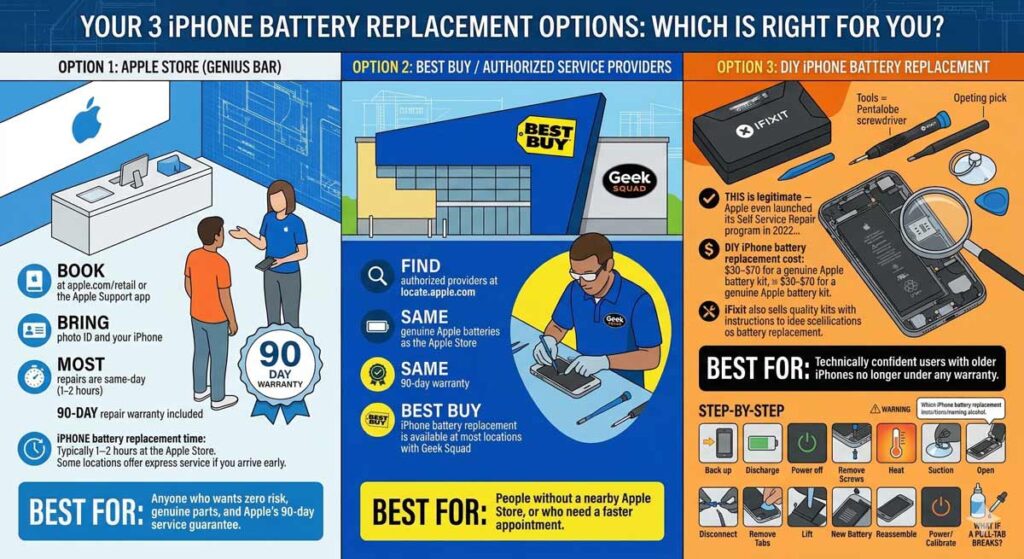
Your 3 iPhone Battery Replacement Options: Which Is Right for You?
When your iPhone's battery begins to fail, leading to short charge life, unexpected shutdowns, and frustrating performance slowdowns, it's time to consider a replacement. But which path should you choose? #iPhone #battery #iphonetips pic.twitter.com/ixFqTM2OUf
— Apple Headlines (@headlines_35337) March 18, 2026
Option 1: Apple Store (Genius Bar)
Best for: Anyone who wants zero risk, genuine parts, and Apple’s 90-day service guarantee.
iPhone battery replacement time: Typically 1–2 hours at the Apple Store. Some locations offer express service if you arrive early.
Option 2: Best Buy / Authorized Service Providers
Best for: People without a nearby Apple Store, or who need a faster appointment.
Option 3: DIY iPhone Battery Replacement
Best for: Technically confident users with older iPhones no longer under any warranty.
This is legitimate — Apple even launched its Self Service Repair program in 2022, making genuine parts available to consumers. But it’s not for everyone.
DIY iPhone battery replacement cost: $30–$70 for a genuine Apple battery kit through Apple’s Self Service Repair store, plus tools if you don’t own them. iFixit also sells quality kits with instructions for most models.
Step-by-Step: How to Replace Your iPhone Battery Yourself
⚠️ Warning: DIY replacement voids any remaining Apple warranty. Only attempt this on out-of-warranty devices. Discharge the battery below 25% before starting.
What You’ll Need:
The Process:
What if a pull-tab breaks? This is the most common DIY problem. If an adhesive tab snaps, use 90%+ isopropyl alcohol applied with a dropper along the battery edge. Wait 2–3 minutes, then use a plastic card to gently work the battery free. Never use a metal tool directly against the battery.
Model-Specific Notes: iPhone 11, 13, and 14
iPhone 11 Battery Replacement
The iPhone 11 uses a single pull-tab adhesive strip. It’s one of the easier models for DIY. Apple charges $89 out of warranty. Battery capacity is 3,110 mAh — a fresh replacement dramatically improves all-day battery life.
iPhone 13 Battery Replacement
The iPhone 13 introduced stronger adhesive and a slightly more compact internal layout. The pull-tab is accessible but requires more patience. iPhone 13 battery replacement cost through Apple is $89. If your iPhone 13 is regularly hitting low battery by afternoon, replacement is almost certainly the fix.
iPhone 14 Battery Replacement
Apple redesigned the iPhone 14’s internals to make back glass easier to replace — but the battery is still accessed through the front. iPhone 14 battery replacement costs $99 through Apple. The process is similar to the iPhone 13 but with updated adhesive placement.
Troubleshooting: What If Your iPhone Still Dies Fast After Replacement?
A new battery should solve most battery drain issues. If it doesn’t, the problem is elsewhere. Here’s how to diagnose:
Check Battery-Draining Apps
Update iOS
An outdated iOS version can cause unexpected battery drain due to software inefficiencies. Go to Settings > General > Software Update and install any pending updates.
Check for Rogue Processes
If one specific app shows 90%+ battery usage, delete and reinstall it. Corrupted app data sometimes causes runaway battery drain that no replacement will fix.
Reset All Settings
If drain continues after a new battery, go to Settings > General > Transfer or Reset iPhone > Reset > Reset All Settings. This resets network, display, and notification settings without erasing your data — and often resolves hidden software-level drain.
When to Suspect Hardware Beyond the Battery
If your iPhone runs hot to the touch constantly, shuts down despite showing 50%+ charge, or doesn’t recognize the new battery, there may be a fault in the charging circuit or logic board. At that point, take it to Apple or an authorized provider for a full diagnostic.
Frequently Asked Questions
Q: When should you replace your iPhone battery?
Replace it when Maximum Capacity drops below 80%, when the phone dies unexpectedly before reaching zero, or when you can’t make it through a normal day on a single charge. Most batteries hit this point after 2–3 years of daily use.
Q: Is iPhone battery replacement in the US covered under warranty?
Apple’s standard 1-year warranty covers manufacturing defects, not normal battery wear. AppleCare+ covers free battery replacement once capacity drops below 80%. Without coverage, you pay Apple’s standard out-of-warranty rate based on your model.
Q: How long does iPhone battery replacement take?
At an Apple Store or Best Buy Geek Squad, most iPhone battery replacement appointments take 1–2 hours. Mail-in service takes 3–5 business days plus shipping. DIY with a kit can take 30–60 minutes if you’re careful and prepared.
Q: Is DIY iPhone battery replacement worth it?
For out-of-warranty iPhones 3+ years old, DIY can make sense — especially if you’re comfortable with small tools. For iPhones under 3 years old or with any remaining coverage, the cost difference rarely justifies the risk. The sweet spot for DIY is older models (iPhone 8 through iPhone 12) where the professional repair cost approaches or exceeds the phone’s market value.
Q: Will replacing my iPhone battery erase my data?
No — a battery replacement does not affect your iPhone’s storage or data. That said, always back up before any repair. If something goes wrong during reassembly and the phone won’t power on, you want your data safe.
References
- Apple Support — iPhone Battery Replacement: support.apple.com/iphone/repair/battery-replacement
- iFixit — iPhone Battery Replacement Wiki: ifixit.com/Wiki/iPhone_Battery_Replacement
- Best Buy — Apple iPhone Service & Repair: bestbuy.com — Apple Authorized Service
- CNET — DIY iPhone Battery Replacement Review: cnet.com
Ready to get your iPhone battery replaced? Check your coverage at checkcoverage.apple.com, then book your appointment at an Apple Store, Best Buy, or Apple Authorized Service Provider near you. Your all-day battery life is one appointment away.
Disclaimer: Pricing information in this article is based on publicly available Apple pricing as of March 2026 and is subject to change without notice. AppleCare+ terms and eligibility vary by plan and device. DIY battery replacement carries risk of device damage and may void remaining warranty coverage. AppleHeadlines.com is not affiliated with Apple Inc., Best Buy, or iFixit. Always verify current pricing and terms directly with your chosen service provider before scheduling a repair. This article is for informational purposes only and does not constitute professional repair advice.

Ruth writes in-depth guides about Apple products, focusing on practical solutions for everyday users. Her articles cover device setup, hidden features, troubleshooting, and the latest updates for iOS, watchOS, and other Apple platforms.
He regularly researches Apple updates and tests features on devices like the iPhone and Apple Watch to ensure readers receive accurate and helpful information.