



Managing dozens or hundreds of Apple devices across your organization doesn’t have to be a logistical nightmare.
Apple Business Manager is a web-based platform that transforms how IT teams deploy iPhones, iPads, and Macs while maintaining security and control.
Whether you’re setting up your first corporate iPad fleet or migrating from manual device configurations, understanding Apple Business Manager can save countless hours and prevent costly security gaps.
This comprehensive guide walks you through everything from basic concepts to advanced deployment strategies.
What is Apple Business Manager?
Apple Business Manager (ABM) is Apple’s centralized platform for organizations to manage devices, apps, and accounts at scale.
Think of it as mission control for your company’s entire Apple ecosystem.
The platform combines three critical functions into one dashboard.
First, it automates device enrollment so new iPhones arrive pre-configured with your security settings.

Second, it manages app licenses so you can purchase and distribute software without individual Apple IDs.
Third, it creates and controls Managed Apple IDs for your workforce.
Unlike consumer-focused Apple services, ABM integrates directly with Mobile Device Management (MDM) solutions like Jamf, Microsoft Intune, or Workspace ONE.
This integration enables zero-touch deployment—employees unbox devices that are already configured with Wi-Fi, email, apps, and security policies.
How Apple Business Manager Works
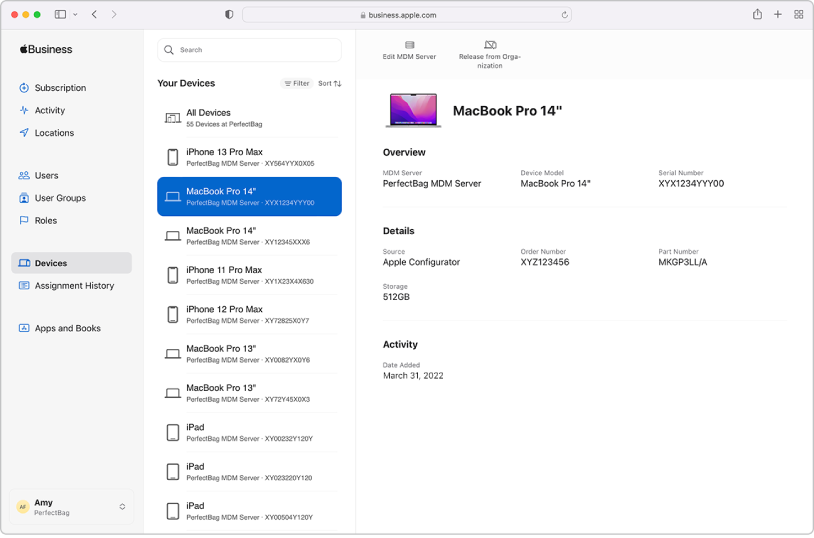
The system operates through a straightforward workflow that connects Apple’s infrastructure with your organization’s IT systems.
The Core Components:
When an employee activates a new device, it contacts Apple’s servers during setup.
The device checks if it’s registered in ABM, then automatically enrolls in your MDM without manual intervention.
The MDM immediately applies configurations—installing apps, setting passcode requirements, and enabling corporate email.
This seamless process eliminates the traditional IT imaging rooms where technicians spent hours configuring individual devices.
Follow US On Social
Apple Business Manager Requirements
Before accessing ABM, your organization must meet specific prerequisites that verify legitimacy and establish proper administration.
Organizational Requirements:
Technical Requirements:
The D-U-N-S Number serves as your organization’s unique identifier across Apple’s business systems. Most established companies already have one, but new businesses can request a number free through the Dun & Bradstreet website—the process typically takes 30 days.
How to Use Apple Business Manager: Step-by-Step Setup
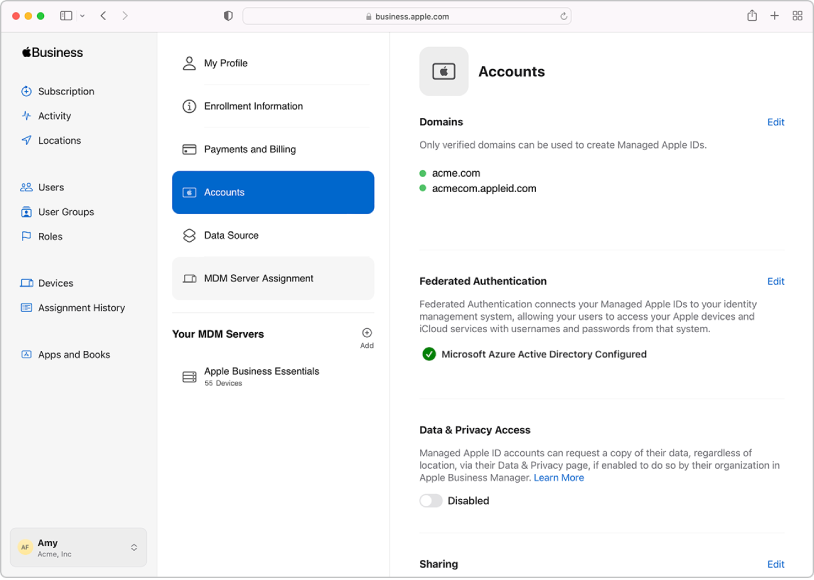
Setting up your ABM account follows a structured enrollment process designed to verify your organization and establish administrative controls.
Phase 1: Account Creation
Phase 2: Administrative Configuration
Phase 3: Device and App Integration
The entire setup process typically takes one week from initial enrollment to first device deployment, though domain verification can happen simultaneously with Apple’s organizational review.
Key Features That Transform Device Management
Apple Business Manager delivers capabilities that fundamentally change how organizations approach Apple device administration.
Automated Device Enrollment (ADE)
Devices automatically configure themselves without IT touching them. An employee in Tokyo can unbox a MacBook and have it fully configured in minutes—complete with security policies, apps, and network settings from your Seattle headquarters.
Volume Purchasing for Apps and Books
Purchase app licenses in bulk at organizational pricing. Distribute Adobe Creative Cloud to your design team or Microsoft Office to everyone without sharing personal Apple IDs. When employees leave, reclaim licenses and reassign them to new hires.
Managed Apple IDs
Create corporate Apple IDs with 200GB iCloud storage per user. These accounts enable iCloud Drive collaboration while maintaining IT control. Unlike personal Apple IDs, Managed Apple IDs support federated authentication through Azure AD or Google Workspace.
Role-Based Administration
Grant precise permissions to different team members. Your help desk can reset passwords without accessing purchasing data. Regional managers can deploy apps to their locations without seeing other departments’ configurations.
Integration with Apple School Manager
Educational institutions benefit from roster integration with Student Information Systems, shared iPad configurations for classroom deployment, and enhanced parental consent management for students under 13.
Follow US On Social
Apple Business Essentials: The All-in-One Alternative
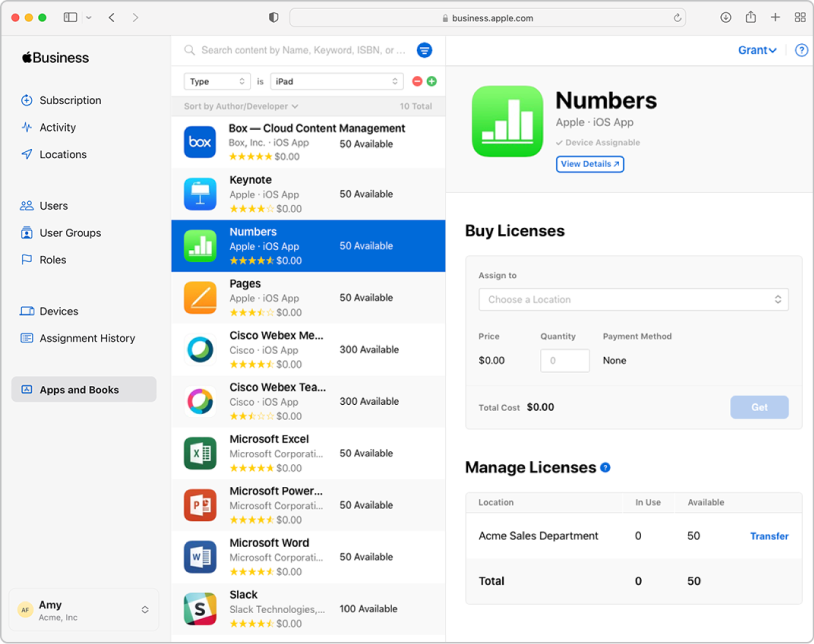
Apple Business Essentials represents a different approach for smaller organizations that want simplified management without complex MDM deployments.
What Makes It Different:
Apple Business Essentials bundles device management, cloud storage, and AppleCare+ support into subscription tiers starting at $2.99 per user monthly. It includes built-in MDM functionality, eliminating the need for third-party solutions.
Ideal For:
Feature Comparison:
| Feature | Apple Business Manager | Apple Business Essentials |
|---|---|---|
| MDM Required | Yes (third-party) | No (built-in) |
| Organization Size | Unlimited | Up to 500 users |
| Pricing | Free (MDM separate) | $2.99-$12.99/user/month |
| iCloud Storage | 200GB with Managed Apple ID | Up to 2TB per user |
| AppleCare+ | Purchased separately | Included in higher tiers |
| Technical Expertise | High | Low to moderate |
For growing businesses, starting with Apple Business Essentials provides immediate value while maintaining the option to migrate to full Apple Business Manager as complexity increases.
Real-World Use Cases Across Industries
Organizations leverage Apple Business Manager to solve diverse operational challenges with creative implementations.
Healthcare: HIPAA-Compliant Patient Care
A 300-bed hospital deployed 500 iPads for nurses using shared device configuration. Devices wipe between shifts, comply with HIPAA encryption requirements, and restrict access to approved medical apps. MDM ensures automatic security updates happen overnight without disrupting patient care.
Retail: Store Associate Enablement
A national retailer equipped 5,000 store associates with iPhones for inventory management and customer service. Single App Mode locks devices to the point-of-sale system during transactions. Geofencing automatically installs region-specific apps based on store location.
Education: 1:1 Student Programs
A school district managing 10,000 student iPads uses Shared iPad for elementary students and personal assignment for high schoolers. Managed Apple IDs integrate with Google Workspace for education, while content filters and screen time limits enforce appropriate use policies.
Creative Agencies: Flexible Workforce Management
A design studio with 60% contract workforce uses temporary Managed Apple IDs. Contractors receive MacBooks pre-loaded with Adobe Creative Suite. When projects end, IT remotely wipes devices and reclaims software licenses within minutes.
Follow US On Social
Advantages and Limitations
Pros:
Cons:
The platform delivers exceptional value for organizations committed to Apple devices but represents overhead for mixed-device environments where Apple products are a minority.
Best Practices for Successful Implementation
Start Small and Scale Gradually
Pilot with a single department or location before organization-wide rollout. Test device configurations, app deployment, and user workflows with a controlled group. Gather feedback and refine policies before expanding.
Document Everything
Create runbooks for common tasks like device assignment, password resets, and app distribution. Document your configuration profiles, enrollment customization, and security policies. Future administrators will thank you.
Leverage Automated Workflows
Connect ABM with identity providers through federated authentication. Automatically create Managed Apple IDs when HR systems add employees. Trigger device assignments based on department attributes in your directory service.
Regular Auditing
Monthly reviews of device inventory, license utilization, and administrative permissions prevent waste and security gaps. Identify unassigned devices, reclaim unused app licenses, and remove departed employees’ access.
Train Your Team
End users need clear guidance on the differences between personal and Managed Apple IDs. Help desk staff require specific training on ABM troubleshooting. Executives need visibility into cost savings and security improvements.
Frequently Asked Questions
1.> Can I use Apple Business Manager with existing devices?
Yes, devices purchased outside ABM can be manually added through Apple Configurator 2 (for supervised enrollment) or by uploading device serial numbers via CSV. However, automatic enrollment only applies to future purchases from authorized resellers linked to your ABM account.
2.> What happens to employee data when they leave?
Your MDM determines data handling policies. Options include remote wipe (complete device reset), selective wipe (removing only corporate data), or account disabling while preserving hardware. Managed Apple IDs can be deleted or suspended independently from device management.
3.> Is Apple Business Manager free?
Yes, ABM itself has no licensing fees. However, you’ll need an MDM solution (ranging from free open-source options to enterprise products costing $5-15 per device monthly). Apple Business Essentials combines both for $2.99-$12.99 per user monthly.
4.> Can I manage Windows or Android devices through ABM?
No, Apple Business Manager exclusively supports Apple hardware. Organizations with mixed environments typically use cross-platform MDM solutions that manage Apple devices through ABM integration while handling other platforms through separate protocols.
5.> How long does enrollment verification take?
Apple typically reviews organizational enrollment requests within 1-2 business days. The D-U-N-S Number request (if you don’t have one) adds approximately 30 days. Domain verification through DNS records happens instantly once you update your records.
The Future of Apple Business Management
Apple continues investing heavily in business and education markets with annual enhancements announced at WWDC (Worldwide Developers Conference).
Recent trends suggest deeper integration with identity providers, expanded automation through APIs, and enhanced security features like passkey authentication for Managed Apple IDs.
The platform increasingly supports modern work models with improved shared device capabilities and flexible assignment options.
As remote and hybrid work become permanent fixtures, expect Apple to strengthen cloud-based management features, cross-device continuity, and zero-trust security frameworks.
Conclusion
Apple Business Manager represents essential infrastructure for any organization deploying Apple devices at scale.
The platform transforms chaotic device management into streamlined automation, saving IT teams hundreds of hours while improving security and user experience.
Starting with clear requirements gathering, proper MDM selection, and phased rollout sets the foundation for long-term success.
Whether you choose full Apple Business Manager with third-party MDM or the simplified Apple Business Essentials bundle, centralizing your Apple device management delivers immediate operational improvements.
Ready to modernize your Apple device management?
Visit business.apple.com to begin enrollment, or contact your Apple Business Team for personalized guidance.
For smaller organizations, explore Apple Business Essentials at support.apple.com/business-essentials.

Virginia J. Alfonso is a seasoned technology writer with a passion for all things digital. With over a decade of experience covering the latest in tech innovation, gadgets, and software, Virginia brings a unique blend of technical expertise and accessible writing to her work. Her articles focus on making complex tech topics easy to understand for readers of all levels.